




01. Edit your form online
Type text, add images, blackout confidential details, add comments, highlights and more.

Type text, add images, blackout confidential details, add comments, highlights and more.

Draw your signature, type it, upload its image, or use your mobile device as a signature pad.

Send it via email, link, or fax. You can also download it, export it or print it out.
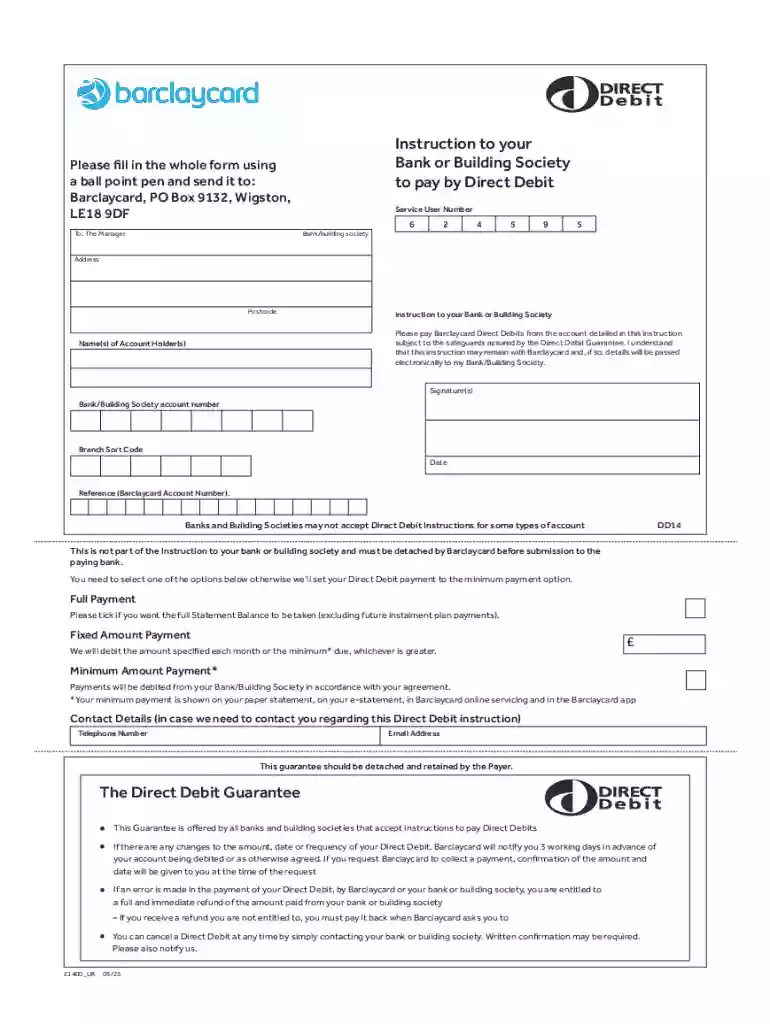
Direct Debit Instruction (DDI) is a financial authorization used to arrange for automated payments from one account, typically a bank or building society, to another account, such as a service provider or credit card issuer. This authorization allows the recipient, such as Barclaycard, to collect payments on specified dates, ensuring timely bill payments without manual intervention from the account holder. The Direct Debit system is popular in the United Kingdom and functions under a secure framework that guarantees the payer's rights, including rights related to changes, errors, and the cancellation of the Direct Debit.
Completing a Direct Debit Instruction involves several steps to ensure accuracy and compliance. First, gather the necessary information, including your bank or building society details. You must provide your account number, sort code, and the name on the account. Next, specify the payment options—whether full, fixed, or minimum payments—based on your agreement with the service provider, such as Barclaycard. Thoroughly review the Direct Debit Guarantee information to understand your rights. Finally, submit the completed instruction to the relevant party, ensuring all details are correct before finalizing the document.
A Direct Debit Instruction includes several critical elements that ensure proper processing and security. One primary element is the account information section, where you provide your bank or building society account number and sort code. Another key element is the payment options that outline the method and amount of payment—whether full, fixed, or minimum—allowing customization to fit your financial planning. Moreover, the Direct Debit Guarantee section assures protection and security under the stipulated rules, providing peace of mind concerning unauthorized or incorrect transactions.
Legal use of Direct Debit Instructions involves compliance with established rules and regulations, ensuring that all parties are protected under the Direct Debit Guarantee. This guarantee states that if there are any changes or errors, the payer is entitled to a full and immediate refund. Furthermore, the legal framework mandates proper notification of payment amounts and due dates, maintaining transparency between the payer and the service provider. Understanding these legal aspects is essential for both parties to ensure smooth transactions and avoid disputes.
Individuals and businesses alike commonly use Direct Debit Instructions to automate their payment systems. For individuals, this might include utility bill payments, mortgage repayments, or credit card balances, minimizing the risk of late fees and promoting financial discipline. Businesses use Direct Debits to streamline accounts receivable processes, reducing administrative costs and improving cash flow management. This method is especially beneficial for subscription-based services that require regular and predictable payments, supporting consistent revenue streams.


Utilizing a Direct Debit Instruction effectively requires understanding its setup and benefits. Begin by selecting a service or supplier that offers Direct Debit payments, such as Barclaycard. Complete the necessary documentation with detailed bank account information and select the desired payment schedule. Regularly monitor your account statements to ensure all Direct Debit transactions are accurate and authorized. By keeping track of these details, you can leverage the convenience of automatic payments while maintaining control over your finances.
Familiarity with specific financial terms can enhance your understanding of Direct Debit Instructions. Key terms include Authorization, which allows the recipient to collect payments from your account, and Direct Debit Guarantee, a protection framework ensuring safe and error-free transactions. Another term, Sort Code, is crucial for identifying your bank during fund transfers. Awareness of these terms allows you to better comprehend Direct Debit operations and engage confidently with financial contracts.
Practical examples of Direct Debit Instructions can illustrate their efficiency and utility. Consider a scenario where an individual sets up a Direct Debit for their utility bills. This setup ensures that monthly payments are automatically deducted based on the specific terms (full, fixed, or minimum payments), avoiding late payment penalties and service interruptions. Similarly, businesses might use Direct Debit to manage regular supplier payments, improving financial predictability and simplifying their accounting processes. These examples highlight the versatility of Direct Debits in both personal and professional contexts.
Setting up a Direct Debit Instruction necessitates several documents to validate the process. Primarily, you need an official document from your bank or building society that confirms your account details, like a bank statement or a voided check. Additionally, any form-specific instructions from the service provider, such as Barclaycard, should be gathered and completed with precision. These documents ensure that all transactional details are accurate, supporting a seamless Direct Debit setup that minimizes errors and enforces guarantees.
We've got more versions of the Direct Debit Instruction form. Select the right Direct Debit Instruction version from the list and start editing it straight away!
At DocHub, your data security is our priority. We follow HIPAA, SOC2, GDPR, and other standards, so you can work on your documents with confidence.


Direct debit payments are processed based on the amount that you authorize. When you select the debit payment option, you will be prompted to enter your bankRead more
Please pay London Business School Direct Debits from the account detailed in this Instruction subject to the safeguards assured by the Direct Debit Guarantee. I
Click here to open the form that can be used to authorise the Port of Rotterdam Authority to draw funds from your bank account via direct debit.


