






Definition and Meaning
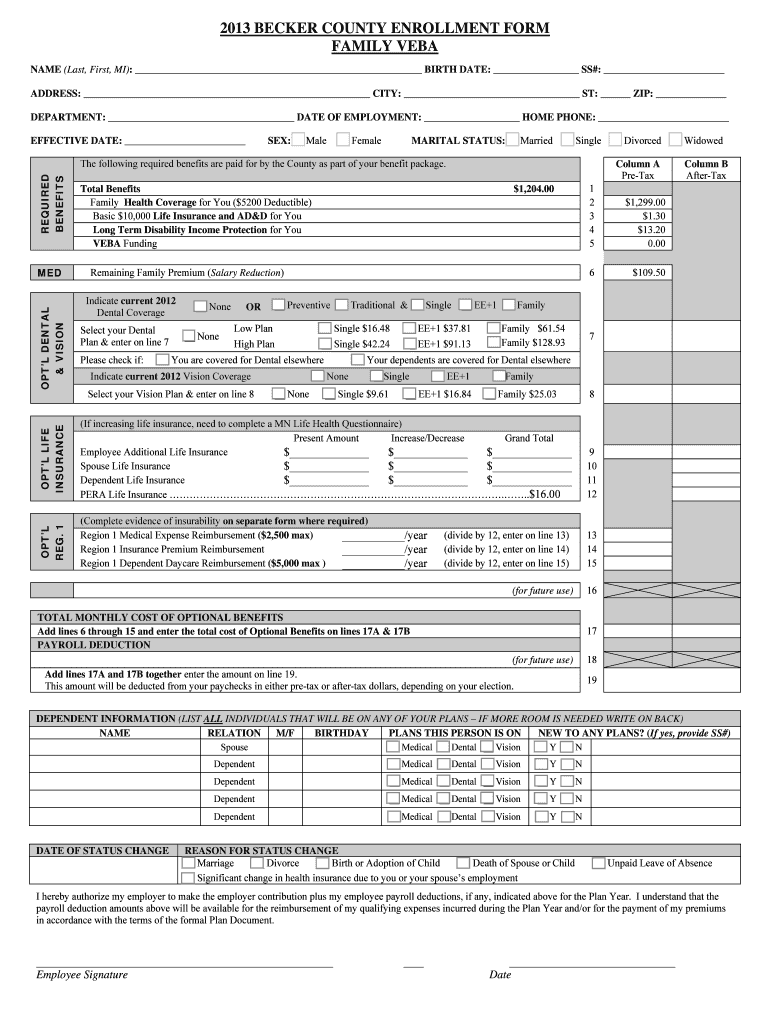
The 2013 Becker County Enrollment Form Family VEBA is a critical document used by employees in Becker County to elect and manage various benefit plans, including health, dental, vision, and life insurance. VEBA, or Voluntary Employees' Beneficiary Association, is a type of tax-advantaged health plan that employers can offer to their employees. The form facilitates the selection of benefits options, ensuring that employees can tailor their benefits package to suit personal and family needs. It provides a comprehensive overview of available plans and associated costs.
How to Use the 2013 Becker County Enrollment Form Family VEBA
To utilize the form efficiently, employees should first gather all requisite personal information, including their name, birthdate, marital status, and details about dependents. With this data on hand, they can methodically work through the available benefit options. Employees should compare plans, consider their healthcare needs, and assess financial implications. After selecting the desired benefits, they must complete all necessary sections, ensuring all required fields are filled before submission. This approach allows for informed decision-making and ensures the form is completed accurately.
Steps to Complete the Form
-
Gather Personal and Dependent Information: Start by collecting essential personal details and information about family members who will be covered by the plan.
-
Review Plan Options: Carefully examine each benefit option available. Pay close attention to coverage details, premium costs, and any other conditions associated with the plans.
-
Select Desired Benefits: Choose the plans that best meet your healthcare and financial needs. Complete the sections dedicated to these choices on the form.
-
Provide Additional Information: Enter any additional required information for optional benefits or special circumstances.
-
Verify and Sign: Review the entire form for accuracy and completeness. Sign and date it to confirm your selections.
-
Submit the Form: Follow the designated submission process, which may include options for digital submission, mailing, or handing it in person at the relevant office.
Key Elements of the Form
-
Personal Information Section: Requires the entry of basic personal details such as name, contact information, and demographic data.
-
Benefits Selection: A detailed list of available health, dental, vision, and life insurance plans, including options for optional benefits.
-
Cost and Payroll Deduction Information: Outlines the financial commitments associated with each plan and how deductions will be managed through payroll.
-
Signature and Authorization: A section requiring the employee's signature to verify that the form is completed correctly and that they accept the terms of the selected benefits.
Who Typically Uses the Form
This form is primarily used by Becker County employees enrolling in or modifying their benefits. It is pertinent for both new hires selecting benefits for the first time and current employees during open enrollment periods, or when qualifying life events necessitate changes in coverage. This form is crucial for ensuring that employees and their families are adequately covered under the applicable benefit plans offered by the county.


Legal Use of the Form
The 2013 Becker County Enrollment Form Family VEBA must comply with all applicable federal and state laws governing benefits plans. This includes adherence to the Employee Retirement Income Security Act (ERISA) standards and any relevant tax regulations. Confidentiality and accuracy are paramount, as the form contains sensitive personal information that must be handled under strict confidentiality to prevent unauthorized access or misuse.
Important Terms Related to the Form
-
VEBA (Voluntary Employees' Beneficiary Association): A tax-exempt trust designed to hold funds for employee benefits.
-
Open Enrollment: A designated period during which employees can enroll in or make changes to their benefit plans.
-
Qualifying Life Event: An event such as marriage, birth, or loss of other coverage that allows employees to change their benefits outside the usual enrollment periods.
-
Premiums: The amount employees pay for their insurance coverage, which may be deducted from their paychecks.
Who Issues the Form
Becker County's Human Resources Department typically issues the 2013 Becker County Enrollment Form Family VEBA. It is responsible for managing the distribution and collection of the form, as well as assisting employees with any questions or issues that may arise during the enrollment process. This department ensures that all legal and procedural standards are observed throughout the benefits election process.