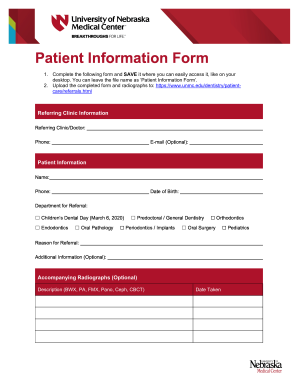
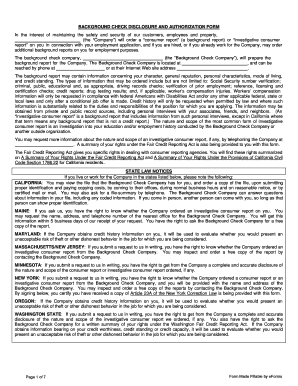
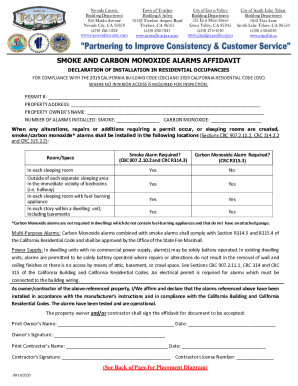
Definition and Meaning
The term "form online" refers to any document available in a digital format that can be filled out and submitted over the internet. These forms streamline processes by reducing the need for paper documentation and allowing users to interact with the form directly through web-based platforms. The transition to online forms facilitates quick data collection, real-time updates, and improved accessibility. Online forms are increasingly prevalent across various sectors, including business, healthcare, government, and education, serving diverse purposes such as applications, registrations, and surveys. By using digital forms, organizations can enhance efficiency, reduce errors, and improve the overall user experience.
How to Use the Form Online
To effectively use an online form, users should first ensure that they have stable internet access and a compatible web browser. Begin by navigating to the website that hosts the desired form, such as DocHub, where forms can be accessed without downloading additional software. Once on the site, locate the specific form you need by using search functions or browsing available categories. After opening the form, take time to understand its structure and the fields required. Fill in each section carefully, ensuring that all necessary fields are completed. Online forms typically have validation checks that prompt users to correct any incomplete or improperly filled sections before submission. Once filled, review the entire form to confirm the details are accurate and that no information has been omitted. Finally, submit the form through the designated online submission button, ensuring to save a copy or confirmation for personal records.
Steps to Complete the Form Online
-
Access the Form: Navigate to the website containing the form and use the search feature to locate the specific form needed.
-
Understand the Requirements: Read through the form instructions and requirements. This will help prevent errors and ensure all necessary documents or details are at hand.
-
Complete the Form Fields: Fill out each section of the form, ensuring to pay attention to required fields marked with an asterisk or specific formatting instructions for dates or numbers.
-
Attach Required Documents: If the form requires supplementary documents, upload them using the platform’s upload feature.
-
Review for Accuracy: Carefully review all entries before proceeding. This reduces the potential for mistakes or delays due to incomplete information.
-
Submit: Once verified, submit the form by clicking the designated button. Note any confirmation messages or emails, which may be important for tracking the submission status.
-
Save a Copy: Download or save a copy of the completed form for your records, ensuring that you have a backup in case follow-up actions are needed.
Key Elements of the Form Online
When filling out an online form, it's crucial to understand its key elements to ensure successful completion and submission:
-
Introduction and Instruction Section: This part provides an overview and any specific instructions necessary for completing the form accurately.
-
Personal Information: Typically includes fields for name, address, contact information, and other relevant demographic data.
-
Document-Specific Sections: Depending on the form’s purpose, there may be sections aimed at gathering details about employment, financial information, or consent statements.
-
Dynamic Fields: Some forms include conditional logic where follow-up questions appear based on previous answers.
-
Signatures and Authentication: Many forms now include sections for electronic signatures to verify identity and agreement to terms or declarations.
Who Typically Uses the Form Online
Online forms are widely used across different sectors, with typical users including:
-
Individuals, Students, and Job Seekers: For applications, enrollment, or registration purposes.
-
Businesses and Organizations: To handle client onboarding, process orders, or manage employee HR needs.
-
Government Agencies: To facilitate public services, such as tax filings, applying for permits, or accessing welfare programs.
-
Healthcare Providers: For patient intake forms, medical history, and consent agreements.
Each user type benefits from the quick access, ease of use, and efficient processing facilitated by online forms, reducing the time and resource constraints associated with paper-based systems.


Legal Use of the Form Online
The legal use of online forms involves several considerations to ensure compliance with local, state, and federal regulations:
-
Data Privacy and Security: Online forms must comply with laws such as the General Data Protection Regulation (GDPR) or Health Insurance Portability and Accountability Act (HIPAA) when handling sensitive information.
-
Electronic Signature Legality: Under the ESIGN Act, electronic signatures on online forms have the same legal standing as handwritten signatures, making them valid for contracts, consents, and more.
-
Retention and Record Keeping: Organizations must ensure that completed forms are securely stored and retained for the legally required period.
-
Access and Authentication: Ensuring only authorized persons can access and complete the form is crucial, often achieved through login credentials or two-factor authentication methods.
Software Compatibility
Online forms often integrate with various software platforms to enhance functionality and user experience:
-
Document Management Systems: Such as DocHub itself, allowing for seamless form import, modification, and storage.
-
Business Software Suites: Including Google Workspace and Office 365 to facilitate collaborative work and easy sharing.
-
Accounting and Financial Tools: Like QuickBooks, enabling data export for financial documentation or tax purposes.
-
Customer Relationship Management (CRM) Systems: Integration can help in maintaining current customer data and automating responses.
These integrations are pivotal for businesses looking to streamline operations by linking form data directly with core systems they rely on daily.
State-by-State Differences in Legal Forms
When dealing with legal online forms, it’s important to be aware of potential state variations that may affect how forms are structured or processed:
-
State-Specific Regulations: Different states might have unique requirements for certain types of legal documentation, such as real estate, family law, or business formation documents.
-
Jurisdictional Language: Online forms might need to adapt legal language to comply with state-specific legislative terminology and stipulations.
-
Additional Documentation: Certain states may require additional forms or affidavits to accompany a primary form submission.
-
Different Submission Processes: Online submissions might differ, with some states offering direct digital submission while others require a combination of electronic and physical submissions.
Understanding these variances is critical for ensuring compliance and avoiding legal issues associated with incorrectly filed forms.