2011 Declaration For Change Form doc - benefitoptions az-2025

Get Form
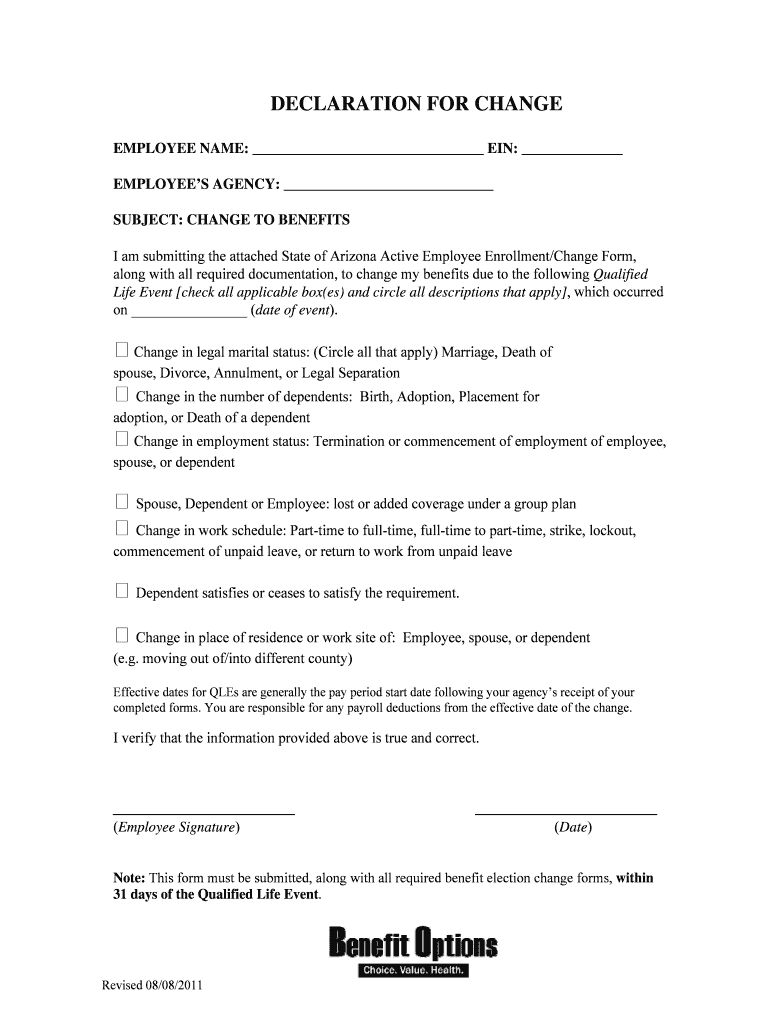
2011 Declaration For Change Form doc - benefitoptions az Preview on Page 1

Here's how it works

01. Edit your form online
Type text, add images, blackout confidential details, add comments, highlights and more.
02. Sign it in a few clicks
Draw your signature, type it, upload its image, or use your mobile device as a signature pad.
03. Share your form with others
Send it via email, link, or fax. You can also download it, export it or print it out.

How to use or fill out 2011 Declaration For Change Form doc - benefitoptions az with DocHub

Form edit decoration
9.5
Ease of Setup
DocHub User Ratings on G2
9.0
Ease of Use
DocHub User Ratings on G2
  1. Click ‘Get Form’ to open it in the editor.
  2. Begin by entering your name and EIN in the designated fields at the top of the form.
  3. Fill in your agency's name to ensure proper processing of your request.
  4. Identify the Qualified Life Event that applies to you by checking all relevant boxes and circling descriptions. Be sure to include the date of the event.
  5. Review the effective dates for changes, which typically align with your agency’s pay period start date following receipt of this form.
  6. Sign and date the form at the bottom, confirming that all information provided is accurate.
  7. Submit this form along with any required documentation within 31 days of your Qualified Life Event for timely processing.

Start using our platform today to easily complete and submit your Declaration For Change Form!

be ready to get more

Complete this form in 5 minutes or less

Get form

Got questions?

We have answers to the most popular questions from our customers. If you can't find an answer to your question, please contact us.
Contact us
How to edit self income declaration form online Create an account. Begin by choosing Start Free Trial and, if you are a new user, establish a profile. Simply add a document. Edit self income declaration form. Save your file.
How to Fill PF Form 11 Members name. Fathers name. Date of birth. Gender. Marital status. Email Id and mobile number. Previous employment details such as the UAN, PF account number, date of exit. KYC details like bank account number, Aadhar number, PAN.
3:00 4:36 Were going to go ahead and click on this. And I caneview my response. So is all the informationMoreWere going to go ahead and click on this. And I caneview my response. So is all the information that I previously submitted. So if I do want to edit this response. I can click on edit response.
Click on the name of the Web Form youd like to change and then click Edit. Once youve clicked on Edit. The pencil icon brings you straight into that specific field to make changes. Once you are happy with the changes youve made to your Web Form, click Save down the bottom right.
be ready to get more

Complete this form in 5 minutes or less

Get form