






Definition and Meaning
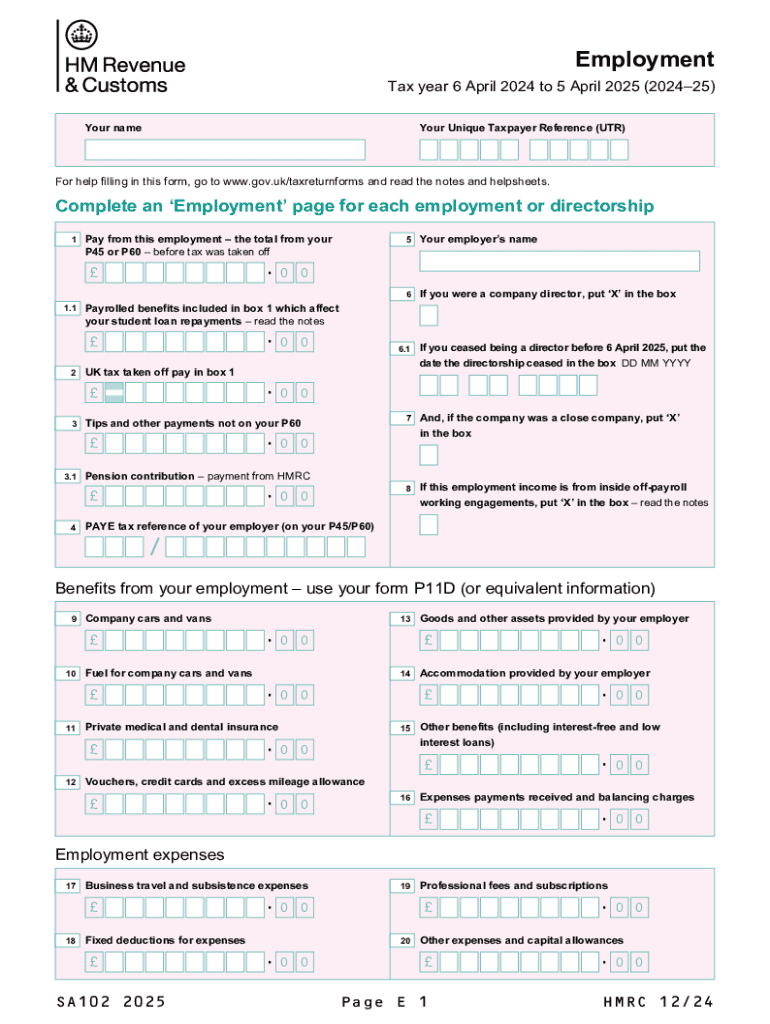
The "Employment (2025) Use the SA102(2025) supplementary pages to record your employment details" form serves as a detailed tax return document specifically designed for reporting employment income for the tax year 2024-25. It offers a structured way for taxpayers to log earnings, tax deductions, benefits received, and employment-related expenses. The form provides a precise method to document pay before tax, UK tax reductions, and any benefits or specific expenses incurred due to employment or directorships. Understanding its purpose can significantly aid in accuracy during filing.
Key Elements
- Income Reporting: Allows entry of all earnings, ensuring all pay is appropriately noted.
- Deductions and Allowances: Details various tax deductions applicable to employees.
- Benefits and Expenses: Sections for reporting non-monetary benefits or employment-related expenses.
- Verification: Part of a comprehensive submission for personal income verification.
How to Obtain the Employment Form
Acquiring the SA102 for 2025 involves several straightforward steps designed for ease of access. Taxpayers can download the form from official government websites or collaborate with tax preparation software that includes it. Here’s how to get it:
- Visit the Official Website: Check the IRS website or government tax resources for downloadable forms.
- Tax Software Programs: Utilize authorized software like TurboTax or QuickBooks, where forms are often integrated.
- Local Tax Office: Obtain physical copies from local tax authorities or service centers.
- Professional Accountants: Engage tax professionals who typically have these forms available.
Steps to Complete the Form
Completing the SA102 form meticulously is crucial for compliance and accuracy. Here’s a step-by-step guide:
- Read Instructions Carefully: Review any accompanying guidelines to understand each section’s requirements.
- Fill Personal Details: Begin by inputting personal information accurately, such as name, address, and social security number.
- Report Income: Document all employment earnings. Pay attention to sections detailing before-tax income and total earnings.
- Deductions: Accurately record eligible deductions and any tax credits applicable.
- Review Benefits: Log all received benefits. This includes non-cash benefits, reimbursable expenses, etc.
- Expenses: Note employment-related expenses that can be claimed.
- Verify and Submit: Double-check entries for accuracy, and retain copies for personal records.
Required Documents
- W-2 Forms: Essential for income verification.
- Employer Statements: Proof of benefits or extra income.
- Receipts for Expenses: Required for claiming specific deductions.
- Tax Credit Documentation: Where applicable, include proof of eligibility for particular tax credits.
Filing Deadlines / Important Dates
Timeliness is essential when filing the SA102 for 2025 to dodge potential penalties:
- Standard Filing Deadline: Typically by April 15th of the subsequent year.
- Extensions: Apply by this date if an extension is needed.
- Late Filing Consequences: Submissions post-deadline may incur penalties and interest.
Legal Use of the Employment Form
The SA102 form's legal application includes presenting an accurate and honest reflection of employment income and related financial details. It is vital to comply with IRS regulations, ensuring data accuracy to avoid legal repercussions. Falsifying information or omissions can lead to investigations or penalties under tax laws. This makes lawful and accurate disclosure critically important for maintaining compliance and transparency with federal standards.
Penalties for Non-Compliance
Failing to file or incorrectly filing the SA102 can have significant consequences, including:
- Fines and Interest: Monetary penalties accrue if the form is inaccurate or late.
- Audit Risk: Increased likelihood of audits.
- Legal Repercussions: In severe cases, may involve legal proceedings or negotiations.
Software Compatibility
The SA102 form can be efficiently managed using several tax preparation software systems. These digital solutions assist in automating calculations, reducing errors, and ensuring adherence to legislative standards:
- TurboTax: Known for helping individual and small-business taxpayers.
- QuickBooks: Ideal for those needing detailed financial management alongside tax reporting.
- H&R Block: Provides robust support and guidance.
By leveraging these tools, taxpayers can streamline the completion process while ensuring compliance.