






Definition & Meaning
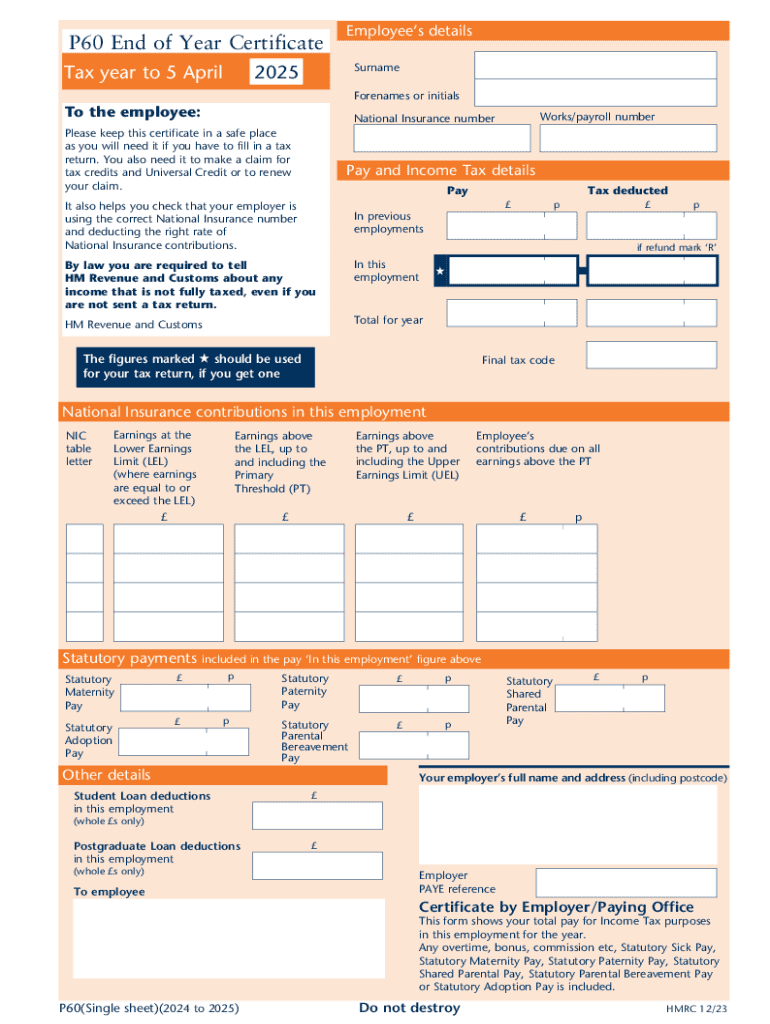
The 2 Form UK HMRC P60 is an official document provided by an employer to an employee at the end of a tax year, detailing the employee’s personal information, total pay, income tax deductions, and National Insurance contributions. This form serves as a vital record for employees when they need to file tax returns or claim certain benefits. The P60 offers a summary of a person’s annual income and tax payments, thus aiding in verifying tax compliance and ensuring that all income and contributions are accurately reported to HM Revenue and Customs.
How to Use the 2 Form UK HMRC P60 (Single Sheet) Fill Online
The online fillable version of the P60 allows users to digitally input information, making the process more efficient and reducing the risk of errors. Users must carefully enter their personal and financial details as per the requirements:
-
Personal Information: Include full name, National Insurance number, and address.
-
Employment Details: Input employer's name, address, and PAYE reference.
-
Financial Data: Record the total annual pay, tax deducted, and National Insurance contributions.
The Online version simplifies submission processes by providing guided fields and reducing the errors associated with manual form filling.
Steps to Complete the 2 Form UK HMRC P60 (Single Sheet) Fill Online
Completion of the P60 online form involves several critical steps:
-
Access the Online Form: Visit a trusted platform like DocHub to access and fill out the form.
-
Input Accurate Data: Ensure all personal and financial data entered is correct and matches your employer’s records.
-
Review Information: Double-check all fields to confirm accuracy before submission.
-
Save a Digital Copy: Keep a digital copy for personal records and future reference.
Completing this form accurately is essential for ensuring compliance with tax obligations.
Key Elements of the 2 Form UK HMRC P60 (Single Sheet) Fill Online
Several core components define the P60 form:
- Employee Details: Includes personal identifiers like full name and National Insurance number.
- Tax Year Information: Clearly states the tax year the document pertains to (ending on April 5th).
- Summary of Earnings and Deductions: Lists total income, PAYE tax deducted, and National Insurance details.
These elements ensure comprehensive documentation of an individual’s tax-related financial activities for the specified period.
Who Typically Uses the 2 Form UK HMRC P60 (Single Sheet) Fill Online
The P60 is predominantly used by:
- Employees: Individuals receiving wages from employment in the UK.
- Employers: Entities required to furnish a P60 to employees covering the tax year’s income and deductions.
This form plays a pivotal role in tax compliance and personal financial management, especially during tax filing seasons.


Form Submission Methods (Online / Mail / In-Person)
Form P60 offers flexible submission methods for ease of use:
- Online Submission: Streamlined through platforms like DocHub, ensuring fast processing and reduced paper waste.
- Mail: While not as efficient, some may prefer traditional mailing for physical documentation.
- In-Person: Typically handled by employers or financial advisors who manage tax filings on behalf of individuals.
The method chosen often depends on user preference and access to resources.
Legal Use of the 2 Form UK HMRC P60 (Single Sheet) Fill Online
The P60 form complies with legal requirements governed by HM Revenue and Customs (HMRC):
- Certification of Income: Legally binding evidence of income and tax paid.
- Binding Documentation: Used in tax disputes or audits to validate reported earnings.
Compliance with these legal frameworks ensures protection against potential audits or discrepancies.
Important Terms Related to the 2 Form UK HMRC P60 (Single Sheet) Fill Online
Understanding terminology is key to successfully navigating the P60 form:
- PAYE (Pay As You Earn): The system by which employers apportion employees' income tax and National Insurance at the source.
- National Insurance Contributions: Payments made toward a person’s entitlement to state benefits, including the state pension.
Familiarity with these terms enables more confident handling of tax matters and accurate form completion.