Definition of Assistive Technology Assessment for Students Who Are Blind
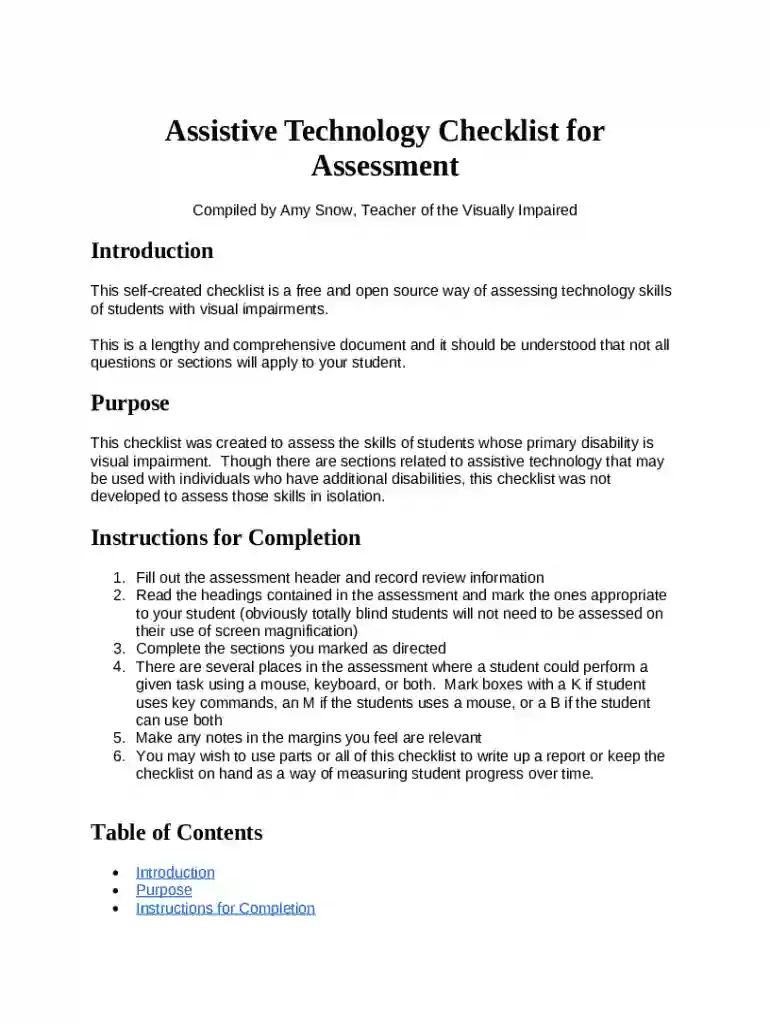
Assistive Technology Assessment for students who are blind refers to the systematic evaluation process aimed at identifying suitable technological tools and strategies that can enhance educational outcomes for visually impaired students. This assessment is designed to evaluate how assistive technologies, such as screen readers, Braille displays, and other adaptive tools, can be integrated into the students’ learning environments to support their education effectively. The focus is on aligning the technology with the students' specific needs, abilities, and educational goals.
Key Components of the Assessment
- Handheld Devices: Evaluating the suitability of devices like tablets and smartphones, which can be equipped with screen readers and voice recognition software.
- Computer Usage: Determining the need for specialized keyboards, screen magnifiers, and other peripherals to facilitate computer interaction.
- Internet Navigation: Assessing the ability to use browsers and online platforms with screen readers and other input methods.
- Word Processing: Evaluating proficiency with text editors and tools that support Braille or voice-to-text features.
How to Use the Assistive Technology Assessment
Step-by-Step Process
- Initial Consultation: Meet with the student, parents, and educational staff to gather comprehensive background information.
- Needs Analysis: Evaluate the student's academic requirements and personal preferences regarding technology use.
- Trial and Observation: Introduce various assistive technologies and observe their interaction and comfort level.
- Feedback Collection: Gather input from the student, educators, and other stakeholders on the effectiveness of the technologies.
- Final Recommendations: Compile a report summarizing findings and recommending technologies tailored to the student's needs.
Practical Examples
- Scenario One: A student utilizing a Braille display for classroom participation.
- Scenario Two: Integration of a text-to-speech application for reading assignments.
Why Assistive Technology Assessments are Essential
Assistive technology assessments are crucial for bridging the educational gap experienced by students who are blind. Tailored assessments ensure that students receive tools and resources that cater to their unique learning styles, improving access to educational materials and fostering independence. This proactive approach not only supports academic success but also enhances students’ confidence and ability to engage with their environment effectively.
Benefits of Tailored Assessments
- Customized Learning Solutions: Ensures that technology is aligned with individual learning goals.
- Enhanced Academic Engagement: Technology enables more interactive and engaging learning experiences.
- Early Intervention: Helps identify learning barriers and address them promptly.
Who Typically Uses Assistive Technology Assessments
Assistive technology assessments are predominantly used by educational institutions, including public and private schools that support students with visual impairments. They are crucial tools for:
- Special Education Teachers: Who need to integrate technology into individualized education plans (IEPs).
- Parents and Guardians: Seeking to advocate for resources that best meet their child's needs.
- Rehabilitation Specialists: Focused on training students in the use of assistive technology.
Case Study
- A middle school implementing an assistive technology program to enhance outcomes in their Special Education department.
Key Elements of Assistive Technology Assessment Forms
Main Sections to Consider
- Student Background Information: Captures essential details about the student's educational history and current academic setting.
- Technological Preferences and Habits: Insight into current technology use and comfort level.
- Assessment Goals: Clearly defined objectives and expected outcomes of the assessment process.
- Evaluation Summary: Detailed analysis of the findings and evaluations made during the assessment.
Examples of Key Questions
- What technologies has the student previously used successfully?
- Are there specific subjects or tasks where the student struggles without technology?
Steps to Complete the Assessment Form
- Acquire the Form: Request from the school’s Special Education department or download from educational resource websites.
- Collate Student Information: Gather all necessary background details and current academic performance metrics.
- Detail Technology Needs: Clearly specify the technological tools required for evaluations.
- Conduct the Assessment: Ensure all necessary stakeholders are involved in the assessment process.
- Compile and Submit: Once completed, securely submit the form to the concerned authorities for review and implementation.
Completing the Form
- Ensure Information Accuracy: Double-check all entries for completeness and correctness.
- Stakeholder Validation: Have the form reviewed and validated by all relevant educational staff and parents.
Examples of Using Assistive Technology Assessment
Real-World Applications
- Example One: Designing a personalized learning plan for a student transitioning from middle to high school.
- Example Two: Implementing advancements in Braille technology within a resource room setting.
Impact Scenarios
- A student excelling in digital media classes due to the use of audio editing software adapted for visually impaired use.
- Successful college admissions facilitated by the effective use of assistive technologies throughout high school.
Available Options
- Online Systems: Submission through dedicated educational portals or via email.
- Postal Mail: Sending physical copies when online submission is not feasible.
- In-Person Submission: Delivering directly to school administrators or educational departments to ensure receipt.
Ensuring Secure Submission
- Confirmation of Receipt: Always request an acknowledgment of receipt from the receiving entity.
- Copy for Records: Retain a copy of the completed form for personal records and future reference.
By focusing on these comprehensive blocks of information, the "Assistive Technology Assessment for Students who are Blind" ensures a well-rounded understanding and application of assistive technologies to enhance learning experiences for visually impaired students.