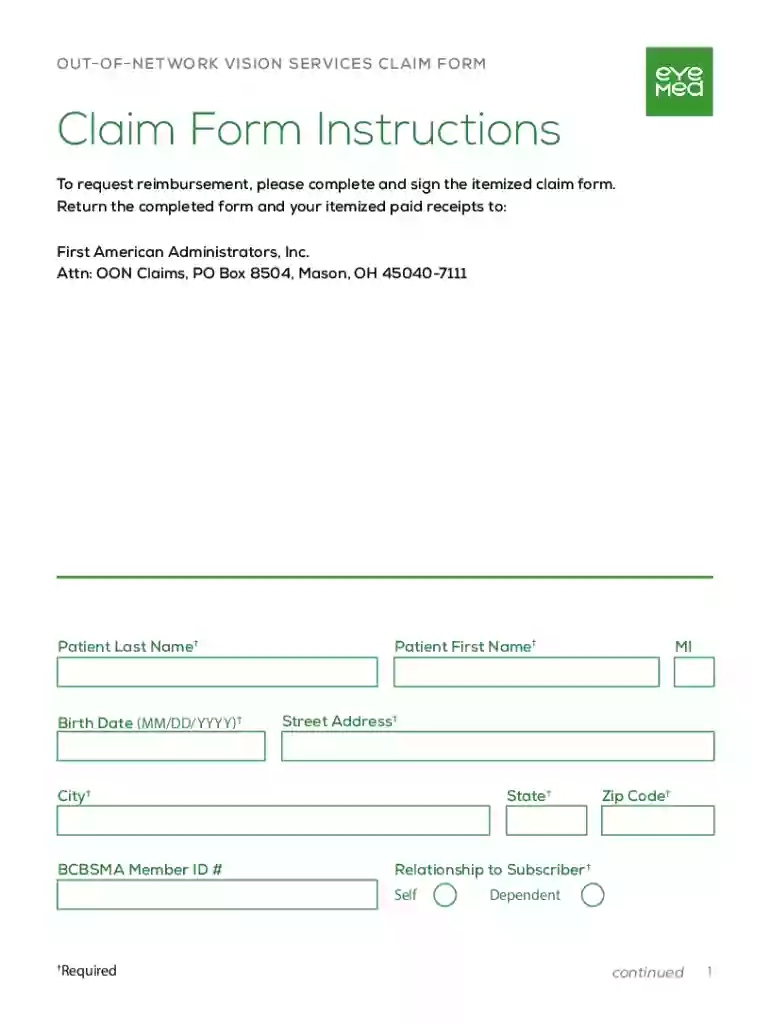
PBEM Claim Form 1 Preview on Page 1

PBEM Claim Form 1 2026

Here's how it works

  • 01. Edit your form online

    Type text, add images, blackout confidential details, add comments, highlights and more.

  • 02. Sign it in a few clicks

    Draw your signature, type it, upload its image, or use your mobile device as a signature pad.

  • 03. Share your form with others

    Send it via email, link, or fax. You can also download it, export it or print it out.

Definition and Meaning

The PBEM Claim Form 1 is a document used for filing claims related to out-of-network vision services. Its purpose is to streamline the process of reporting and seeking reimbursement for such services, ensuring compliance with requirements necessary for claim approval. By using this form, individuals can systematically provide the needed information to verify the validity of their claims. Understanding the significance of this form is crucial for efficiently managing healthcare-related expenses.

Scope of Use

  • Primarily used for out-of-network vision service claims.
  • Ensures necessary details are documented for reimbursement.
  • Facilitates communication between the service provider and the insurance company.

Intended Audience

  • Individuals seeking reimbursement for vision services.
  • Insurance companies processing out-of-network claims.

How to Obtain the PBEM Claim Form 1

The PBEM Claim Form 1 can be acquired through various sources, ensuring accessibility for those requiring it. Understanding where and how to obtain this form is the first step in the claims process.

Sources to Obtain the Form

  • Insurance Provider's Website: Most insurers offer downloadable versions of the form on their websites.
  • Customer Service: Request a mailed copy by contacting customer service for your insurance provider.
  • In-Person at Insurance Offices: Some insurance offices provide hard copies for direct pickup.

Tips for Requesting the Form

  • Verify whether your insurance provider requires a specific version of the form.
  • Confirm if there is an online submission option, which may eliminate the need for a physical copy.

Steps to Complete the PBEM Claim Form 1

Completing the PBEM Claim Form 1 requires careful attention to detail to ensure that all sections are accurately filled out. Here is a step-by-step guide to assist in the completion process.

Step-by-Step Completion Guide

  1. Personal Information: Enter your personal details such as full name, address, and policy number.
  2. Service Details: Document the date of service, name of the healthcare provider, and detailed description of the vision service received.
  3. Out-of-Network Provider Information: List the provider's contact details and any relevant identification numbers.
  4. Itemized Billing: Include a detailed billing statement from the healthcare provider.
  5. Certification and Signature: Sign the form to certify the accuracy of the information provided.

Common Mistakes to Avoid

  • Double-check all dates and numbers for accuracy.
  • Ensure that all sections are complete before submission to prevent processing delays.

Required Documents

Supporting documentation is integral to the processing of the PBEM Claim Form 1. These documents validate the details entered in the form and can significantly influence the approval process.

Necessary Supporting Documents

  • Billing Statements: An itemized receipt from the healthcare provider.
  • Proof of Payment: A copy of the payment confirmation if the service was paid in full.
  • Insurance Policy Copy: Confirming eligibility for reimbursement claim.

Importance of Accurate Documentation

Accurate and complete documentation can significantly expedite the claim process, reducing the likelihood of rejection due to incomplete forms or discrepancies in the provided information.

Form Submission Methods

To cater to various preferences and technological capacities, the PBEM Claim Form 1 can be submitted through multiple methods, each with its own set of guidelines and timeframes.

Online Submission

  • Platform Access: Forms are typically submitted through the insurance company’s website.
  • Digital Copies: Ensure all scanned documents are clear and legible.
  • Confirmation Receipt: Always obtain and save the electronic confirmation after submission.

Mail Submission

  • Mail Address: Verify the exact mailing address provided by your insurer to avoid delays.
  • Confirmation of Delivery: Use certified mail services for proof of delivery.

In-Person Submission

  • Direct Submission: Visit the nearest insurance provider's office if they accept walk-ins.
  • Confirmation: Request a receipt upon submission for personal records.

Key Elements of the PBEM Claim Form 1

Understanding the key components of the PBEM Claim Form 1 is integral to successfully completing and submitting it. Accurate completion ensures faster processing times and minimizes the risk of claim denial.

Essential Sections

  • Claimant Information: Personal details and insurance information.
  • Service Description: Detailed account of the out-of-network vision service provided.
  • Provider Information: Contact and identification details of the service provider.
  • Expense Summary: A summary of all incurred costs associated with the service.
  • Authorization Signature: Signature of the claimant to authorize submission.

Fillable Fields

  • Text Boxes: For entering personal and service details.
  • Dropdown Menus: Frequently used for provider or service type selection.
  • Signature Fields: May offer both digital and physical signature options.

Legal Use of the PBEM Claim Form 1

It is essential to understand the legal implications associated with the PBEM Claim Form 1, as improper use can result in penalties or claim denial. The form serves as both a legal document and a means of ensuring compliance with insurance claim policies.

Compliance Requirements

  • Accurate Information: All details provided must be true and verifiable; false information leads to serious legal consequences.
  • Timely Submission: Ensure the form is submitted within specified claim periods to preserve the right to reimbursement.

General Fraud Warning

Submitting false information intentionally can lead to legal prosecution and a permanent mark on one's insurance record. It is recommended to review all entries thoroughly before form submission.

State-Specific Rules for the PBEM Claim Form 1

Rules and regulations regarding claim submissions can vary significantly from one state to another. Familiarizing yourself with these differences is crucial for a successful claims process.

State Variations

  • Filing Deadlines: Different states may have unique deadlines for claim submissions.
  • Documentation Requirements: Some states might require additional forms or supplementary documentation.
  • Processing Times: The duration it takes to process claims may vary depending on state-specific regulations.

Checking State Compliance

  • Consult your insurance provider to verify specific laws applicable in your state.
  • Review state insurance department resources for the most current guidelines and rules.

By adhering to these guidelines and understanding the intricacies of the PBEM Claim Form 1, applicants can effectively navigate the claims process to achieve timely and successful reimbursement.

See more PBEM Claim Form 1 versions

We've got more versions of the PBEM Claim Form 1 form. Select the right PBEM Claim Form 1 version from the list and start editing it straight away!

VersionsForm popularityFillable & printable
20234.2 Satisfied (47 Votes)
20184.2 Satisfied (53 Votes)
20084.9 Satisfied (43 Votes)

be ready to get more

Complete this form in 5 minutes or less

Got questions?

We have answers to the most popular questions from our customers. If you can't find an answer to your question, please contact us.

Information to include on an expense reimbursement form. Name of product or service. Individual item or line cost. Total cost. Payment method (i.e., cash, credit card, etc.) Date purchased. Explanation of purchase. Original or copy of the receipt.
1. Billing Provider Name Address. Enter the name and address of the hospital/facility submitting the claim. 2 Pay to Address Pay to address if different than field 1.
Log into your Medi Assist portal and click the Reimbursement tile. Fill in the required details and click Intimate. Intimate us about your impending claim. Present your Medi Assist Ecard at the hospital during admission along with any other legally accepted identity card.
A complete reimbursement form should include the employees name, expense date, merchant name, approval sections, expense category, amount, business purpose, and receipt information.
Reimbursement is like getting your money back. If you spend your own money on something for work, school, or business, you can ask the organization or company to pay you back. For example, if you travel for work and pay for your flight, the company will give you back the money you spent.

Security and compliance

At DocHub, your data security is our priority. We follow HIPAA, SOC2, GDPR, and other standards, so you can work on your documents with confidence.
be ready to get more

Complete this form in 5 minutes or less

People also ask

Amazon.com : NEW CMS 1500 Claim Forms - 500 Sheets (02/12 Version) for Laser or Inkjet Printers : Business Claim Forms : Office Products.

Related links

Tribenet FAQs

TribeNet is an immersive Play By EMail game set in a dynamic multi-player world. What is a PBEM game? Play-by-mail (PBM) games, often referred to as play-by-

Learn more
Hazelwood/Mill Park NET Operation Plan

Document the damage, by filling up (Damage Assessment Form #1). by dialing 503.823.1410. Turn in Damage Assessment Forms (#1) at Staging Area. Fill in and

Learn more
Gary Grigsbys War in the East 2 - 2 Setting Up The Game

PBEM allows two human players to play by exchanging turn files by e-mail in a manner that inhibits cheating.

Learn more
If you believe that this page should be taken down, please follow our DMCA take down process here