Type text, add images, blackout confidential details, add comments, highlights and more.
02. Sign it in a few clicks
Draw your signature, type it, upload its image, or use your mobile device as a signature pad.
03. Share your form with others
Send dispute form maybank via email, link, or fax. You can also download it, export it or print it out.
How to use or fill out maybank dispute form with our platform
Ease of Setup
DocHub User Ratings on G2
Ease of Use
DocHub User Ratings on G2
Click ‘Get Form’ to open the maybank dispute form in the editor.
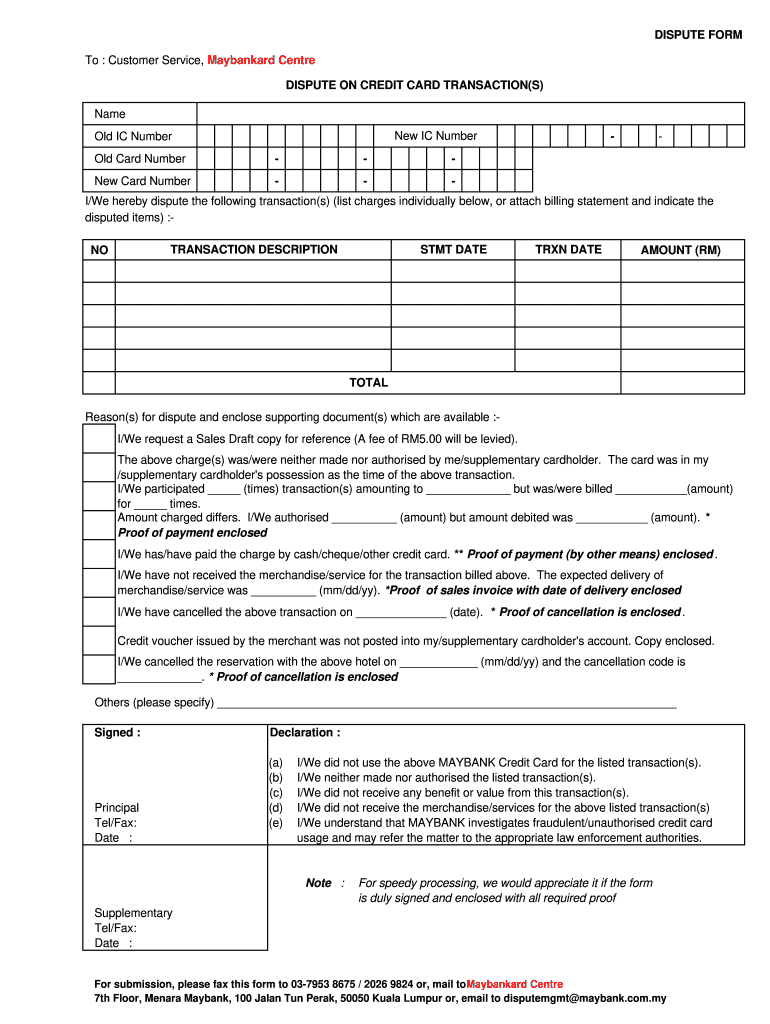
Begin by entering your personal details in the 'Name', 'New IC Number', 'Old IC Number', and 'Old Card Number' fields. Ensure accuracy for a smooth processing experience.
List the disputed transactions under 'TRANSACTION DESCRIPTION'. Include details such as statement date, transaction date, and amount for each charge you are disputing.
In the section for reasons for dispute, clearly state your reasons and attach any supporting documents. If you require a Sales Draft copy, indicate this and note the associated fee.
Review the declaration section carefully. Check all applicable statements to confirm your understanding of the implications of disputing these charges.
Finally, sign and date the form. Make sure to include your contact information before submitting it via fax, mail, or email as indicated at the bottom of the form.
Start using our platform today to fill out your maybank dispute form easily and for free!
We've got more versions of the maybank dispute form form. Select the right maybank dispute form version from the list and start editing it straight away!
Maybank dispute form onlineMaybank dispute form malaysiaMaybank Dispute Form emailMaybank dispute form pdfMaybank dispute form downloadMaybank dispute form 2026Maybank dispute credit cardMaybank dispute form pdf download
Security and compliance
At DocHub, your data security is our priority. We follow HIPAA, SOC2, GDPR, and other standards, so you can work on your documents with confidence.
For, although that was the case of a will, the circumstances were much stronger than in our case; and yet the parol evidence was not permitted. The general.Read more
Cookie consent notice
This site uses cookies to enhance site navigation and personalize your experience.
By using this site you agree to our use of cookies as described in our Privacy Notice.
You can modify your selections by visiting our Cookie and Advertising Notice.