




Here's how it works



How to use or fill out form 2271 2009 with our platform

- Click ‘Get Form’ to open it in the editor.
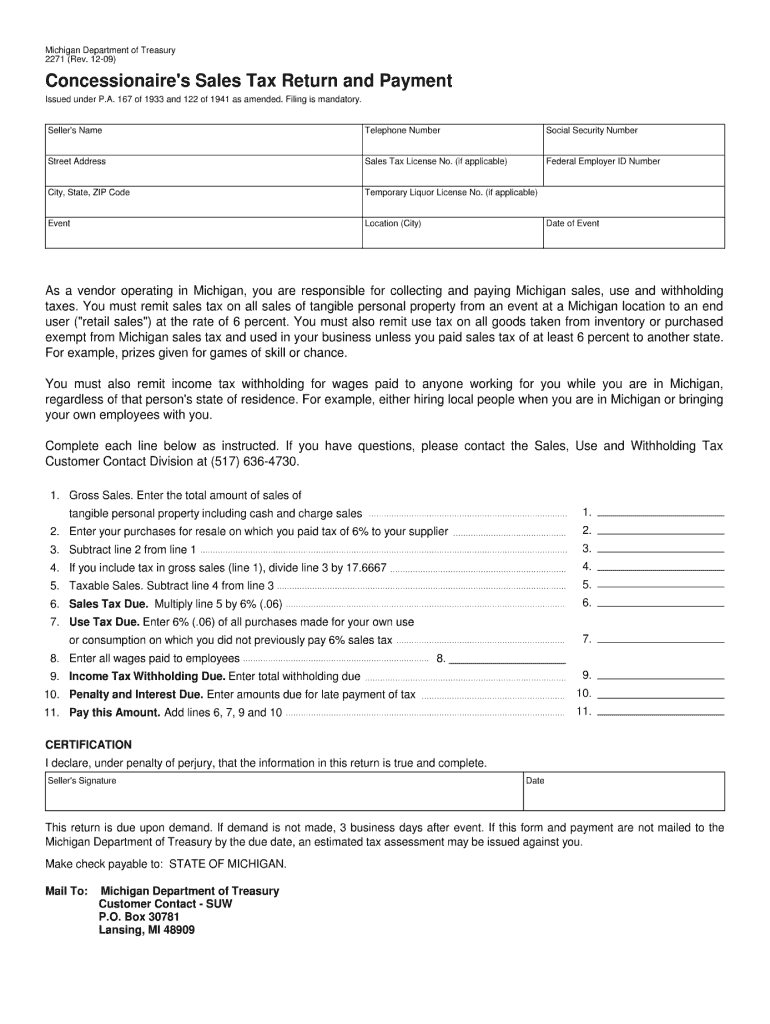
- Begin by entering your Seller's Name, Telephone Number, and Social Security Number in the designated fields. Ensure accuracy as this information is crucial for tax processing.
- Fill in your Street Address, City, State, ZIP Code, and Sales Tax License No. if applicable. This helps identify your business location.
- Provide details about the Event including its Location and Date. This information is essential for tax reporting related to specific sales events.
- Complete the Gross Sales section by entering total sales figures. Follow this by detailing purchases for resale on which you paid tax.
- Calculate Taxable Sales by subtracting line 4 from line 3 and then determine Sales Tax Due by multiplying taxable sales by 6%.
- Finally, certify your return by signing and dating it before submitting it through our platform for a seamless filing experience.
Start using our platform today to fill out form 2271 2009 easily and efficiently!
It's free
See more form 2271 2009 versions
| Versions | Form popularity | Fillable & printable |
|---|---|---|
| 2025 | 4.9 Satisfied (51 Votes) | |
| 2024 | 4.7 Satisfied (50 Votes) | |
| 2023 | 4.2 Satisfied (51 Votes) | |
| 2022 | 4.8 Satisfied (78 Votes) | |
| 2021 | 4.4 Satisfied (120 Votes) | |
| 2020 | 4.3 Satisfied (130 Votes) | |
| 2019 | 4.3 Satisfied (65 Votes) | |
| 2018 | 4.3 Satisfied (52 Votes) | |
| 2017 | 4.3 Satisfied (55 Votes) | |
| 2009 | 4.4 Satisfied (520 Votes) |
Got questions?
Can I type my eSignature on my form 2271 2009?
Sure, a typed name is accepted as a valid electronic signature when you create it on your paperwork using a compliant solution like DocHub. Simply add your form 2271 2009 to our editor, click Sign in the top tool pane → Create your signature → Type your name in the proper tab, and select how it will look on your document.
How do you edit form 2271 2009 on Android?
Document editing with DocHub is equally convenient on desktop and mobile devices. You just need an internet browser to modify your form 2271 2009 on Android. Open our site and sign in to access the tools you require. Add your file and introduce your intended changes. After that, you can keep your form in your file storage or send it out instantly.
Security and compliance
At DocHub, your data security is our priority. We follow HIPAA, SOC2, GDPR, and other standards, so you can work on your documents with confidence.
Learn more


