







Definition and Meaning
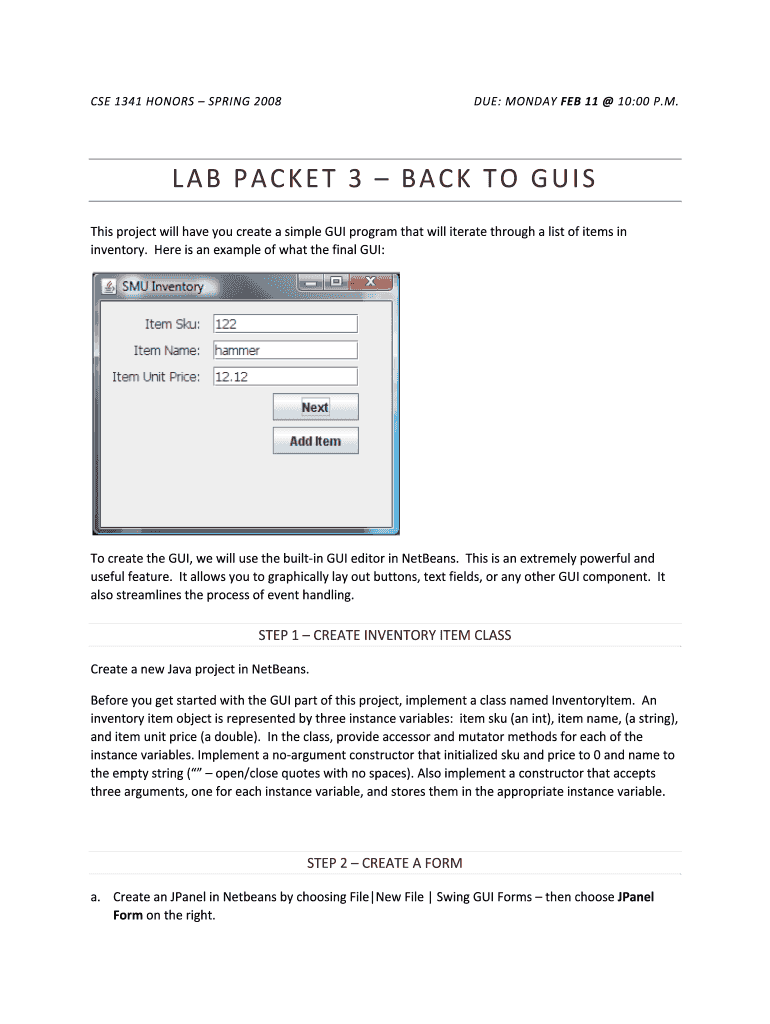
The "LAB PACKET 3 BACK TO GUIS - lyle smu" is a structured assignment used in academic settings, particularly for courses like CSE 1341 Honors at Southern Methodist University (SMU). This lab packet focuses on transitioning back to using graphical user interfaces (GUIs), a crucial element in software development and user experience design.
Key Features
- GUI Development: Students are required to create a simple application using NetBeans, emphasizing the creation and manipulation of GUI elements.
- Programming Fundamentals: Emphasis is placed on class creation and object-oriented programming, particularly the development of an InventoryItem class.
- Interactive Components: The project demands designing a JPanel to display inventory items, leveraging interactive elements like buttons for user input.
How to Use the LAB PACKET 3 BACK TO GUIS - lyle smu
This lab packet provides a step-by-step guide for students to complete the project:
- Understand the Requirements: Read through the project description to grasp the objectives, such as creating a simple GUI application with interactive components.
- Set Up the Development Environment: Use NetBeans as the integrated development environment (IDE) to write and test your code.
- Develop the InventoryItem Class: Begin by creating the class that will represent inventory items in the application.
- Design the GUI: Use JPanel to lay out the inventory display, ensuring user interaction through buttons to add or update items.
- Final Submission: Include the project directory along with activity and class diagrams as specified in the assignment.
Steps to Complete the LAB PACKET 3 BACK TO GUIS - lyle smu
Follow these practical steps to complete the lab:
- Preparation Phase: Gather all necessary tools and software, such as NetBeans, documentation, and any additional libraries.
- Class Construction: Develop the InventoryItem class with appropriate properties and methods. Document any assumptions or constraints.
- GUI Layout: Utilize GridLayout or FlowLayout for arranging components in the JPanel. Include labels, text fields, and buttons.
- Interaction Handling: Implement event listeners for buttons to update, add, or delete inventory items.
- Testing and Debugging: Conduct thorough testing to ensure all functionalities work as intended. Resolve bugs that prevent program execution.
- Submit Project: Ensure that the project directory is well-organized and includes all required documents for submission.
Why You Should Use the LAB PACKET 3 BACK TO GUIS - lyle smu
- Skill Development: Enhances practical skills in GUI programming, critical for modern software applications.
- Academic Requirement: Fulfills course prerequisites, contributing to overall grade and understanding of computer science principles.
- Project-Based Learning: Offers hands-on experience, reinforcing theoretical knowledge through practical application.
Key Elements of the LAB PACKET 3 BACK TO GUIS - lyle smu
InventoryItem Class
- Attributes: Designed to handle properties like ID, name, and quantity.
- Methods: Includes functionalities for setting and getting inventory details.
GUI Components
- JPanel Integration: Core component for displaying inventory details.
- User Interactions: Button-driven actions for manipulating inventory information.
Software Compatibility
The lab packet necessitates using specific software tools:
- NetBeans IDE: Essential for developing and testing Java applications, supporting GUI development with integrated design tools.
- Java SDK: Provides fundamental libraries and environment settings necessary for running and compiling Java programs.
Legal Use of the LAB PACKET 3 BACK TO GUIS - lyle smu
- Intellectual Property: Ensure that all code developed in response to the lab packet complies with SMU's academic policies regarding originality and plagiarism.
- Sharing and Collaboration: While discussion is encouraged, sharing direct code solutions may violate academic integrity rules.
Important Terms Related to LAB PACKET 3 BACK TO GUIS - lyle smu
- GUI: Stands for graphical user interface, crucial for creating user-friendly applications.
- JPanel: A container in Java Swing that can hold a group of components, used here for displaying inventory items.
- Event Listener: A pivotal programming construct for handling user actions like button clicks.
Who Typically Uses the LAB PACKET 3 BACK TO GUIS - lyle smu
- Undergraduate Students: Primarily used in coursework for students in introductory programming courses at SMU.
- Instructors and Facilitators: Utilized by teaching staff to assess students' grasp of GUIs and object-oriented programming.


Examples of Using the LAB PACKET 3 BACK TO GUIS - lyle smu
Case Study: Student A
- Challenges: Struggled with integrating event listeners but resolved these through debugging sessions and peer discussions.
- Outcome: Successfully submitted a fully functional application with a robust GUI, scoring high marks.
Real-World Application
- Prototype Development: Several students have adapted the lab project into more complex applications, such as inventory management systems for student-run businesses.
Penalties for Non-Compliance
- Academic Consequences: Failure to comply with submission guidelines can result in deductions or academic penalties.
- Integrity Violations: Plagiarism or unauthorized collaboration may lead to disciplinary action as per SMU's academic guidelines.




