







Definition & Meaning
A form online refers to digital versions of documents that are designed to be filled out and submitted via the internet. These forms can range from simple contact forms to complex applications, such as those used for tax filing, loan applications, or job submissions. The primary feature of online forms is their accessibility and convenience, as they enable users to complete and send documents from any device with internet access. This reduces the need for physical paperwork and expedites processes that traditionally require in-person submissions.
Common Types of Online Forms
- Application Forms: Used for applying to schools, jobs, or other programs.
- Survey Forms: Designed to gather feedback or data from respondents.
- Registration Forms: Utilized for event sign-ups or account creation.
- Feedback Forms: Allow users to share their experiences or thoughts on a product or service.
Benefits
- Accessibility: Available 24/7 with a stable internet connection.
- Efficiency: Reduces time spent on administrative tasks.
- Accuracy: Minimizes errors through guided input fields.
How to Use the Form Online
Using an online form typically involves accessing a specific link or website where the form is hosted. Here are the general steps to follow:
- Access the Form: Visit the website hosting the form or follow a link directly to the form page.
- Review Instructions: Read any instructions or guidelines provided to understand the requirements and necessary fields.
- Complete the Form: Fill in the mandatory fields, ensuring accuracy in details like personal information or official data.
- Attach Documents: If required, upload any supporting documents directly to the form.
- Review Entries: Double-check all entries for mistakes or omissions before proceeding to submission.
- Submit the Form: Click the submit button to send your form. You may receive a confirmation email or reference number.
Common Features
- Save and Resume: Allows users to save progress and return to complete the form later.
- Validation Logic: Checks entries for consistency and required fields before submission.
Steps to Complete the Form Online
Detailed instructions help ensure accuracy and completeness when filling out a form online:
- Read the Guidance Notes: Before starting, review any additional guidance notes provided, which can clarify particular sections or policies.
- Prepare Necessary Information: Gather all required documents and relevant information beforehand, such as identification numbers or financial records.
- Fill Out Personal Details: Begin by filling out personal details, such as name, address, and contact information, ensuring all are current.
- Complete All Sections: Progress through each section, providing accurate responses to all questions and ticking checkboxes where applicable.
- Use Dropdowns for Selection: Many forms use dropdowns for specific options—choose the option that best applies to your situation.
- Provide Digital Signature: If necessary, use an electronic signature to sign the form, either by inputting a digital signature or typing your name as authorization.
- Verify Completed Form: Before final submission, review all entered data for accuracy and completeness, correcting any errors identified.
Important Tips
- Avoid submitting incorrect information as it may delay processing or lead to rejection.
- Make use of help icons or contact support if questions or issues arise during completion.
Key Elements of the Form Online
Understanding the structure and elements of online forms promotes efficiency and precision:
Essential Components
- Identification Section: Requires personal data for identification, such as name, address, and social security number.
- Financial Information: This section could ask for financial records or income details, especially relevant for applications involving financial aid or loans.
- Declarations and Agreements: Often includes terms where the user confirms the accuracy of the information and agrees to the conditions of the form.
Validation Measures
- Required Fields: Ensures all necessary information is filled out before submission. An asterisk (*) usually marks these fields.
- Conditional Logic: Adjusts the visibility of certain questions based on previous answers, ensuring relevance in responses.
Legal Use of the Form Online
Online forms frequently have legal considerations, especially for applications, contracts, or agreements. Legal use generally involves compliance with relevant laws and regulations to render the submitted information binding and legitimate.
Compliance Requirements
- E-Signature Laws: Comply with the ESIGN Act, which grants electronic signatures the same legal status as handwritten ones.
- Data Protection: Adherence to data protection laws, ensuring user data confidentiality is maintained and protected against unauthorized access.
Practical Scenarios
- Contractual Agreements: Many transactions, such as leasing or purchase agreements, are now processed online and require legally binding signatures.
- Government Forms: Often used for electronically filing taxes or applying for permits, where legal precision in submission is critical.
Examples of Using the Form Online
Online forms are used in a diverse range of scenarios, from simple to highly complex interactions:
Practical Applications
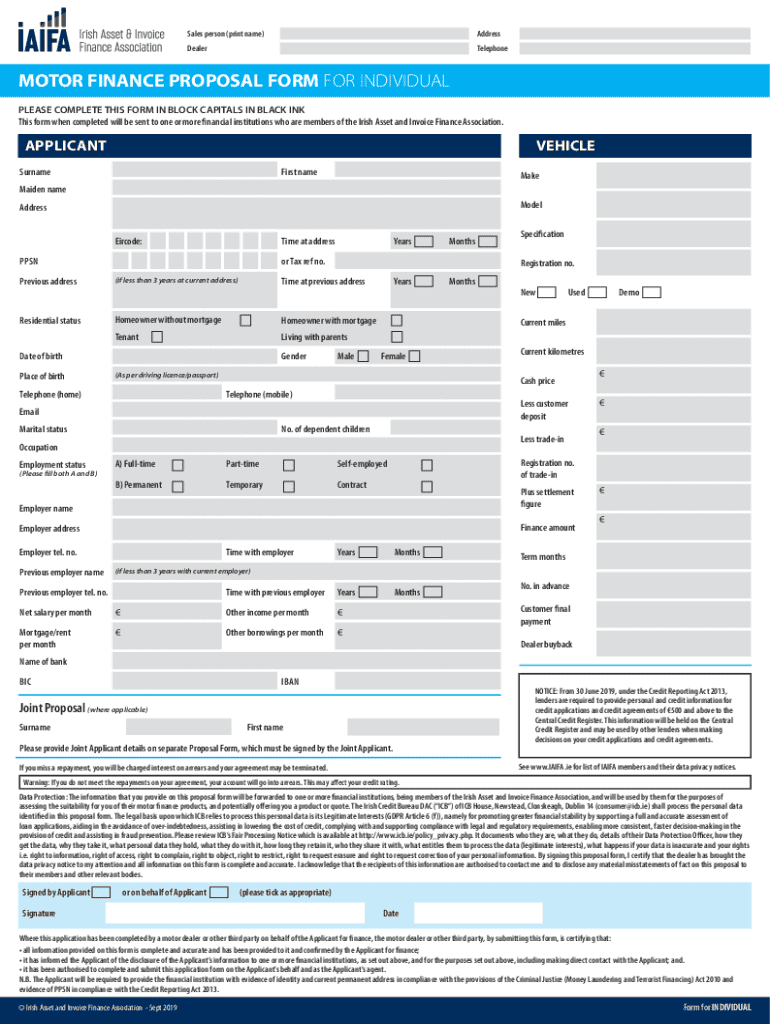
- Motor Finance Proposal Form: Suitable for individuals applying for vehicle finance, requiring extensive personal and financial data input.
- Tax Reporting Forms: Such as the W-9 or 1040 forms, used to report taxable income to the IRS.
- University Applications: Encompass registration and course sign-up, frequently requiring detailed educational background information.
Case Study: Motor Finance Proposal Form
- Required Fields: Includes personal details such as name, employment, and vehicle information.
- Important Notices: Alerts about credit reporting and potential consequences of missed repayments.
Form Submission Methods (Online / Mail / In-Person)
Submitting forms encompasses various methods, each with distinct processes:
- Online Submission: Provides instant transfer and confirmation. Most secure and efficient for digitally available forms.
- Mail Submission: Forms completed and printed must be sent to the appropriate address, typically involving longer processing times.
- In-Person Submission: Requires physically visiting an office to hand over forms, often used for applications needing direct authentication.
Required Documents
Documents supplement online forms to provide validation and evidence for the submitted information:
Commonly Required
- Identification Proof: Such as a driver’s license or passport to verify identity.
- Financial Statements: Bank statements or pay stubs when financial assessment is crucial.
- Proof of Address: Utility bills or leases to confirm residency.
Scenarios of Importance
- Motor Finance Applications: Requires income verification documents to assess the applicant's financial standing.
- Educational Applications: Often demand academic records or certificates for background scrutiny.




