






Definition & Meaning
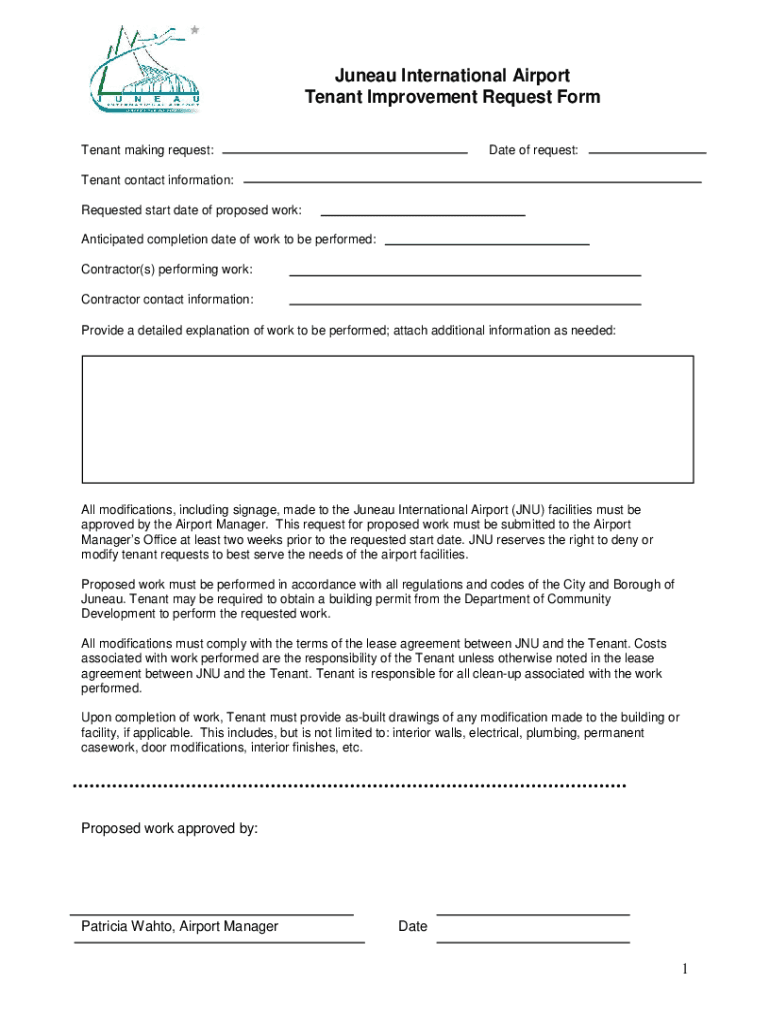
The Juneau International Airport Tenant Improvement Request Form serves as a formal document that allows tenants to initiate requests for modifications to airport facilities. This form is crucial for managing changes that tenants wish to make to the leased premises or surrounding areas. It provides a structured method for detailing the proposed improvements, thereby ensuring that all necessary information is conveyed to the airport management. This not only helps in maintaining compliance with airport regulations but also ensures that any structural changes are aligned with safety and operational standards.
How to Use the Juneau International Airport Tenant Improvement Request Form
To effectively use the Tenant Improvement Request Form, tenants should follow a series of steps to accurately complete the form. Initially, gather all relevant information about the proposed modifications, such as the scope of work, estimated costs, and timelines. Tenants should also include detailed contact information for their chosen contractors or vendors. This form requires clear descriptions of the intended changes, so using specific language and providing diagrams or plans can be beneficial. Once the form is completed, it should be submitted to the Airport Manager for review and approval.
How to Obtain the Juneau International Airport Tenant Improvement Request Form
The Juneau International Airport Tenant Improvement Request Form can typically be obtained directly from the airport’s administrative office. It may also be available for download from the airport's official website. Tenants should ensure they have the latest version of the form to avoid submission errors. If the form is downloaded online, consider reviewing it to confirm it includes all necessary sections and instructions.
Steps to Complete the Juneau International Airport Tenant Improvement Request Form
-
Detail the Proposed Work: Clearly outline the nature of the improvements, including specific changes and materials to be used.
-
Provide Contractor Information: List the name, contact details, and licensing information of the contractors involved.
-
Include Compliance Information: Ensure that all proposed changes comply with local building codes and regulations as specified in the form.
-
Attach Supporting Documents: Include diagrams, plans, cost estimates, and any other documentation that supplements the improvement request.
-
Review and Submit: Double-check all information for accuracy before submitting it to the Airport Manager for approval.
Why Should You Use the Juneau International Airport Tenant Improvement Request Form
Using the Tenant Improvement Request Form is essential for maintaining compliance with airport standards and avoiding potential legal or operational issues. This form ensures that all improvements adhere to safety and engineering standards, providing a record for both the tenant and airport management. It also facilitates transparent communication between tenants and the airport, reducing the risk of misunderstandings regarding the scope and impact of proposed changes.
Who Typically Uses the Juneau International Airport Tenant Improvement Request Form
This form is primarily used by tenants of Juneau International Airport who lease spaces and seek to make alterations. These may include airlines, retail vendors, and service providers operating within the airport. Each of these entities may need to tailor their lease areas to better serve operational needs or customer preferences. As such, the form is a critical tool for any entity requiring modifications, expansions, or renovations within the airport premises.


Key Elements of the Juneau International Airport Tenant Improvement Request Form
Key elements of the form include:
- Tenant Information: Contact details and identification of the tenant initiating the request.
- Detailed Scope of Work: Description of the planned improvements, including materials and methods.
- Contractor Details: Information about the contractors undertaking the project.
- Compliance Assurance: Sections requiring evidence of adherence to local codes and airport standards.
- Cost Responsibility Acknowledgment: Confirmation from the tenant regarding the acceptance of all associated costs and clean-up responsibilities.
Legal Use of the Juneau International Airport Tenant Improvement Request Form
The legal use of the Tenant Improvement Request Form is to ensure that any changes made by tenants do not violate local, state, or federal regulations related to safety, structural integrity, and usability of airport facilities. Moreover, by providing a documented request process, the form helps protect both tenants and the airport from potential liabilities or disputes arising from unauthorized modifications or misunderstandings about the scope of permitted work.
Examples of Using the Juneau International Airport Tenant Improvement Request Form
Consider scenarios such as a retail shop within the airport wanting to expand its premises to accommodate more products, or an airline seeking to upgrade its check-in counters for greater efficiency. In each example, the Tenant Improvement Request Form formalizes and facilitates these requests, with tenants submitting detailed plans and getting the necessary approvals before any work begins.
Form Submission Methods
Generally, the Juneau International Airport Tenant Improvement Request Form can be submitted via:
- In-Person: Directly to the administrative office at the airport.
- Mail: Sent to the designated airport management office address.
- Email or Online Submission: For offices that accept electronic submissions, ensure all sections are clearly filled out before sending.
Ensure to confirm the preferred submission method with airport administration and adhere to any associated deadlines.