INJURIES AND ILLNESSES FORM SH-900 1 2026

Get Form
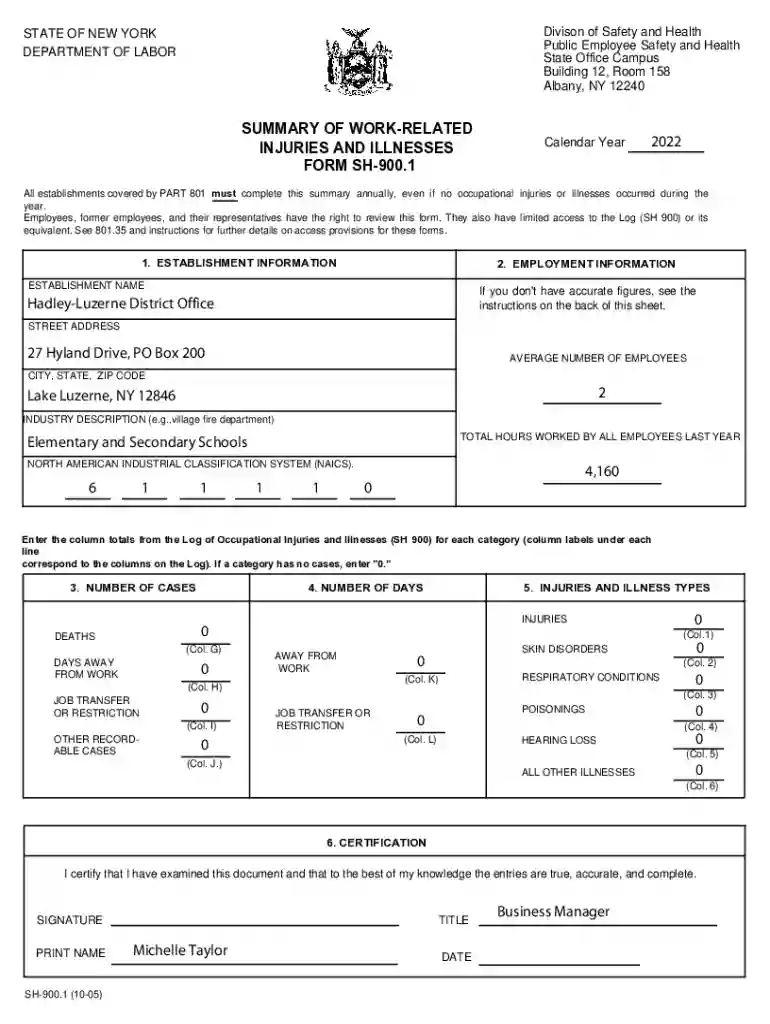
INJURIES AND ILLNESSES FORM SH-900 1 Preview on Page 1

Here's how it works

01. Edit your form online
Type text, add images, blackout confidential details, add comments, highlights and more.

02. Sign it in a few clicks
Draw your signature, type it, upload its image, or use your mobile device as a signature pad.

03. Share your form with others
Send it via email, link, or fax. You can also download it, export it or print it out.

Definition and Meaning of Injuries and Illnesses Form SH-900 1

The Injuries and Illnesses Form SH-900 1 is a standardized document used predominantly in the United States for recording work-related injuries and illnesses. It is essential for employers to maintain an accurate log of any incidents that occur within their establishments. The form is part of broader occupational safety requirements and helps in tracking and analyzing workplace safety trends over time. Understanding its purpose and application is crucial for compliance with federal and state labor safety regulations.

How to Use the Injuries and Illnesses Form SH-900 1

To effectively utilize the Injuries and Illnesses Form SH-900 1, employers should first ensure that they have a comprehensive understanding of the incidents that qualify for reporting. The form typically requires details such as the type of injury or illness, how it occurred, and the action taken subsequently. Employers must compile and maintain these records throughout the year and review them regularly to enhance workplace safety measures.

Key Steps in Form Usage

  1. Incident Documentation: Record each event as it happens, ensuring detailed and accurate data entry.
  2. Regular Review: Conduct periodic assessments of logged data to identify safety patterns and improve preventive measures.
  3. Annual Submission: Ensure timely submission of the completed form to relevant authorities as mandated by specific state and federal laws.

Steps to Complete the Injuries and Illnesses Form SH-900 1

Completing the form requires careful attention to detail and adherence to guidelines. The process involves documenting each incident accurately, ensuring all necessary fields are filled out correctly, and verifying that information aligns with organizational records.

Detailed Completion Process

  • Gather Essential Information: Collect names, dates, descriptions of events, and any related medical assessments.
  • Fill Out Required Sections: Enter data systematically, ensuring clarity and accuracy.
  • Review and Validate: Double-check all entries for consistency and completeness before submission.

Key Elements of the Injuries and Illnesses Form SH-900 1

Understanding the critical components of the form is vital for accurate completion and compliance. The form typically includes sections for employee details, incident descriptions, and subsequent actions taken.

Notable Sections

  • Employee Information: Includes names, roles, and identification numbers.
  • Incident Details: Covers the nature of the injury or illness, its cause, and any environmental factors involved.
  • Corrective Measures: Details steps taken following the incident, such as medical treatment or policy changes.

Legal Use and Compliance for Injuries and Illnesses Form SH-900 1

Compliance with federal and state regulations concerning workplace safety is mandatory. The Injuries and Illnesses Form SH-900 1 plays a pivotal role in meeting these legal requirements by providing a documented account of workplace incidents.

Compliance Guidelines

  • Federal Regulations: Ensure adherence to guidelines set by the Occupational Safety and Health Administration (OSHA).
  • State Laws: Be aware of any additional requirements specific to the state where the business operates.
  • Documentation and Retention: Maintain records meticulously and store them securely for mandated durations.

Who Typically Uses the Injuries and Illnesses Form SH-900 1

The form is commonly used by employers across various industries who are required to track workplace safety incidents. It is particularly relevant for businesses operating in environments prone to health and safety risks, such as construction sites, manufacturing plants, and service industries.


decoration image ratings of Dochub

Typical Users

  • Human Resources Personnel
  • Health and Safety Officers
  • Management Teams in High-Risk Industries

Why You Should Use the Injuries and Illnesses Form SH-900 1

Using this form is crucial for maintaining workplace safety and ensuring regulatory compliance. It enables employers to identify areas needing improvement and helps in mitigating future risks by analyzing patterns and implementing safety protocols.

Benefits of Using the Form

  • Enhanced Safety Protocols: Allows for systematic analysis of incident data leading to improved safety measures.
  • Legal Protection: Provides documentation that can be crucial in legal scenarios involving workplace injuries.
  • Data-Driven Insights: Facilitates strategic decision-making by highlighting prevalent safety issues.

Filing Deadlines and Important Dates for the Injuries and Illnesses Form SH-900 1

Timely submission of the form is critical to maintaining compliance with regulatory requirements. Missing deadlines can lead to penalties and increased scrutiny from oversight bodies.

Important Timing Considerations

  • Annual Submission: Due dates typically align with fiscal year reporting — check state-specific deadlines.
  • Incident Reporting: Log incidents as they occur, maintaining monthly updates to ensure accuracy.
  • Review Periods: Schedule regular reviews to keep data current and reflective of any safety changes implemented.
be ready to get more

Complete this form in 5 minutes or less

Get form

Got questions?

We have answers to the most popular questions from our customers. If you can't find an answer to your question, please contact us.
Contact us
Covered establishments must submit their annual 300A, 300, and 301 data to the Injury Tracking Application (ITA). Visit our Injury Tracking Application page for information about submitting annual work-related injury and illness data through the ITA, including answers to frequently asked questions.
Who is covered under the new rule? All employers under OSHA jurisdiction must report all work-related fatalities, hospitalizations, amputations and losses of an eye to OSHA, even employers who are exempt from routinely keeping OSHA injury and illness records due to company size or industry.
A company executive must complete the task of docHubing the Summary of Work-Related Injuries and Illnesses. This involves reviewing and signing off on the document.
You must consider an injury or illness to meet the general recording criteria, and therefore to be recordable, if it results in any of the following: death, days away from work, restricted work or transfer to another job, medical treatment beyond first aid, or loss of consciousness.
On April 30, 2018, federal OSHA posted a trade release requiring all affected employers to submit injury and illness data in the federal OSHA Injury Tracking Application online portal, even if the employer was covered by a state plan that had not completed adoption of their own state rule.

Security and compliance

At DocHub, your data security is our priority. We follow HIPAA, SOC2, GDPR, and other standards, so you can work on your documents with confidence.

Learn more
ccpa2
pci-dss
gdpr-compliance
hipaa
soc-compliance
be ready to get more

Complete this form in 5 minutes or less

Get form

People also ask

All employers are required to notify OSHA when an employee is killed on the job or suffers a work-related hospitalization, amputation, or loss of an eye. A fatality must be reported within 8 hours. An in-patient hospitalization, amputation, or eye loss must be reported within 24 hours.
Establishments that meet certain size and industry criteria are required to electronically submit injury and illness data from their OSHA Form 300A, 300, and 301 (or equivalent forms) once per year to OSHA. OSHA collects this work-related injury and illness data through the Injury Tracking Application (ITA).

Related links