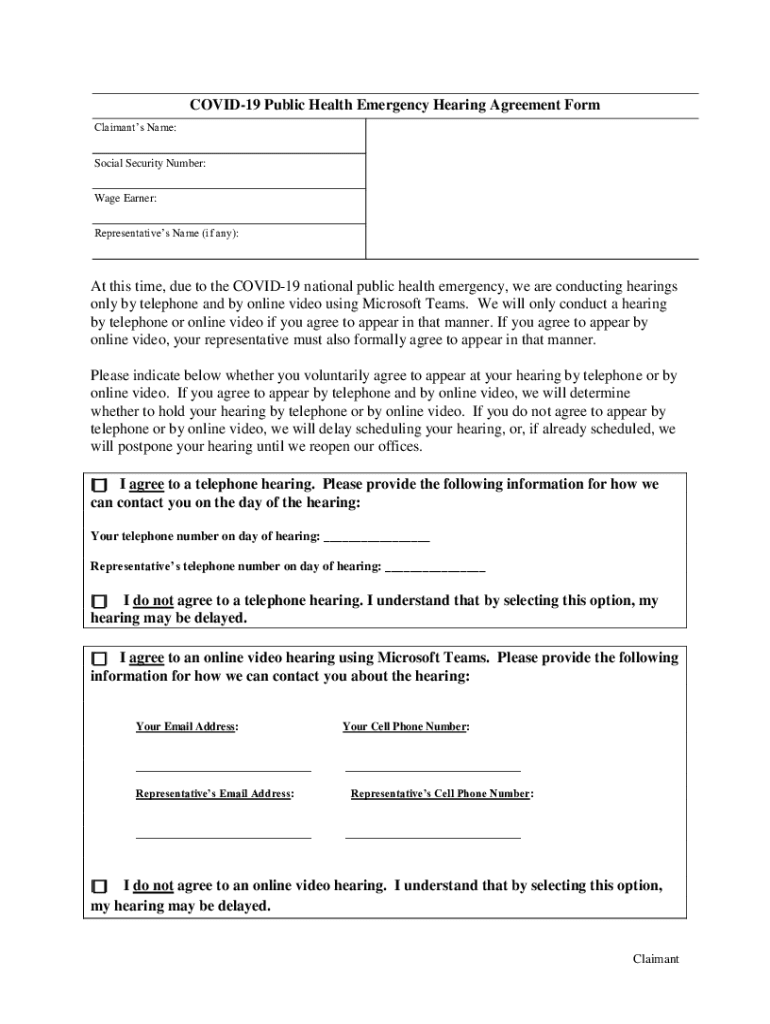
Ssa covid 19 video hearing agreement form 2026

Get Form
remote hearing agreement form Preview on Page 1

Here's how it works

01. Edit your remote hearing agreement form online
Type text, add images, blackout confidential details, add comments, highlights and more.
02. Sign it in a few clicks
Draw your signature, type it, upload its image, or use your mobile device as a signature pad.
03. Share your form with others
Send social security administration hearing via email, link, or fax. You can also download it, export it or print it out.

How to use or fill out ssa covid 19 video hearing agreement form with our platform

Form edit decoration
9.5
Ease of Setup
DocHub User Ratings on G2
9.0
Ease of Use
DocHub User Ratings on G2
  1. Click ‘Get Form’ to open the SSA COVID-19 Video Hearing Agreement Form in the editor.
  2. Begin by entering the Claimant’s Name and Social Security Number at the top of the form. This information is essential for identifying your case.
  3. Indicate your preference for a hearing format by checking either 'I agree to a telephone hearing' or 'I agree to an online video hearing using Microsoft Teams.' If you choose online, provide your email address and cell phone number.
  4. If applicable, fill in the Representative’s Name and their contact details. Ensure that both you and your representative agree on the chosen method of hearing.
  5. Review all entered information for accuracy. Add any additional comments if necessary, then sign and date the form at the bottom.

Start filling out your SSA COVID-19 Video Hearing Agreement Form today for free using our platform!

See more ssa covid 19 video hearing agreement form versions

We've got more versions of the ssa covid 19 video hearing agreement form form. Select the right ssa covid 19 video hearing agreement form version from the list and start editing it straight away!
Versions Form popularity Fillable & printable
2020 4.8 Satisfied (94 Votes)
be ready to get more

Complete this form in 5 minutes or less

Get form

Got questions?

We have answers to the most popular questions from our customers. If you can't find an answer to your question, please contact us.
Contact us

Many software solutions are available out there for document editing and signing. DocHub is one of the most in-demand online solutions that comply with all data protection and compliance requirements and ensures your electronically signed documentation is legally enforceable. All you need to try it out is to create an account, upload your covid 19 remote hearing agreement form, provide the requested details, and click Sign. Create your eSignature by typing, drawing it, uploading its picture to your template, or scanning a unique QR code.

You need only a web connection and a browser to fill out your ssa covid 19 video hearing agreement form on an iOS phone. Open the DocHub website and authenticate. Then, add your document or select it from the list in your dashboard. Then use our editing instruments to fill out your form and preserve all your changes. You can also send it to a dedicated recipient right away.

What Questions Are Asked at a SSDI Hearing? Personal Background Questions. Work Background Questions. Medical Issues Questions. Specific Activity Limitation Questions (If Applicable) Questions About Activity Limitations Arising From Non-Physical Problems (Mental Health or Pain)
Tips When Answering Disability Judge Questions Be direct and concise. Be Honest Even if you think your answer might harm your case. If you dont understand a question, ask for it to be repeated. Be prepared. Contemplate your answers to key questions.
If you want to keep yours, here are some tips on how to pass a continuing disability review: Follow Your Treatment Protocol. Learn More About Your Condition. Answer the Short Form Honestly. Keep Copies of Your Medical Records. Inform the SSA of Any Change in Address.

Security and compliance

At DocHub, your data security is our priority. We follow HIPAA, SOC2, GDPR, and other standards, so you can work on your documents with confidence.

Learn more
ccpa2
pci-dss
gdpr-compliance
hipaa
soc-compliance
be ready to get more

Complete this form in 5 minutes or less

Get form

People also ask

Making Statements That Can Hurt Your Claim Unless you are specifically asked pertinent questions, do not talk about alcohol or drug use, criminal history, family members getting disability or unemployment, or similar topics. However, if you are asked directly about any of those topics, answer them truthfully.
The most important thing about a Social Security disability hearing is to tell the truth. When the judge asks a question, dont try to figure out why the judge is asking that particular question or whether your answer will help or hurt your case. Be candid about your strengths as well as about your limitations.
0:05 2:31 How to Describe Your Daily Activities at Your Disability Hearing - YouTube YouTube Start of suggested clip End of suggested clip They ask how you spend a usual day. They use your description to figure out whether or not yourMoreThey ask how you spend a usual day. They use your description to figure out whether or not your daily activities are consistent with the symptoms. And limitations you describe.
The doctor might ask questions like: What impairments do you have, and how do they affect you? How has their life changed since the onset of their mental illness? Whats your ability to interact with others and your relationship with your family, friends, and the community?
During the disability hearing, after you get sworn in the judge will ask you some questions regarding your employment history, as well as the limitations of your disability. Then the judge will ask the vocational expert hypothetical questions about what jobs someone with your limitations could do.

Related links