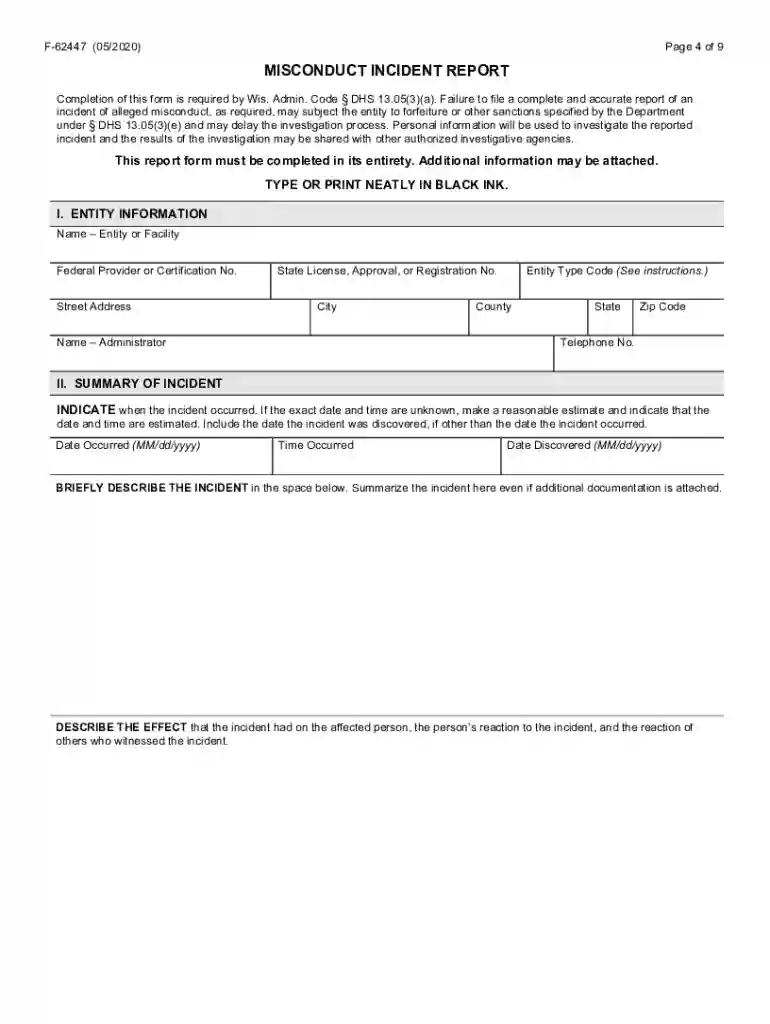
wisconsin caregiver misconduct registry Preview on Page 1

Wisconsin misconduct reporting 2026

Here's how it works

  • 01. Edit your wisconsin caregiver misconduct registry online

    Type text, add images, blackout confidential details, add comments, highlights and more.

  • 02. Sign it in a few clicks

    Draw your signature, type it, upload its image, or use your mobile device as a signature pad.

  • 03. Share your form with others

    Send misconduct registry via email, link, or fax. You can also download it, export it or print it out.

How to use or fill out Wisconsin Misconduct Reporting with our platform

Form edit decoration
9.5
Ease of Setup
DocHub User Ratings on G2
9.0
Ease of Use
DocHub User Ratings on G2
  1. Click ‘Get Form’ to open the Wisconsin Misconduct Incident Report in the editor.
  2. Begin with the ENTITY INFORMATION section. Fill in the name of the entity or facility responsible for the care of the affected person, along with relevant identification numbers and contact details.
  3. Move to the SUMMARY OF INCIDENT section. Clearly indicate when the incident occurred, providing specific dates and times if possible. Summarize the incident and describe its effects on the affected person.
  4. In AFFECTED PERSON INFORMATION, enter details about the individual impacted by the incident, including their name, date of birth, and contact information.
  5. Complete ACCUSED PERSON INFORMATION if known. Include their name, position at the time of the incident, and any other relevant details.
  6. Proceed to LAW ENFORCEMENT INVOLVEMENT to indicate if law enforcement was contacted. Provide necessary officer details if applicable.
  7. Fill out PERSONS WITH SPECIFIC KNOWLEDGE OF THE INCIDENT by listing individuals who can provide further information about what happened.
  8. Finally, ensure that all sections are completed accurately before submitting your report through our platform for a streamlined process.

Start using our platform today to efficiently complete your Wisconsin Misconduct Incident Report for free!

See more wisconsin caregiver misconduct registry versions

We've got more versions of the wisconsin caregiver misconduct registry form. Select the right wisconsin caregiver misconduct registry version from the list and start editing it straight away!

VersionsForm popularityFillable & printable
20204.8 Satisfied (125 Votes)
20104.3 Satisfied (60 Votes)

be ready to get more

Complete this form in 5 minutes or less

Security and compliance

At DocHub, your data security is our priority. We follow HIPAA, SOC2, GDPR, and other standards, so you can work on your documents with confidence.

mir reporting wisconsin

Misconduct Reporting System | Wisconsin Department of

Sep 25, 2025 To access the MRS, you must create and register a MyWisconsin ID. Detailed instructions for signing up for the MRS are located in DQA MisconductRead more

Learn more
Academics Are Pushing Back on For-Profit Academic Publishing

Jun 20, 2025 Pressures to publish in prestigious journals contribute to issues like irreproducible results, publication bias, and even scientific misconduct.Read more

Learn more
Caregiver Misconduct Reporting Requirements Worksheet

Log into the Misconduct Incident Report (MIR) system using your WILMS ID and password. 1. . Access the MIR system at: more

Learn more
If you believe that this page should be taken down, please follow our DMCA take down process here