Type text, add images, blackout confidential details, add comments, highlights and more.
02. Sign it in a few clicks
Draw your signature, type it, upload its image, or use your mobile device as a signature pad.
03. Share your form with others
Send it 2104 how to fill out married via email, link, or fax. You can also download it, export it or print it out.
How to use or fill out 2021 IT-2104.1 with our platform
Ease of Setup
DocHub User Ratings on G2
Ease of Use
DocHub User Ratings on G2
Click ‘Get Form’ to open the IT-2104.1 in the editor.
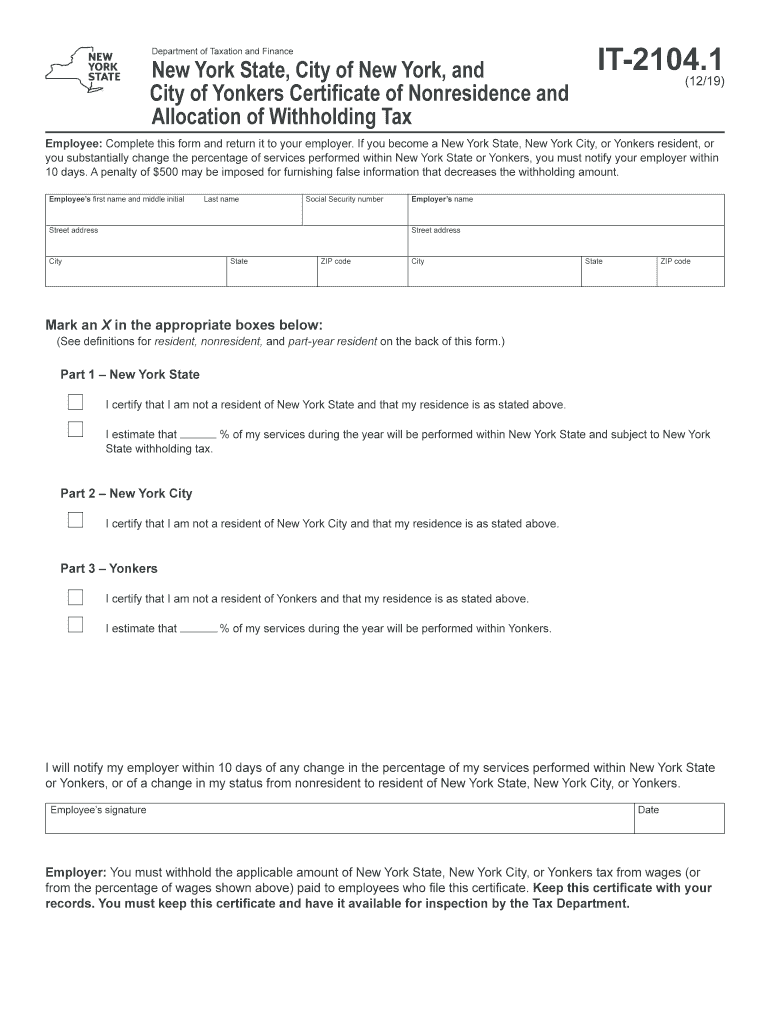
Begin by entering your personal information: fill in your first name, middle initial, last name, and Social Security number in the designated fields.
Next, provide your street address, city, state, and ZIP code to ensure accurate identification.
Input your employer’s name and their address details as required.
In Part 1 for New York State, certify your non-residency by marking the appropriate box and estimate the percentage of services performed within New York State.
Repeat a similar process for Part 2 (New York City) and Part 3 (Yonkers), certifying non-residency and estimating service percentages as applicable.
Finally, sign and date the form at the bottom before submitting it back to your employer.
Start using our platform today to easily complete your IT-2104.1 form online for free!
Every allowance you are eligible to claim reduces the amount of money withheld, which means more money in your pocket during the year. To ensure you are aware of every allowance you are eligible for, we recommend you complete the worksheet that accompanies Form IT-2104.
How do I know how many allowances I need to claim?
Generally, the number of allowances you should claim is dependent on your filing status, income, and whether or not you claim someone as a dependent. Typically, you can either claim more allowances and get higher paychecks, or claim less allowances and get a larger tax refund.
Is it better to claim 1 or 0 allowances?
Claiming 0 means more withheld. It reduces the take-home pay but possibly leads to a refund. Claiming 1 means less withheld. This option presents a larger paycheck but increases the risk of owing amounts at tax time.
How many allowances should I claim in 2104?
When you use the form IT-2104 Employees Withholding Allowance Certificate for your state and city taxes, you may claim as many allowances as are justified by your circumstances. However, if you claim more than 14 allowances, you must complete the Withholding Certificate Affirmation.
How many allowances should I claim in New York state?
A single filer with no children should claim a maximum of 1 allowance, while a married couple with one source of income should file a joint return with 2 allowances. You can also claim your children as dependents if you support them financially and theyre not past the age of 19.
it2104 1
IT-2104 worksheet2021 it 2104 1 pdf2021 it 2104 1 calculatorIT-2104 instructionsIT-2104 worksheet pdfIT-2104 worksheet 20252021 it 2104 1 exampleIT-2104 calculator
Security and compliance
At DocHub, your data security is our priority. We follow HIPAA, SOC2, GDPR, and other standards, so you can work on your documents with confidence.
If you are a single person with one W2 job and no special deductions, two allowances should be very close to the right amount to withhold; one allowance would give a bigger refund.
What is the NY IT-2104.1 form?
NYS, NYC, and Yonkers Non-Residence Certificate (IT-2104.1) Use to determine your tax withholding allocations if you work in NYS, NYC, or Yonkers but are not a resident of NYS.
Related links
Remote Codes
What you need is to program your remote to control them in advance: 1. Turn on the component to be programmed. 2. Look up the brand and corresponding code.
Form IT-2104 Employees Withholding Allowance Certificate
Employee: Give this form to your employer and keep a copy for your records. Remember to review this form once a year and update it if needed. Note: Single
Cookie consent notice
This site uses cookies to enhance site navigation and personalize your experience.
By using this site you agree to our use of cookies as described in our Privacy Notice.
You can modify your selections by visiting our Cookie and Advertising Notice.