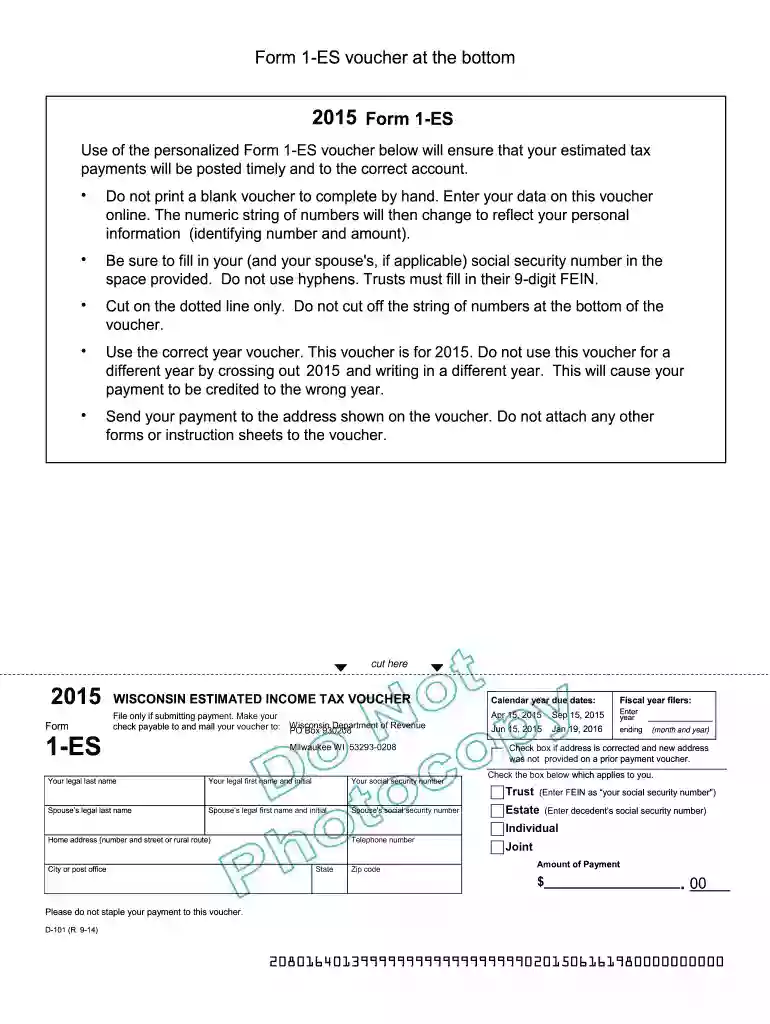
2015 Wisconsin Form 1-ES Preview on Page 1

2015 Wisconsin Form 1-ES-2026

Here's how it works

  • 01. Edit your form online

    Type text, add images, blackout confidential details, add comments, highlights and more.

  • 02. Sign it in a few clicks

    Draw your signature, type it, upload its image, or use your mobile device as a signature pad.

  • 03. Share your form with others

    Send it via email, link, or fax. You can also download it, export it or print it out.

Definition and Purpose of the 2015 Wisconsin Form 1-ES

The 2015 Wisconsin Form 1-ES is a tax document used by individuals to report and pay estimated tax payments in Wisconsin for the tax year 2015. Its primary function is to help taxpayers make timely quarterly payments to the Wisconsin Department of Revenue to avoid penalties associated with underpayment of taxes. This form is particularly relevant for individuals who do not have taxes withheld from their income, such as the self-employed, retirees with taxable incomes, or investors with high capital gains.

Importance of Accurate Information

  • Ensures that payments are appropriately credited to your tax account.
  • Prevents discrepancies that could lead to audits or penalties.
  • Accurate personal information guarantees proper identification by the Wisconsin Department of Revenue.

How to Use the 2015 Wisconsin Form 1-ES

Using the 2015 Wisconsin Form 1-ES involves calculating your estimated tax liability for the year and dividing it into four payments. Each payment is made on a quarterly basis, requiring the taxpayer to estimate their annual income and expected tax deductions.

Step-by-Step Completion

  1. Calculate Total Taxable Income: Consider all sources, including wages, dividends, and self-employment income.
  2. Estimate Deductions: Factor in standard or itemized deductions applicable to your situation.
  3. Determine Tax Liability: Use the Wisconsin tax rate schedule for 2015 to calculate your liability.
  4. Divide into Payments: Split your annual tax liability into four equal amounts.
  5. Complete the Voucher: Input personal and payment information on the Form 1-ES voucher.
  6. Submit Payments Timely: Ensure payments are made according to the indicated deadlines to avoid interest charges.

How to Obtain the 2015 Wisconsin Form 1-ES

Obtaining the 2015 Wisconsin Form 1-ES is simple and can be done in multiple ways. It is available both online and through direct request from the Wisconsin Department of Revenue.

Online Access

  • Visit the Wisconsin Department of Revenue website to download a PDF of the form.
  • Use tax preparation software that supports Wisconsin forms to generate the form.

Physical Copies

  • Call the Wisconsin Department of Revenue to request a mailed copy.
  • Visit a local taxpayer service center for assistance and to pick up forms.

Filing Deadlines and Important Dates

Pay special attention to the payment schedule for estimated tax payments in 2015. The deadlines are crucial for avoiding penalties:

  1. April 15, 2015: Due date for the first quarter payment.
  2. June 15, 2015: Due date for the second quarter.
  3. September 15, 2015: Due date for the third quarter.
  4. January 15, 2016: Final payment covering the last quarter.

Consequences of Missing Deadlines

  • Interest and Penalties: Late payments incur interest and penalties, calculated based on the amount and duration of the underpayment.
  • Adjustment of Future Payments: Missing or underpaying affects the calculation of subsequent quarterly payments.

Key Elements of the 2015 Wisconsin Form 1-ES

Understanding the components of the 2015 Form 1-ES ensures accurate completion.

Major Components

  • Personal Information: Name, address, and Social Security number.
  • Estimated Tax Amount: Calculated according to projected annual income.
  • Voucher Details: Specifies quarterly payment amounts.

Additional Features

  • OCR Scan Line: Essential for processing by the Department of Revenue.
  • Paper Quality Requirements: Use of designated paper ensures compatibility with state systems.

Legal Use of the 2015 Wisconsin Form 1-ES

Using the form correctly ensures compliance with Wisconsin tax laws. The form is governed by specific statutory requirements that dictate its use and the manner in which taxpayers must report their estimated taxes.

Relevant Statutes

  • State Tax Code Compliance: Following state guidelines helps maintain compliance.
  • Legal mandates require document retention for audit purposes.

Examples of Using the 2015 Wisconsin Form 1-ES

To better grasp its application, consider these scenarios where taxpayers would use the 2015 Wisconsin Form 1-ES:

Self-Employed Individuals

  • Estimating taxes on business profits requires careful income forecasts.
  • Adjusting estimates quarterly as income fluctuates helps maintain accuracy.

Retirees

  • Retirees realize the need for estimated payments when receiving distributions not subject to withholding.
  • Accounting for social security income and other taxable pensions requires separate estimation.

Penalties for Non-Compliance

Failure to comply with estimated payment requirements can lead to significant penalties:

Types of Penalties

  • Underpayment Penalty: Imposed for not paying sufficient estimated taxes by year-end.
  • Late Payment Fees: Applied to any underpayment not compensated by due dates.

Mitigation Strategies

  • Amend Income Projections: Change estimates in response to financial changes.
  • Quarterly Adjustments: Modify payments each quarter to better reflect expected liabilities.

By thoroughly understanding and following these comprehensive guidelines, taxpayers can effectively manage their estimated tax obligations using the 2015 Wisconsin Form 1-ES.

See more 2015 Wisconsin Form 1-ES versions

We've got more versions of the 2015 Wisconsin Form 1-ES form. Select the right 2015 Wisconsin Form 1-ES version from the list and start editing it straight away!

VersionsForm popularityFillable & printable
20204.8 Satisfied (63 Votes)
20194.3 Satisfied (284 Votes)
20184.4 Satisfied (305 Votes)
20174.3 Satisfied (35 Votes)
20164.4 Satisfied (555 Votes)
20153.9 Satisfied (41 Votes)
20124 Satisfied (52 Votes)

be ready to get more

Complete this form in 5 minutes or less

Got questions?

We have answers to the most popular questions from our customers. If you can't find an answer to your question, please contact us.

If you expect to owe at least $1000 at tax time next year, using the vouchers or making estimated quarterly payments can help you avoid a big tax bill or an underpayment penalty next year. You are not required to use them.
For those who do not have internet access or the ability to print, paper forms and instructions are available upon request. Call or visit any of the Department of Revenue offices located throughout the state. Call (608) 266-2486.
Estimate Payment Dates To avoid an underpayment penalty, individuals generally must pay 25% of their required annual payment by April 15, June 15, September 15, and January 15 of the following year, to avoid an underpayment penalty.
Report all your estimated tax payments on Form 1040, line 26. Also include any overpayment that you elected to credit from your prior year tax return.
Use Form 1040-ES to figure and pay your estimated tax. Estimated tax is the method used to pay tax on income that is not subject to withholding (for example, earnings from self-employment, interest, dividends, rents, alimony, etc.).

Security and compliance

At DocHub, your data security is our priority. We follow HIPAA, SOC2, GDPR, and other standards, so you can work on your documents with confidence.

be ready to get more

Complete this form in 5 minutes or less

People also ask

Id suggest filing either an amended return, or form 843, to let the IRS know that you want them to refund you that excess payment. Yes, you need to let your tax preparer know that you paid estimated taxes, including how much you paid on which dates.
Wisconsin doesnt have a specific signature form for electronic filing. However, they still require a signature. Youll need to complete and sign the WI Electronic Filing Authorization for Corporations worksheet before you file the return electronically.

Related links

2018 I-111 Form 1 Instructions - Wisconsin Income Tax

Use Form 1-ES to make an extension payment even if you will be filing your return electronically do not use Form EPV.

Learn more
Quick BioPIC Users Guide USERS GUIDE ER-201730

Quick BioPIC User Guide Updated October 2021 This Quick Guide is intended for at a POC) rather than the temporal components.

Learn more
DOR Forms - Wisconsin Department of Revenue

Fill-in forms option: Income Tax Forms. Tax Forms and Instructions. Property Tax Exemptions. Electronic Filing or Electronic Payment

Learn more
If you believe that this page should be taken down, please follow our DMCA take down process here