Cdtfa check payent voucher form 2026

Get Form
cdtfa 65 Preview on Page 1

Here's how it works

01. Edit your cdtfa 65 online
Type text, add images, blackout confidential details, add comments, highlights and more.
02. Sign it in a few clicks
Draw your signature, type it, upload its image, or use your mobile device as a signature pad.
03. Share your form with others
Send cdtfa 65 form via email, link, or fax. You can also download it, export it or print it out.

How to use or fill out cdtfa check payment voucher form with our platform

Form edit decoration
9.5
Ease of Setup
DocHub User Ratings on G2
9.0
Ease of Use
DocHub User Ratings on G2
  1. Click ‘Get Form’ to open the cdtfa check payment voucher form in the editor.
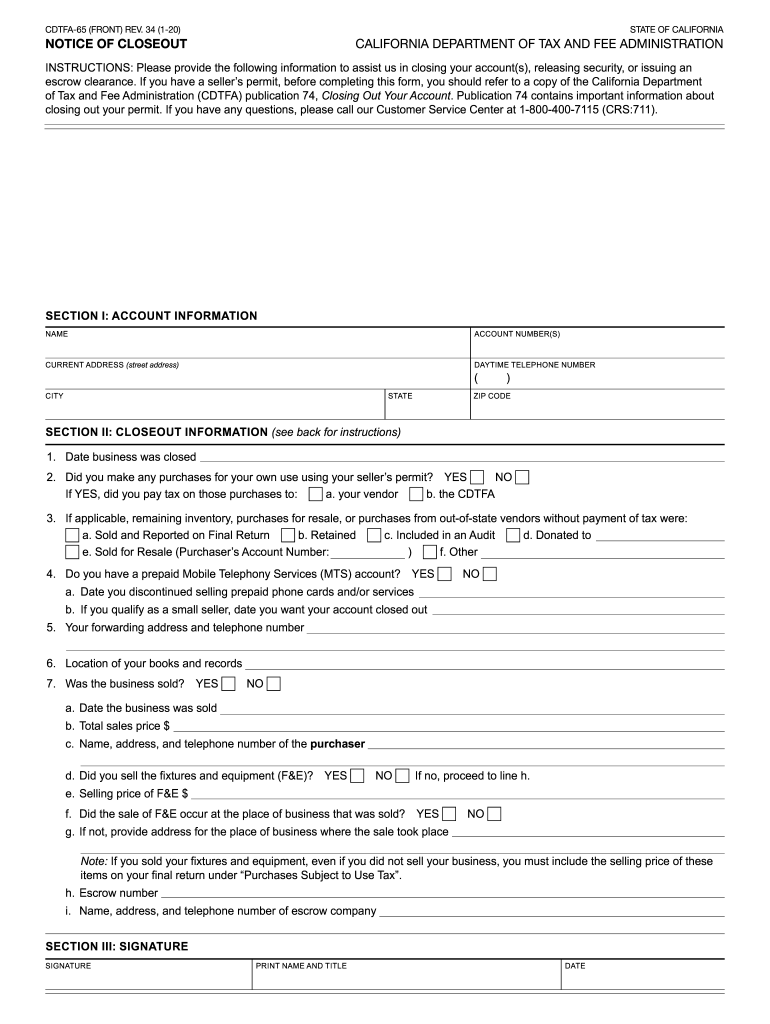
  2. Begin by filling out Section I: Account Information. Enter your name, account number(s), current address, and daytime telephone number. Ensure all details are accurate for smooth processing.
  3. Proceed to Section II: Closeout Information. Here, provide the date your business was closed and answer questions regarding purchases made with your seller’s permit. Be sure to indicate if you paid tax on those purchases.
  4. Continue through the section by detailing any remaining inventory or sales of fixtures and equipment. This information is crucial for finalizing your closeout.
  5. In Section III: Signature, sign and print your name along with your title and date to validate the form.
  6. Finally, review all sections for completeness before submitting the form along with any required documents to the CDTFA.

Start using our platform today to fill out your cdtfa check payment voucher form easily and for free!

See more cdtfa check payent voucher form versions

We've got more versions of the cdtfa check payent voucher form form. Select the right cdtfa check payent voucher form version from the list and start editing it straight away!
Versions Form popularity Fillable & printable
2020 4.8 Satisfied (58 Votes)
2018 4.1 Satisfied (53 Votes)
2017 4 Satisfied (50 Votes)
be ready to get more

Complete this form in 5 minutes or less

Get form

Got questions?

We have answers to the most popular questions from our customers. If you can't find an answer to your question, please contact us.
Contact us
If you mail your tax payment: Make your check, money order or cashiers check payable to U.S. Treasury. Please note: Do not send cash through the mail. If you prefer cash payment, see More information.
Make your check or money order payable to the California Department of Tax and Fee Administration. Write your CDTFA account number on your check or money order. Hand delivery of a check or money order is acceptable at any public field office during normal business hours.
You can make online payments 24 hours a day, 7 days a week up until 11:59 p.m. Pacific Time on the delinquency date. There is no cost to you for electronic check (eCheck) payments.
FTB offers a variety of payment options including direct pay from your bank account via our Web Pay service (free), online credit card payments (subject to fees), and payment plans for eligible taxpayers (subject to fees).
The main forms include: Resale Certificate (CDTFA-230): Allows businesses to purchase items for resale without paying sales tax. Exemption Certificate (CDTFA-101): Allows qualified entities to purchase items tax-free based on their exempt status.

Security and compliance

At DocHub, your data security is our priority. We follow HIPAA, SOC2, GDPR, and other standards, so you can work on your documents with confidence.

Learn more
ccpa2
pci-dss
gdpr-compliance
hipaa
soc-compliance
be ready to get more

Complete this form in 5 minutes or less

Get form

People also ask

When sending money by mail, use money orders as a safe alternative to cash and personal checks. U.S. Postal Service money orders are affordable, widely accepted, and never expire. Your money order receipt will help you track your payment and show proof of value in case the money order gets lost, stolen, or damaged.
Paying with a Check or Money Order Through the Mail or Online. Write the check or money order to the Franchise Tax Board. Make sure to note the tax year or tax period along with your Social Security Number, Individual tax ID number, or FTB ID number on the check.
Note: If you are calling with questions about your CDTFA account, taxes, or fees, for the quickest response please call us at 1-800-400-7115. Customer Service Representatives are available to assist you Monday through Friday (except on state holidays) from 7:30 a.m. to 5:00 p.m. (Pacific time).

cdtfa closeout form