




Here's how it works

01. Edit your ifta international fuel tax agreement online
Type text, add images, blackout confidential details, add comments, highlights and more.

02. Sign it in a few clicks
Draw your signature, type it, upload its image, or use your mobile device as a signature pad.

03. Share your form with others
Send international fuel tax agreement via email, link, or fax. You can also download it, export it or print it out.
How to use or fill out IFTA International Fuel Tax Agreement with our platform

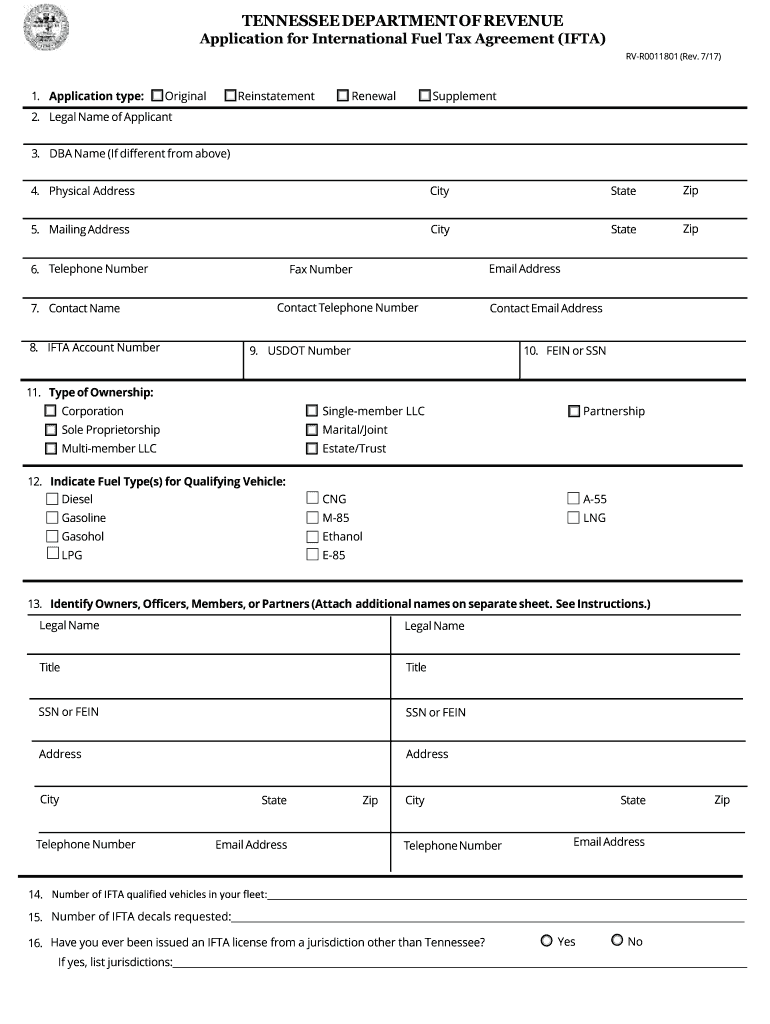
- Click ‘Get Form’ to open the IFTA application in the editor.
- Begin by selecting the application type: Original, Reinstatement, Renewal, or Supplement. This is crucial for processing your request correctly.
- Fill in your Legal Name and DBA Name (if applicable) along with your Physical Address, including City, State, and Zip code.
- Provide your Mailing Address details. Ensure that both addresses are accurate for correspondence purposes.
- Enter your Telephone Number and Contact Name. Include an Email Address and Fax Number if available for efficient communication.
- Input your IFTA Account Number and USDOT Number. If you have a FEIN or SSN, include that as well.
- Select the Type of Ownership from the provided options such as Corporation or Sole Proprietorship.
- Indicate the Fuel Type(s) for your qualifying vehicle by checking all that apply from the list provided.
- Identify Owners, Officers, Members, or Partners by filling in their Legal Names and Titles. Attach additional names on a separate sheet if necessary.
- Complete sections regarding the number of IFTA qualified vehicles and decals requested. Answer questions about previous IFTA licenses and bulk storage maintenance accurately.
- Finally, review all information for accuracy before signing and dating the application under penalties of perjury.
Start using our platform today to streamline your IFTA application process for free!
Fill out ifta international fuel tax agreement online
It's free
See more ifta international fuel tax agreement versions
We've got more versions of the ifta international fuel tax agreement form. Select the right ifta international fuel tax agreement version from the list and start editing it straight away!
| Versions | Form popularity | Fillable & printable |
|---|---|---|
| 2017 | 4.9 Satisfied (26 Votes) |
Security and compliance
At DocHub, your data security is our priority. We follow HIPAA, SOC2, GDPR, and other standards, so you can work on your documents with confidence.
Learn more


