




Here's how it works

01. Edit your dochub com fillable form online
Type text, add images, blackout confidential details, add comments, highlights and more.

02. Sign it in a few clicks
Draw your signature, type it, upload its image, or use your mobile device as a signature pad.

03. Share your form with others
Send texas comptroller form 14 317 via email, link, or fax. You can also download it, export it or print it out.
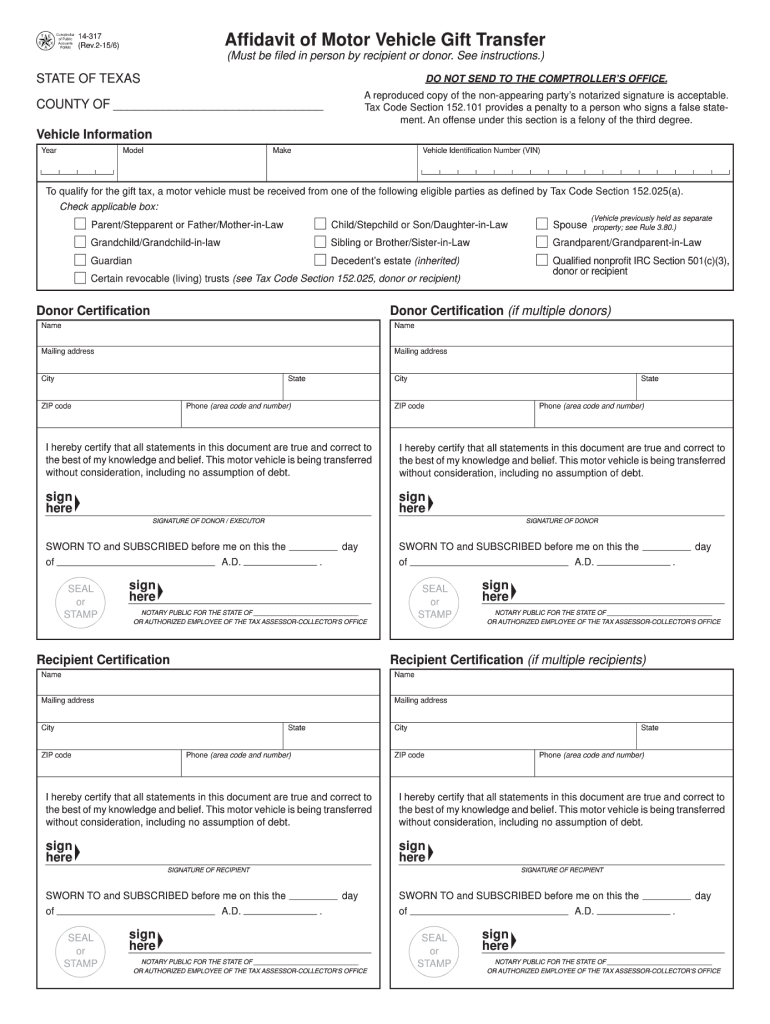
How to use or fill out vehicle gift with our platform

- Click ‘Get Form’ to open the vehicle gift document in the editor.
- Begin by entering the donor's information in the designated fields, including name, address, and contact details. This ensures that all parties are clearly identified.
- Next, fill in the recipient's information. Make sure to double-check spelling and accuracy to avoid any issues during the transfer process.
- In the vehicle details section, provide specific information about the vehicle being gifted, such as make, model, year, and VIN. This is crucial for proper documentation.
- Review all entered information for accuracy. Use our platform’s editing tools to make any necessary adjustments before finalizing your document.
- Once everything is complete, utilize our signing feature to add signatures from both parties electronically. This step is essential for legal validation of the gift.
Start using our platform today for free and simplify your vehicle gift process!
Fill out vehicle gift online
It's free
See more vehicle gift versions
We've got more versions of the vehicle gift form. Select the right vehicle gift version from the list and start editing it straight away!
Security and compliance
At DocHub, your data security is our priority. We follow HIPAA, SOC2, GDPR, and other standards, so you can work on your documents with confidence.
Learn more


Related forms
Tennessee uniform filing sheet
The document is a Uniform Facsimile Filing Cover Sheet for Tennessee courts, designed for submitting legal documents via ...
Change of occupancy addendum
This document is an Addendum to a lease agreement that allows for changes in occupancy by adding or removing residents. ...

Interview protocol template
The document is an Interview Protocol Form designed for a research project focused on understanding the learning experie ...

Pinellas county quit claim deed
The document provides detailed information about the quit claim deed process in Pinellas County, Florida, outlining its ...