
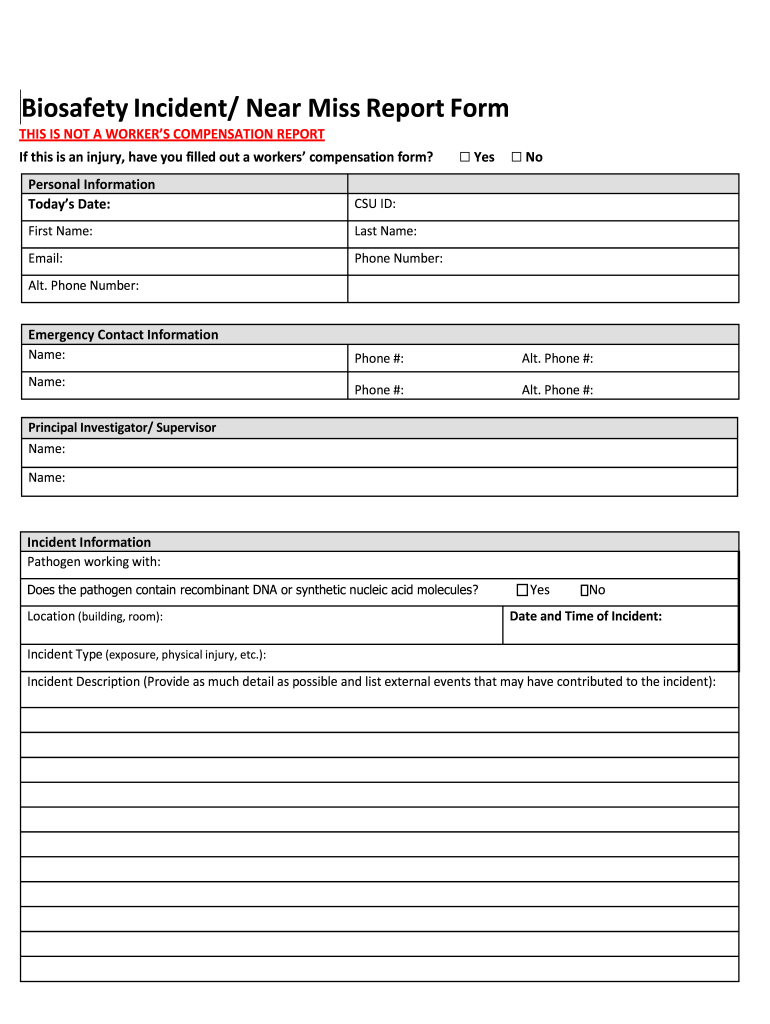







Definition and Purpose of the Biosafety Incident Report Form
The Biosafety Incident Report Form is a critical document used for reporting incidents or near misses related to exposure or injuries while handling pathogens. This form serves as an essential tool for capturing comprehensive details about the occurrence, including personal information and the nature of the incident. By systematically documenting these events, the form enables organizations to monitor biosafety risks, enhance safety protocols, and ensure compliance with health regulations.
How to Use the Biosafety Incident Report Form
The use of the Biosafety Incident Report Form involves various stakeholders ranging from individual researchers to safety officers. Here’s how to navigate the process:
- Complete Personal Information: Start by filling out personal details such as name, contact information, and position within the organization.
- Describe the Incident: Provide a detailed account of the incident, including the type of pathogen involved, the specific location where the event occurred, and a description of the event sequence.
- Specify PPE Utilized: Indicate the personal protective equipment used at the time of the incident to assess compliance with safety standards.
- Report Immediate Actions: Document any immediate actions taken to control or mitigate the incident, which assists in evaluating the effectiveness of emergency responses.
Obtaining the Biosafety Incident Report Form
Access to the Biosafety Incident Report Form can be achieved through several methods, ensuring broad availability for those who require it:
- Institutional Access: Many organizations provide access via their internal networks or safety departments.
- Online Resources: Some institutions may offer downloadable versions from their websites, allowing users to print or fill them out digitally.
- Direct Request: For specialized or updated versions, contacting a biosafety officer or institutional safety committee might be necessary.
Key Steps to Complete the Biosafety Incident Report Form
Completing this form requires careful attention to detail to ensure accurate reporting. Follow these steps:
- Gather Needed Information: Collect all relevant details before starting, including any witness statements and supplementary evidence.
- Fill Out Each Section Precisely: Accuracy is paramount, especially when detailing pathogen types and describing the incident.
- Review for Completeness: Double-check each section to ensure all fields are filled out.
- Submit to the Correct Authority: Typically, this involves sending the form to a designated safety officer or committee for review and action.
Importance of the Biosafety Incident Report Form
Documenting incidents through the Biosafety Incident Report Form is crucial for various reasons:
- Safety Enhancement: It identifies potential risks and weaknesses in current safety protocols, enabling improvements.
- Regulatory Compliance: Ensures adherence to biosafety regulations and standards.
- Organizational Learning: Provides an opportunity for learning and instituting preventive measures to avoid future incidents.
Typical Users of the Biosafety Incident Report Form
This form is predominantly used by individuals and entities involved in laboratory work or environments where pathogens are present:
- Research Scientists and Technicians: Frequently handle pathogens and therefore are primary users.
- Biosafety Professionals: Use this form to monitor incidents and develop safety strategies.
- Institutional Administrators: Utilize the documented data to ensure compliance and safety improvements.
Essential Terms Related to the Biosafety Incident Report Form
Understanding the terminology associated with this form enhances clarity:
- Pathogen: Any microorganism, virus, or infectious agent that can cause disease.
- Biosafety: The procedures and policies implemented to prevent exposure to pathogens.
- Near Miss: An event that could have resulted in exposure or injury but did not.
Legal Considerations for Using the Biosafety Incident Report Form
Legal adherence is fundamental to ensure proper handling and compliance:
- Privacy and Confidentiality: Maintain strict confidentiality of personal data in accordance with privacy laws.
- Document Retention: Follow institutional and legal guidelines for retaining and storing forms.
- Reporting Obligations: Ensure timely submission of the form as required by legal standards and institutional policies.
Key Elements of the Biosafety Incident Report Form
The form comprises several sections, each integral to comprehensive reporting:
- Incident Details: Covers the type, date, and description of the incident.
- Pathogen Information: Identifies the biological agents involved.
- Actions Taken: Documents immediate and follow-up actions to address the incident.
- Witness Statements: Optional but provides additional perspectives on the event.
By following these guidelines, users can effectively utilize the Biosafety Incident Report Form to enhance biosafety protocols and maintain a safe working environment.




