




01. Edit your form online
Type text, add images, blackout confidential details, add comments, highlights and more.

Type text, add images, blackout confidential details, add comments, highlights and more.

Draw your signature, type it, upload its image, or use your mobile device as a signature pad.

Send it via email, link, or fax. You can also download it, export it or print it out.
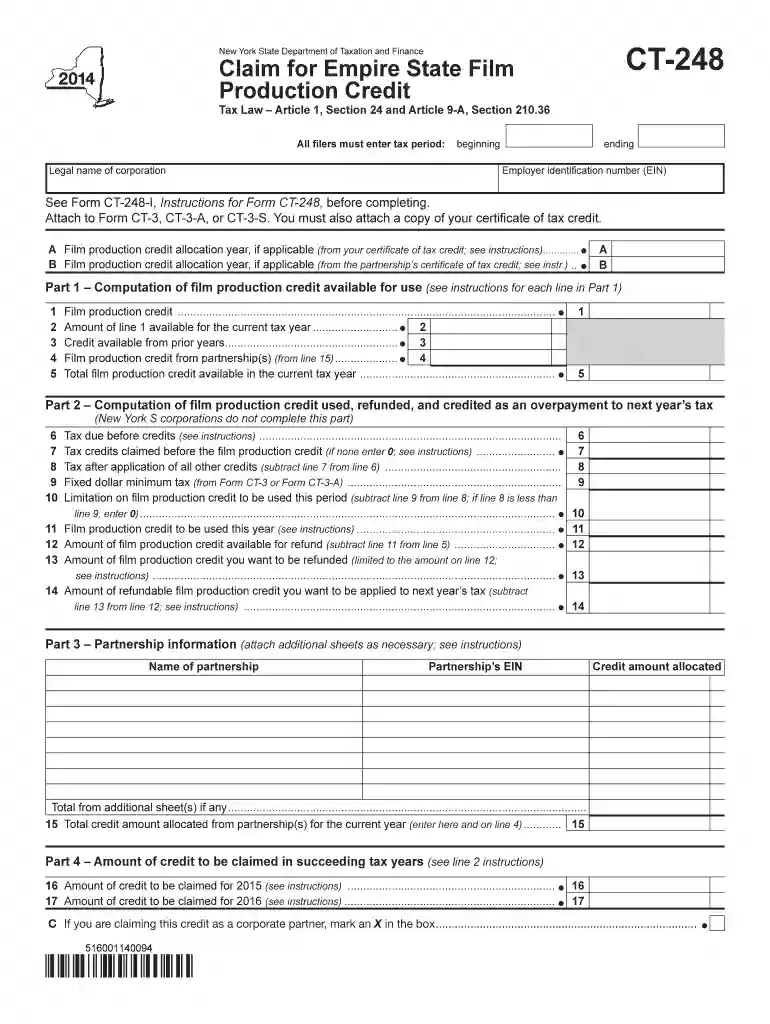
The CT Form is a specific document issued by the New York State Department of Taxation and Finance. Its primary purpose is to facilitate the claiming of the Empire State Film Production Credit, a tax incentive designed to support and encourage film production activities within New York State. This form requires detailed information from applicants, including their tax periods, legal business names, and employer identification numbers. Additionally, it outlines the steps necessary for applicants to calculate the film production credits they are eligible to claim, including the computation of available credits and specifics around usage, refunds, and partnerships associated with the production activities.
Using the CT Form involves several carefully outlined steps to ensure accurate submission and to maximize the benefit of the Empire State Film Production Credit.
Gather Required Information: Ensure all necessary business information, such as tax periods, legal names, and employer identification numbers, are collected.
Complete Credit Calculations: Utilize the provided sections to calculate the potential credits, addressing each part to document qualifying expenses related to film production activities.
Detail Credit Usage and Refunds: Clearly articulate how generated credits will be used within your business, including any requests for refunds or future credit carryovers.
To accurately and thoroughly complete the CT Form, familiarize yourself with the following critical sections:
Applicant Information: Includes basic information such as tax periods, legal names, and employer identification numbers.
Credit Computation: Sections dedicated to calculating the quantity of credits available based on eligible film production expenses.
Credit Utilization: Details outlining how the credits will be employed within the taxpayer's financial plans.
Partnership Involvement: Information documenting any partnerships that are part of the film production credit claim.
Download the Form: Obtain the CT Form from the New York State Department of Taxation and Finance website or contact them for a physical copy if necessary.
Review Form Instructions: Read through all instructions thoroughly; they provide crucial details about filling out each section accurately.
Enter Detailed Financials: For each section, input detailed financial information pertaining to film production costs, credits computation, and usage expectations.
Verify All Entries: Before submission, cross-verify every entry to reduce the chances of errors that could delay processing or eligibility.
Submit the Form: Depending on preference or requirement, submit the form either online, through mail, or in-person to the Department of Taxation and Finance.
This form is primarily used by production companies operating in New York State that engage in film production activities. Such entities are looking to take advantage of tax credits offered for expenses incurred during film production. This includes:
Motion Picture Production Companies: Those involved in the production of feature films, television series, and other large-scale visual media.
Independent Producers: Small and medium enterprises working on independent film projects within New York State.


The legal use of the CT Form is strictly for the submission of accurate and verifiable claims for film production credits under New York State law. Misrepresentation or false claims can result in penalties, including fines or disqualification from credits. It’s crucial for taxpayers to maintain documented proof of production expenses and use the credit for its intended purpose, explicitly following New York State guidelines.
Certain terms play a pivotal role in understanding and completing the CT Form:
Empire State Film Production Credit: A tax credit incentive offered to encourage film production within New York State.
Tax Period: The accounting period for which the tax credit is calculated.
Employer Identification Number (EIN): A unique number assigned to businesses for tax purposes.
Credit Carryover: The ability to apply unused credit amounts against future tax obligations.
Timely filing of the CT Form is crucial for receiving credits. Ensure you are familiar with all deadlines:
Annual Filing Deadline: The specific deadline by which the CT Form must be submitted can vary, so always check the New York State Department of Taxation and Finance’s official schedule for that particular year.
Extension Requests: If an extension is necessary, ensure to file the request before the standard deadline to avoid penalties.
Each of these sections provides a comprehensive overview, equipping users with the necessary knowledge to effectively navigate and complete the CT Form process, thereby unlocking the benefits associated with the Empire State Film Production Credit.
We've got more versions of the ct 248 2014 form form. Select the right ct 248 2014 form version from the list and start editing it straight away!
| Versions | Form popularity | Fillable & printable |
|---|---|---|
| 2025 | 4.1 Satisfied (40 Votes) | |
| 2024 | 4.7 Satisfied (30 Votes) | |
| 2023 | 4.5 Satisfied (37 Votes) | |
| 2022 | 4.5 Satisfied (58 Votes) | |
| 2021 | 4.8 Satisfied (88 Votes) | |
| 2020 | 3.9 Satisfied (53 Votes) | |
| 2019 | 4.4 Satisfied (137 Votes) | |
| 2018 | 4.3 Satisfied (39 Votes) | |
| 2017 | 4.3 Satisfied (31 Votes) | |
| 2015 | 4.3 Satisfied (95 Votes) | |
| 2014 | 4 Satisfied (27 Votes) | |
| 2013 | 4 Satisfied (34 Votes) | |
| 2012 | 4 Satisfied (53 Votes) |
At DocHub, your data security is our priority. We follow HIPAA, SOC2, GDPR, and other standards, so you can work on your documents with confidence.
Attach to Form CT-3, CT-3-A, or CT-3-S. You must also attach a copy of your certificate of tax credit. Part 1 Computation of film production credit available
This transmittal introduces Chapter 40, Hospital and Hospital Health Care Complex Cost Report,. Form CMS-2552-10, which contains instructions for the completion
Part-year residents and nonresidents do not qualify for the CT EITC and must file Form CT-1040NR/PY. Qualified taxpayers claim the CT EITC by completing


