







Definition and Purpose of the Kansas Business Tax Application Online 2014 Form
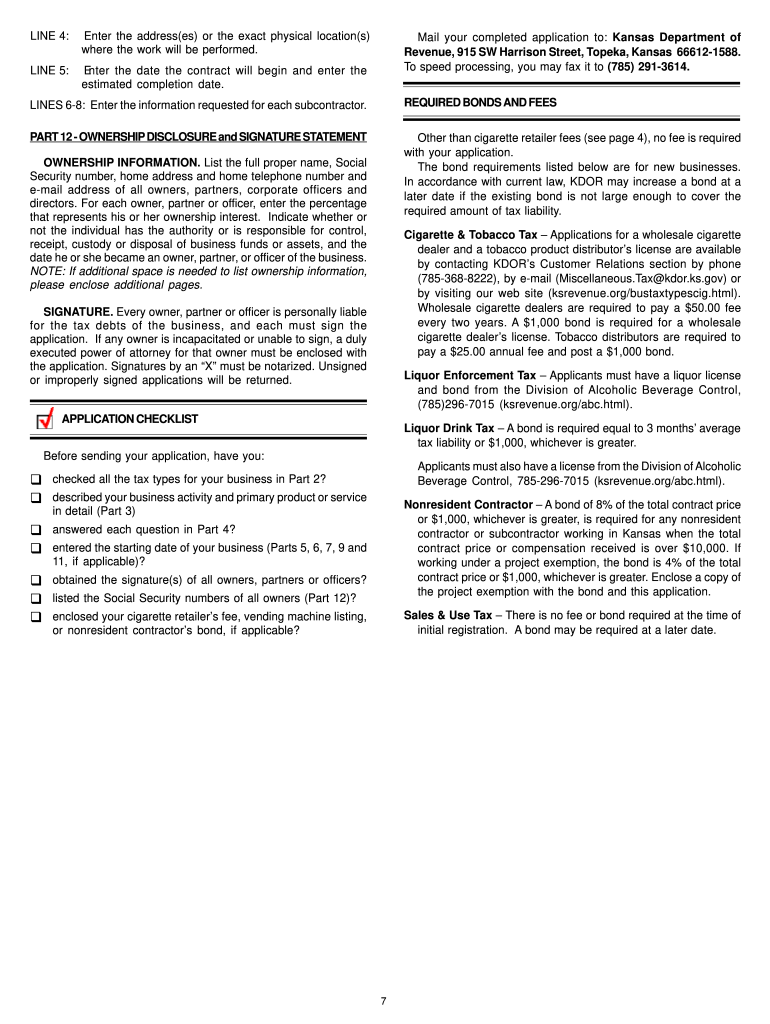
The Kansas Business Tax Application Online 2014 form is essential for business owners looking to register for state taxes in Kansas. This form serves as a starting point for establishing the necessary tax accounts, including sales tax, employer withholding tax, and other applicable state taxes. By completing this form, businesses ensure they are compliant with state tax requirements, which are crucial for legal and financial operations. Understanding the form's purpose helps businesses navigate the complexities of tax registrations and establishes a foundation for lawful business conduct in Kansas.
How to Obtain the Kansas Business Tax Application Online 2014 Form
Securing the Kansas Business Tax Application Online 2014 form is a straightforward process. It is available for download from the Kansas Department of Revenue’s website. Alternatively, businesses can access it through document management platforms such as DocHub, which offers editing and filing capabilities directly online. To initiate the process:
- Visit the official Kansas Department of Revenue website.
- Navigate to the business tax section.
- Download the specific form needed for your business type.
- Consider using platforms like DocHub for a streamlined digital experience.
This approach ensures you have the most current version, critical for compliance and accuracy.
Steps to Complete the Kansas Business Tax Application Online 2014 Form
Completing the Kansas Business Tax Application requires attention to detail. Follow these steps carefully:
-
Identify Your Business Structure:
- Determine whether your business is a sole proprietorship, partnership, LLC, or corporation, as each has different registration requirements.
-
Gather Required Information:
- Prepare necessary documentation including your federal employer identification number (FEIN), business address, contact details, and type of business activities.
-
Fill Out Basic Details:
- Input business name, address, and owner information. Ensure accuracy to avoid processing delays.
-
Specify Tax Types:
- Indicate which taxes you need to register for, such as sales tax or withholding tax.
-
Sign and Submit Form:
- Ensure that the form is signed appropriately. If submitting online, an electronic signature may be required.
-
Review and Submit:
- Double-check the form for errors before submission. Submit either online through the Kansas Department of Revenue portal or via mail.
Completing these steps ensures thorough and compliant submission, minimizing processing time and errors.
Required Documents for Submission
Preparing the necessary documentation beforehand is crucial for the smooth submission of the Kansas Business Tax Application Online 2014 form:
- Federal Employer Identification Number (FEIN): Required for all business types except sole proprietorships without employees.
- Business License or Articles of Incorporation: Proof of legal business formation in Kansas.
- Bank Account Details: Information relating to financial transactions relating to tax payments.
- Business Ownership and Board Information: Lists of owners or board members, applicable for corporations and LLCs.
These documents facilitate verification and approval of your tax application, providing a clear picture of business operations to the state authorities.
Key Elements of the Kansas Business Tax Application Online 2014 Form
Understanding the components of the Kansas Business Tax Application is essential for accurate completion:
- Business Identification Information: Includes name, address, and FEIN.
- Tax Types Enrollment: Specification of the tax account types such as sales tax or withholding tax.
- Ownership and Structure: Information about partners or shareholders depending on business structure.
- Business Activities and NAICS Code: Detailed description of the business activities and the appropriate industry classification.
These key elements form the core data points required by the state to process your tax application effectively.
Business Entity Types and Their Relevance
Different business structures need different registration processes and requirements while using the Kansas Business Tax Application 2014 form. Understanding these differences ensures compliance:
- Sole Proprietorships: Simple entry, fewer documentation requirements.
- Partnerships and LLCs: Require listing partners or members, may need additional compliance documentation.
- Corporations: Detailed filing required, including shareholder information and corporate bylaws.
Each entity type has distinct tax implications, which affect how the application is processed and which additional forms or documentation are necessary.
Penalties for Non-Compliance
Failing to correctly file the Kansas Business Tax Application form or neglecting required tax registrations can result in significant penalties:
- Financial Fines: Vary depending on the severity and duration of non-compliance.
- Interest on Unpaid Taxes: Additional charges accruing on late payments.
- Legal Action: In severe cases, the state may take legal measures against the business.
Understanding these penalties emphasizes the importance of timely and accurate submission of the form.
Digital vs. Paper Submission Methods
Choosing the right submission method for the Kansas Business Tax Application impacts processing time and convenience:
- Digital Submission: Offers faster processing, receipt confirmation, and easier access through platforms like DocHub.
- Paper Submission: Traditional option, which may result in longer processing times and potential for manual errors.
Digital methods generally provide more efficiency, particularly for businesses that value speed and technology integration in their workflow.




