




01. Edit your form online
Type text, add images, blackout confidential details, add comments, highlights and more.

Type text, add images, blackout confidential details, add comments, highlights and more.

Draw your signature, type it, upload its image, or use your mobile device as a signature pad.

Send it via email, link, or fax. You can also download it, export it or print it out.
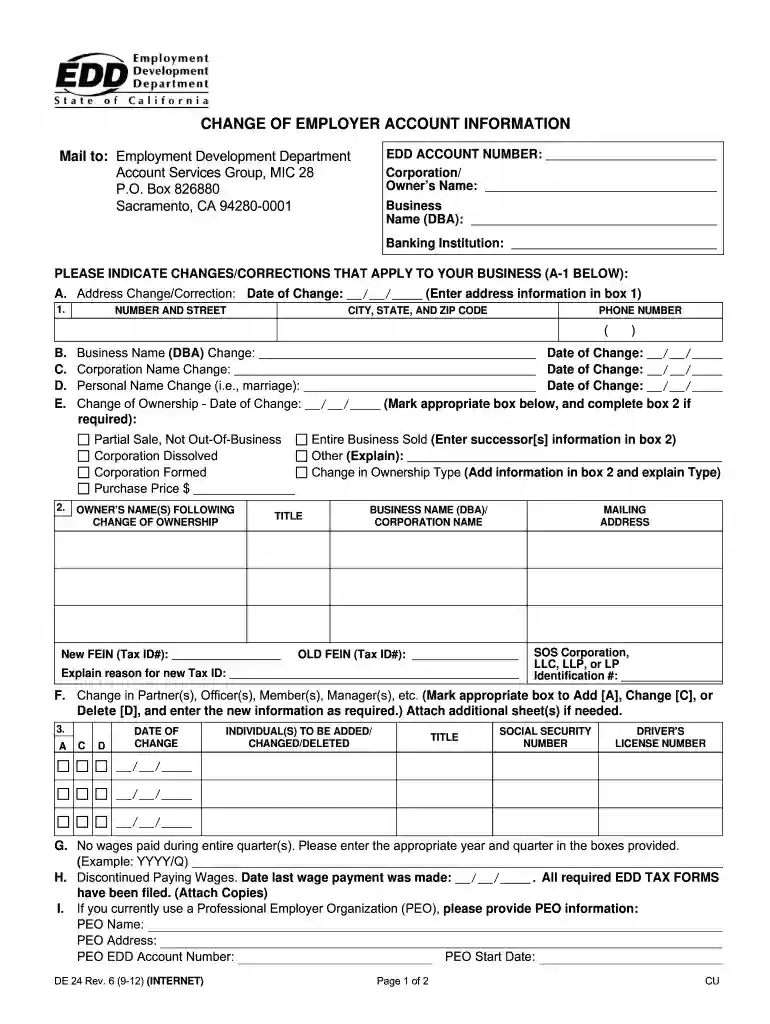
The "DE 24 Instructions 2011 Form" is specific guidance designed for managing changes related to employer accounts with the Employment Development Department (EDD) in California. It is essentially a detailed guide on how businesses can update critical information such as their business address, ownership, corporate structure, and other relevant employer data. These instructions facilitate the proper submission of updated business information, ensuring compliance with EDD’s statutory requirements. This form is integral for businesses to accurately report wage payments and declare any cessation of operations, thereby maintaining alignment with state regulations.
Understand the Form’s Layout: Familiarize yourself with the different sections of the DE 24 form. Each section is dedicated to specific changes such as business address updates, changes in ownership, or corporate structure modifications.
Gather Necessary Information: Collect all relevant business information. This includes your current employer account number, the new or updated details you wish to submit, and any supporting documentation required to verify these changes.
Complete Each Section with Accuracy: Follow the step-by-step instructions provided within the form to fill out each section accurately. Pay particular attention to the requirements for verifying changes, ensuring that all information is complete before submission.
Review Form Requirements: Begin by thoroughly reviewing the instructions to understand what specific details are needed for each type of update, be it an address change or a change in business ownership.
Fill Out Identification Details: Enter your employer identification number and other pertinent identification details accurately.
Update Necessary Sections: Depending on the nature of the change, fill out the corresponding section of the form. For example, use the designated part of the form for updating business addresses or ownership details.
Attach Supporting Documents: Include any necessary documentation that supports the changes made. This might include articles of incorporation for structural changes or proof of new ownership.
Sign and Submit: After completing all sections and double-checking for any errors, sign the form as required and submit it through the prescribed submission methods.
The DE 24 form is primarily used by California business entities that need to officially update their employer account information with the state’s Employment Development Department. This includes:


Compliance with the DE 24 Instructions 2011 Form is legally required for all businesses in California. This ensures that employer accounts with the EDD reflect correct and updated information, which is crucial for auditing, taxation, and employment records. Utilizing this form appropriately allows businesses to remain compliant with state guidelines and avoid potential penalties or notices for outdated or incorrect information.
To complete the DE 24 Instructions 2011 form thoroughly and correctly, certain documents must accompany your submission:
The DE 24 form can be submitted through various channels for efficiency:
The DE 24 form is available in both digital and paper formats, allowing flexibility in submissions:
We've got more versions of the de24 instructions 2011 form form. Select the right de24 instructions 2011 form version from the list and start editing it straight away!
At DocHub, your data security is our priority. We follow HIPAA, SOC2, GDPR, and other standards, so you can work on your documents with confidence.


