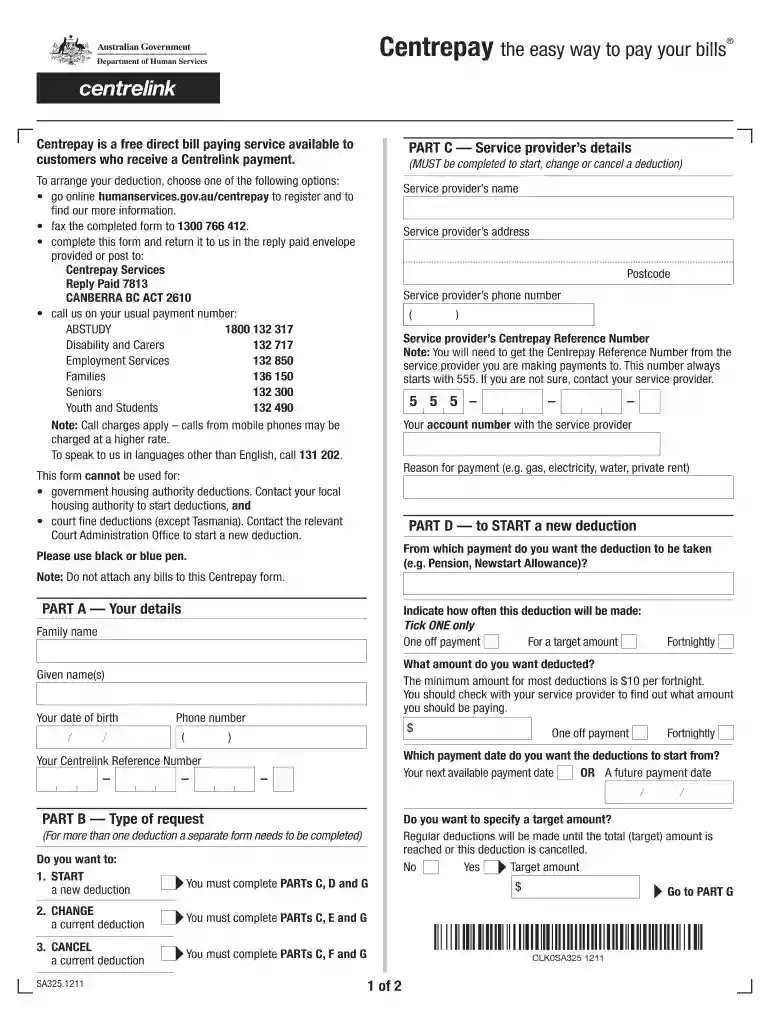
Instructions Centrepay the easy way to pay your bills Centrepay is a free direct bill paying service 2026

Get Form
Instructions Centrepay the easy way to pay your bills Centrepay is a free direct bill paying service Preview on Page 1

Here's how it works

01. Edit your form online
Type text, add images, blackout confidential details, add comments, highlights and more.

02. Sign it in a few clicks
Draw your signature, type it, upload its image, or use your mobile device as a signature pad.

03. Share your form with others
Send it via email, link, or fax. You can also download it, export it or print it out.

Definition & Meaning

Centrepay is a free service that allows individuals receiving Centrelink benefits to manage their bill payments directly. This system facilitates seamless deductions from Centrelink payments to pay various service providers, ensuring bills are settled on time without additional effort from the user. The primary goal is to provide a convenient and efficient way for recipients to handle recurring expenses, such as utility bills or rent.

How to Use Centrepay for Bill Payments

To use Centrepay, eligible users must first authorize deductions by providing essential details to Centrelink. This process typically involves identifying the service providers to be paid and specifying the amount to be deducted from each Centrelink payment cycle. Users can initiate, adjust, or cancel these deductions to align with changes in service providers or personal financial circumstances. This flexibility ensures that payments are tailored to individual needs.

  1. Identify eligible bills: Confirm which of your regular expenses can be paid via Centrepay, focusing on essential services.
  2. Set up deductions: Provide Centrelink with necessary information, such as your customer reference number with service providers and desired deduction amounts.
  3. Monitor and adjust: Regularly review your deductions to ensure they remain aligned with your financial situation, making modifications as necessary.

Steps to Complete Instructions: Centrepay

Completing the Centrepay agreement is a straightforward process once you have all necessary information:

  1. Gather required details: Before you begin, collect information regarding your Centrelink reference number, the service provider's details, and desired payment amounts.
  2. Access Centrelink services: Log into your Centrelink account online or visit a local Centrelink office to initiate the setup process.
  3. Fill the Centrepay form: Provide all gathered information to authorize deductions. Ensure accuracy to avoid delays or errors in processing.
  4. Confirmation: After submission, wait for Centrelink to confirm that your deductions are in place. Keep track of this confirmation for your records.

Key Elements of Centrepay Instructions

Effective use of Centrepay hinges on understanding its essential components:

  • Personal Details: Includes Centrelink and service provider reference numbers.
  • Payment Information: Details of how much you want deducted and the frequency of these deductions.
  • Authorization: Formal consent that allows Centrelink to make payments on your behalf from your income support payments.

Why Use Centrepay?

Centrepay offers several advantages for Centrelink beneficiaries:

  • Financial Management: Automates bill payments, helping prevent late fees and ensuring critical services remain uninterrupted.
  • Flexibility: Users can adjust payment amounts or cancel deductions if necessary, providing control over financial commitments.
  • Security: Payments are made directly to service providers, reducing the risk of missed payments and associated penalties.

Important Terms Related to Centrepay

Understanding the terminology in Centrepay documentation is crucial:

  • Deduction Amount: The specific sum you authorize Centrelink to pay your service provider each cycle.
  • Service Provider: Companies or entities, such as utility companies or landlords, to whom payments are made.
  • Centrelink Reference Number: A unique identifier for each Centrelink recipient, necessary for setting up Centrepay deductions.

Legal Use of Centrepay

Centrepay is governed by Australian law, ensuring that deductions are only made with explicit consent from the Centrelink recipient. Users have the right to:

  • Modify or cancel deductions at any time.
  • Receive transparent communication regarding their Centrepay transactions.
  • File complaints if they encounter unauthorized deductions or errors in processing.

Examples of Using Centrepay

Practical situations where Centrepay proves beneficial include:

  • Utility Bills: Deducting regular payments to cover water, electricity, or gas services.
  • Rent Payments: Ensuring weekly or monthly rent is paid directly to the landlord, reducing risks of eviction due to late payments.
  • School Fees: Allocating funds from Centrelink payments for educational expenses, supporting continuity in children's education.

These examples illustrate the practical utility of Centrepay in everyday financial management for individuals relying on Centrelink assistance.

See more Instructions Centrepay the easy way to pay your bills Centrepay is a free direct bill paying service versions

We've got more versions of the Instructions Centrepay the easy way to pay your bills Centrepay is a free direct bill paying service form. Select the right Instructions Centrepay the easy way to pay your bills Centrepay is a free direct bill paying service version from the list and start editing it straight away!
Versions Form popularity Fillable & printable
2016 4.5 Satisfied (61 Votes)
2014 4.7 Satisfied (43 Votes)
2012 4 Satisfied (20 Votes)
be ready to get more

Complete this form in 5 minutes or less

Get form

Got questions?

We have answers to the most popular questions from our customers. If you can't find an answer to your question, please contact us.
Contact us
If you want to claim a payment or concession, you need a Centrelink Customer Reference Number (CRN) before you can link Centrelink. You can get a CRN by proving who you are with Centrelink. To prove your identity online for Centrelink, you will need to either: enter details from your identity documents; or.
The page layout will look different if youre using a mobile device. Step 1: get started. Sign in to myGov and select Centrelink. Step 2: add a new Centrepay deduction. Step 3: choose a service provider. Step 4: enter the details of your deduction. Step 5: review and submit. Step 6: sign out.
The Core Problem - Inappropriate Access The most worrying issue is inappropriate access to the Centrepay system by certain types of businesses. Some businesses given access sell over-priced or unsafe products and in some cases, exploit consumers.
Centrepay is a voluntary service which is free for Centrelink customers. You can use Centrepay to arrange regular deductions from your Centrelink payment. How to use it. You can use the Centrepay bill paying service to pay for goods and services from registered businesses.
Can you change your Centrepay deductions? Yes, you can change, suspend or cancel your deductions at any time online at humanservices.gov.au/onlineservices, by calling Centrelink completing a Centrepay deduction from at a Centrelink Service Centre.

Security and compliance

At DocHub, your data security is our priority. We follow HIPAA, SOC2, GDPR, and other standards, so you can work on your documents with confidence.

Learn more
ccpa2
pci-dss
gdpr-compliance
hipaa
soc-compliance

People also ask

Setting up deductions by asking the business you want to pay to set it up for you. using the myGov mobile app on your mobile device. using the Express Plus Centrelink mobile app on your mobile device. by calling us on your regular payment line. at a service centre with help from our staff.
There is a $10 minimum amount for each Centrepay deduction.

Related links