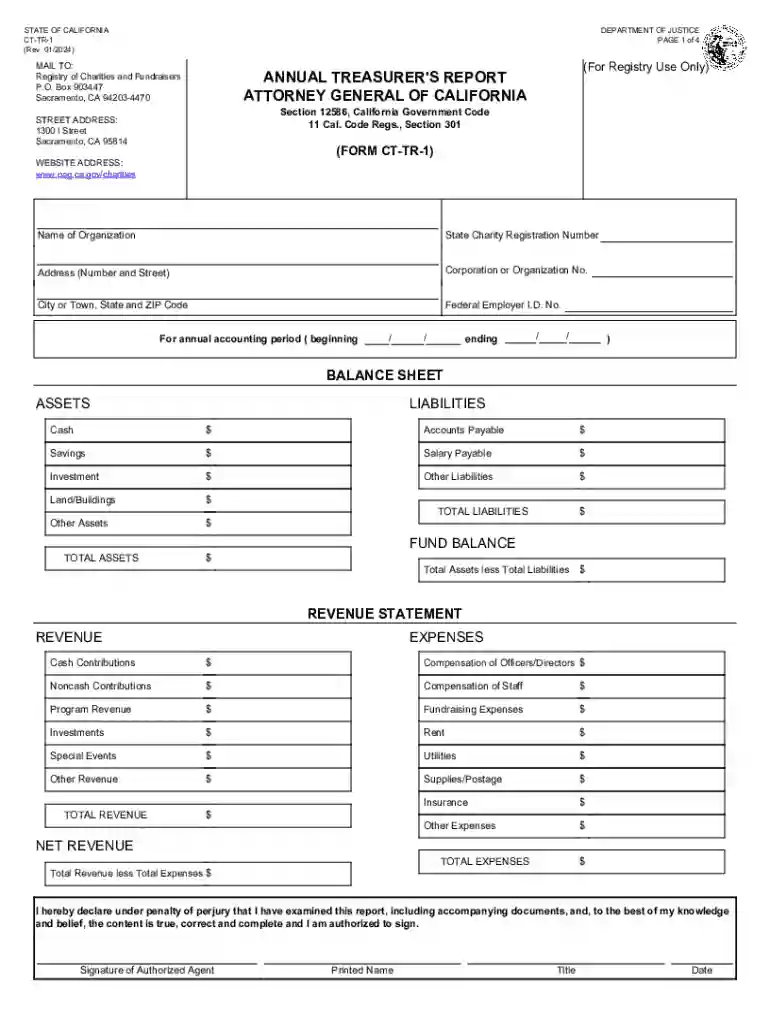
ANNUAL TREASURER'S REPORT ATTORNEY GENERAL OF 2026

Get Form
ANNUAL TREASURER'S REPORT ATTORNEY GENERAL OF Preview on Page 1

Here's how it works

01. Edit your form online
Type text, add images, blackout confidential details, add comments, highlights and more.

02. Sign it in a few clicks
Draw your signature, type it, upload its image, or use your mobile device as a signature pad.

03. Share your form with others
Send it via email, link, or fax. You can also download it, export it or print it out.

Definition & Meaning

The Annual Treasurer's Report, officially known as Form CT-TR-1, is a mandatory financial document that charitable organizations in California with total revenues under $50,000 must file with the Attorney General's Office. This report is required by the California Department of Justice to ensure transparency and accountability in the financial operations of smaller charities. The form captures various financial details, helping maintain regulatory compliance and support the state's oversight of nonprofit activities.

Components of Form CT-TR-1

  • Balance Sheet: Outlines the organization's financial position, detailing assets, liabilities, and net assets.
  • Revenue Statement: Provides an overview of income sources and expenses, helping to identify financial health and sustainability.
  • Privacy Notices: Information on the collection and use of personal data.
  • Exemptions: Criteria and details about who may be exempt from filing requirements.

How to Use the Annual Treasurer's Report

Using Form CT-TR-1 involves compiling comprehensive financial data to provide a complete picture of the nonprofit's fiscal activities for the specified period. Ensure all figures are accurate and reflect the organization's financial practices.

Steps for Accurate Report Use

  1. Gather Financial Records: Collect balance sheets, revenue statements, and any pertinent financial documents.
  2. Complete Required Fields: Fill in the form accurately, ensuring that all financial data is correct.
  3. Review for Errors: Check for any discrepancies or errors in reported data.
  4. File Promptly: Submit by the designated deadline to avoid penalties.

Steps to Complete the Form

To complete the Annual Treasurer’s Report efficiently, follow these step-by-step instructions:

  1. Download the Form: Obtain the latest version of Form CT-TR-1 from the California Attorney General's website.
  2. Enter Financial Information: Input data from your balance sheet and revenue statement.
  3. Detail Revenue Sources: Clearly list income sources and amounts.
  4. Review and Validate Entries: Ensure all entries are correct and consistent with supporting documents.
  5. Sign and Date: The treasurer or authorized official must sign.
  6. Submit: Use the designated submission method to file the report.

Filing Deadlines / Important Dates

Meeting filing deadlines is crucial to ensure compliance:

  • Annual Deadline: Typically, the report is due four months and fifteen days after the close of the organization’s fiscal year.
  • Extensions: Request an extension if necessary before the original deadline.
  • Penalties: Failure to file on time could lead to fines or other repercussions.

Who Typically Uses the Annual Treasurer's Report

This form is primarily used by small charitable organizations operating within California that have total revenues of under $50,000. It is an essential tool for:


  • Nonprofit Treasurers: Responsible for preparing and filing the report to maintain compliance.
  • Accountants: Assisting charities in ensuring accuracy in financial reporting.
  • Regulatory Bodies: Verifying financial transparency and accountability in the nonprofit sector.
decoration image ratings of Dochub

Legal Use of the Annual Treasurer's Report

Form CT-TR-1 serves as a legal document to monitor financial integrity. It ensures organizations adhere to state laws regulating nonprofit operations and maintain eligibility for certain benefits and exemptions.

Compliance and Regulations

  • Regulatory Adherence: Ensures compliance with California's statutory mandates for financial reporting.
  • Exemption Verification: Used to verify eligibility for exemptions based on financial status.

Important Terms Related to the Report

Understanding the terminology in the report is crucial:

  • Total Revenue: All income received from various sources.
  • Net Assets: Residual interest in the organization's assets after liabilities are deducted.
  • Fixed Assets: Long-term tangible assets such as property.

Key Elements of the Form

These elements are critical in providing a complete and accurate report:

  • Statement of Financial Position: Summarizes the organization's financial posture.
  • Income Details: Breakdown of charitable contributions, grants, and other income sources.
  • Expenditure Report: Detailed account of operating expenses and program expenditures.

Required Documents

Ensure you have these necessary documents before beginning:

  • Balance Sheets: Financial statement listing the charity's assets and liabilities.
  • Revenue and Expense Reports: Outline income sources and expenditures over the fiscal year.
  • Previous Year's Report: Reference for consistency and accuracy in reporting.

Penalties for Non-Compliance

Failing to file or filing inaccurately can incur penalties which may include:

  • Fines: Monetary penalties enforced by the state.
  • Loss of Good Standing: Potential removal from state-charity registries.
  • Operational Risks: Jeopardizing public trust and funding opportunities.
be ready to get more

Complete this form in 5 minutes or less

Get form

Got questions?

We have answers to the most popular questions from our customers. If you can't find an answer to your question, please contact us.
Contact us
Every charitable nonprofit corporation, unincorporated association or trustee holding assets for charitable purposes that is required to register with the Attorney Generals Office is also required to annually file Form RRF-1 regardless of whether the corporation files Form 990s annually or is on extended reporting.
Basics of a Treasurer Report for Nonprofits The organizations cash balance at the beginning of the reporting period. The revenue the nonprofit brought in during the reporting period. The expenses the organization incurred during the reporting period. The nonprofits cash balance at the end of the reporting period.
Every charitable corporation, unincorporated association, charitable trustee and other legal entities holding property for charitable purposes, must file with the Attorney General an initial registration form and other documents required by law.
Extensions of time for filing Form RRF-1 will be allowed if an organization has received an extension from the Internal Revenue Service for filing the IRS Form 990, 990-PF, 990- EZ, or 1120.
WHO MUST FILE FORM CT-TR-1? Charitable organizations whose total revenue for the fiscal year is under $50,000 must file Form CT-TR-1 and RRF-1 with the Attorney Generals Office. Private foundations are not required to file Form CT-TR-1 and instead must file IRS Form 990-PF with the RRF-1.

Security and compliance

At DocHub, your data security is our priority. We follow HIPAA, SOC2, GDPR, and other standards, so you can work on your documents with confidence.

Learn more
ccpa2
pci-dss
gdpr-compliance
hipaa
soc-compliance
be ready to get more

Complete this form in 5 minutes or less

Get form

People also ask

All registrants have a renewal fee based on total revenue. Remember to file Form RRF-1 with either Form CT-TR-1 or IRS Form 990(EZ/PF). Initial Registration fee required from charity registration applicants on Form CT-1 updated to $50. Raffle Registration fee is updated on Form CT-NRP-1 to $30.

Related links