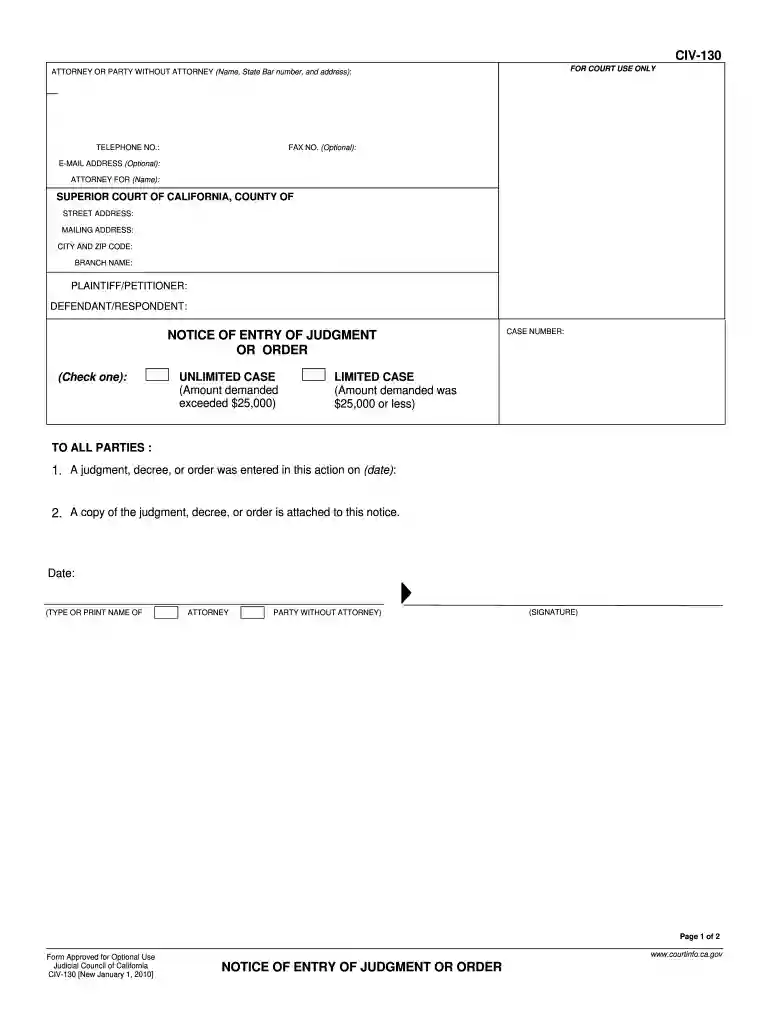
Civ 130 form 2026

Get Form
notice of entry of judgment Preview on Page 1

Here's how it works

01. Edit your notice of entry of judgment online
Type text, add images, blackout confidential details, add comments, highlights and more.

02. Sign it in a few clicks
Draw your signature, type it, upload its image, or use your mobile device as a signature pad.

03. Share your form with others
Send notice of entry of judgment sample via email, link, or fax. You can also download it, export it or print it out.

How to use or fill out civ 130 form with our platform

Form edit decoration
9.5
Ease of Setup
DocHub User Ratings on G2
9.0
Ease of Use
DocHub User Ratings on G2
  1. Click ‘Get Form’ to open the CIV-130 in the editor.
  2. Begin by filling in your details as the attorney or party without an attorney. Include your name, State Bar number, address, telephone number, and email address if applicable.
  3. Next, specify the court information including the Superior Court of California, county, street address, mailing address, city, and zip code.
  4. Indicate whether you are the plaintiff/petitioner or defendant/respondent by filling in the respective fields.
  5. Select whether this is an unlimited case (amount demanded exceeds $25,000) or a limited case (amount demanded is $25,000 or less) by checking the appropriate box.
  6. Enter the date when the judgment or order was entered and attach a copy of it to this notice.
  7. Complete the proof of service section by providing details about how and when you served the notice to all parties involved.

Start using our platform today for free to streamline your document editing and form completion!

See more civ 130 form versions

We've got more versions of the civ 130 form form. Select the right civ 130 form version from the list and start editing it straight away!
Versions Form popularity Fillable & printable
2024 4.9 Satisfied (30 Votes)
2010 4.9 Satisfied (43 Votes)
be ready to get more

Complete this form in 5 minutes or less

Get form

Got questions?

We have answers to the most popular questions from our customers. If you can't find an answer to your question, please contact us.
Contact us
(b) Notice of entry of judgment Promptly upon entry of the award as a judgment, the clerk must serve notice of entry of judgment on all parties who have appeared in the case and must execute a certificate of service and place it in the courts file in the case. (Subd (b) amended effective January 1, 2016.)
Notice of Entry of Judgment or Order (CIV-130) Tells the parties that a judgment has been entered in a case. Service of this notice sets the start date of important deadlines regarding the ability to set-aside or challenge the judgment.
Appearance, Stipulations, and Waivers (Family LawUniform ParentageCustody and Support) (FL-130) Tell the court that you and your spouse or domestic partner want the court to approve your written agreement or stipulated judgment without going to court for a trial.
When you need form CIV-130. In the legal process, the CIV-130 Notice of Entry of Judgment form is used after a judgment, decree, or order has been entered by the court in a civil case.
The purpose of filing a motion for final judgment is to request the court to issue a final decision or ruling on the case, bringing the litigation to a close. It allows the moving party to seek a final resolution and obtain a judgment in their favor or against the opposing party.

Security and compliance

At DocHub, your data security is our priority. We follow HIPAA, SOC2, GDPR, and other standards, so you can work on your documents with confidence.

Learn more
ccpa2
pci-dss
gdpr-compliance
hipaa
soc-compliance
be ready to get more

Complete this form in 5 minutes or less

Get form

People also ask

Request for Entry of Default (Application to Enter Default) (CIV-100) Asks the court to enter a default against the defendant or cross-defendant because they failed to file an Answer or other responsive document in the case. Can be used to ask for a default alone, or also a default judgment.

county cochise