




Here's how it works

01. Edit your abt 6001 online
Type text, add images, blackout confidential details, add comments, highlights and more.

02. Sign it in a few clicks
Draw your signature, type it, upload its image, or use your mobile device as a signature pad.

03. Share your form with others
Send form 6001 via email, link, or fax. You can also download it, export it or print it out.
How to use or fill out abt 6001 2012 form with our platform

- Click ‘Get Form’ to open the abt 6001 2012 form in the editor.
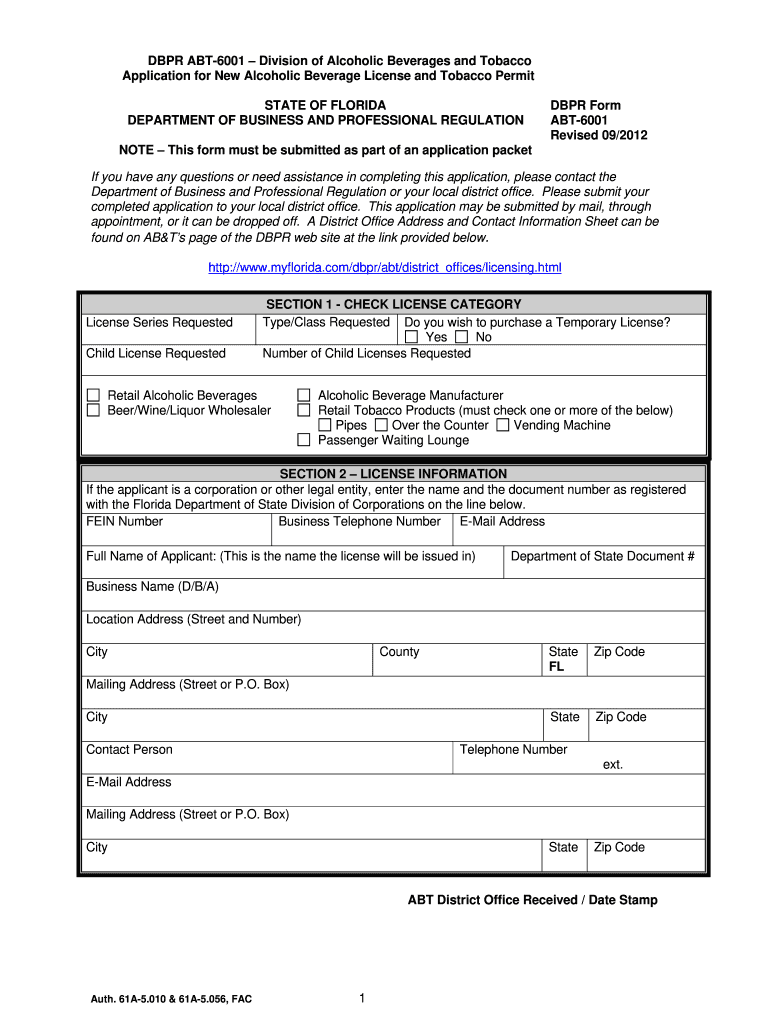
- Begin with Section 1, where you will check the license category. Select the type/class of license you are applying for and indicate if you wish to purchase a Temporary License.
- In Section 2, provide your business information. Enter the full name of the applicant, business name (D/B/A), location address, and contact details including email and phone number.
- Proceed to Section 3 to fill out related party personal information. This includes details about individuals connected with the business such as their names, addresses, and any relevant legal history.
- In Section 4, describe the premises to be licensed. Draw a floor plan of your establishment directly in the editor, ensuring all areas are clearly marked.
- Complete Sections 5 through 11 by providing necessary approvals from zoning authorities, health departments, and any contracts or agreements related to your business.
Start filling out your abt 6001 2012 form online for free today!
Fill out abt 6001 2012 form online
It's free
It's free
See more abt 6001 2012 form versions
We've got more versions of the abt 6001 2012 form form. Select the right abt 6001 2012 form version from the list and start editing it straight away!
Security and compliance
At DocHub, your data security is our priority. We follow HIPAA, SOC2, GDPR, and other standards, so you can work on your documents with confidence.
Learn more


