




Here's how it works



How to use or fill out State Sector Retirement Savings Scheme Members' Guide with our platform

- Click ‘Get Form’ to open the State Sector Retirement Savings Scheme Members' Guide in the editor.
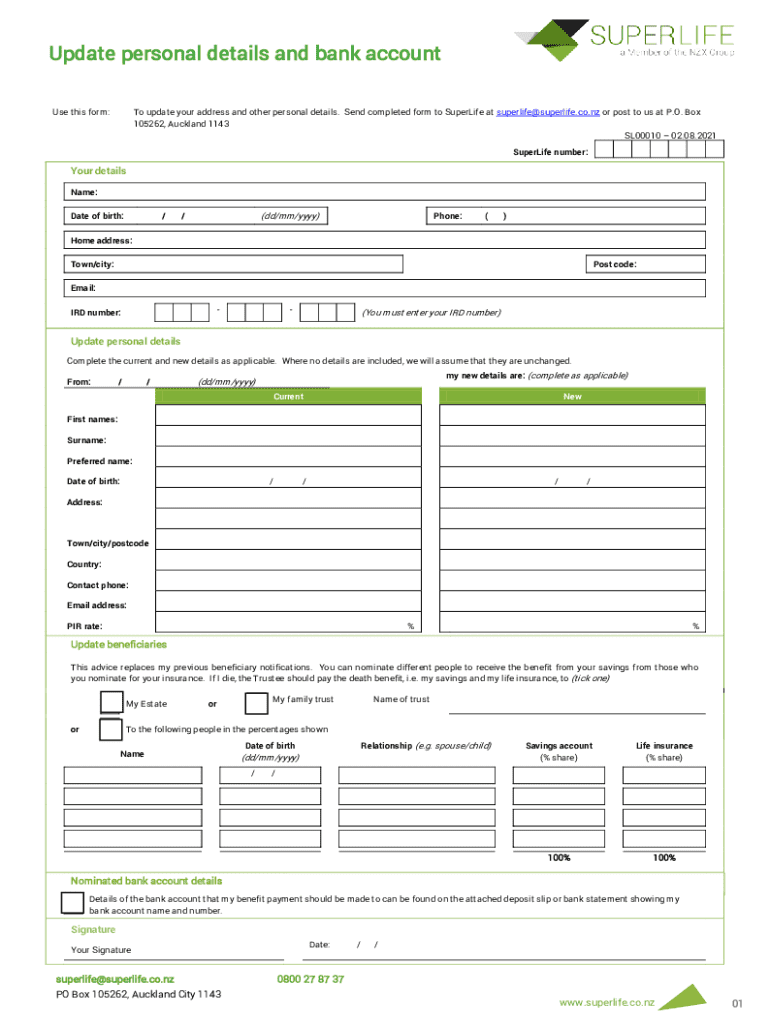
- Begin by entering your SuperLife number at the top of the form. This is essential for identifying your account.
- Fill in your personal details, including your name, date of birth, phone number, home address, town/city, postcode, email, and IRD number. Ensure all fields are completed accurately.
- In the 'Update personal details' section, provide both your current and new details where applicable. If certain details remain unchanged, leave those fields blank.
- For updating beneficiaries, indicate whether you want to allocate benefits to your estate or a family trust. Fill in the names and relationships of individuals you wish to nominate along with their respective shares.
- Complete the bank account details section by attaching a deposit slip or bank statement that shows your account name and number.
- Finally, sign and date the form before submitting it via email or post as indicated at the bottom of the document.
Start using our platform today to easily update your retirement savings information for free!
It's free
See more State Sector Retirement Savings Scheme Members' Guide versions
Got questions?
Can I complete and sign my State Sector Retirement Savings Scheme Members' Guide online?
Sure, and it’s really easy! DocHub is a web-based PDF editor with advanced document processing functions that allow you promptly edit your documents, fill out blank fields and insert new ones for others to fill out, and create electronic signatures in several ways. Add your State Sector Retirement Savings Scheme Members' Guide, provide information as requested, and choose how you want to eSign your template - by typing your name, drawing your signature, uploading its image, or using a QR code.
How do you edit State Sector Retirement Savings Scheme Members' Guide in Chrome?
If you are using Chrome, there are two simple ways to modify your State Sector Retirement Savings Scheme Members' Guide online. First, go to the DocHub site, add your document, and modify it utilizing our toolbar. You can also set up our Chrome extension and modify any document by dragging and dropping it in your browser window.
Who started KiwiSaver in NZ?
What is the New Zealand retirement scheme?
What is the New Zealand retirement Trust?
Security and compliance
At DocHub, your data security is our priority. We follow HIPAA, SOC2, GDPR, and other standards, so you can work on your documents with confidence.
Learn more


