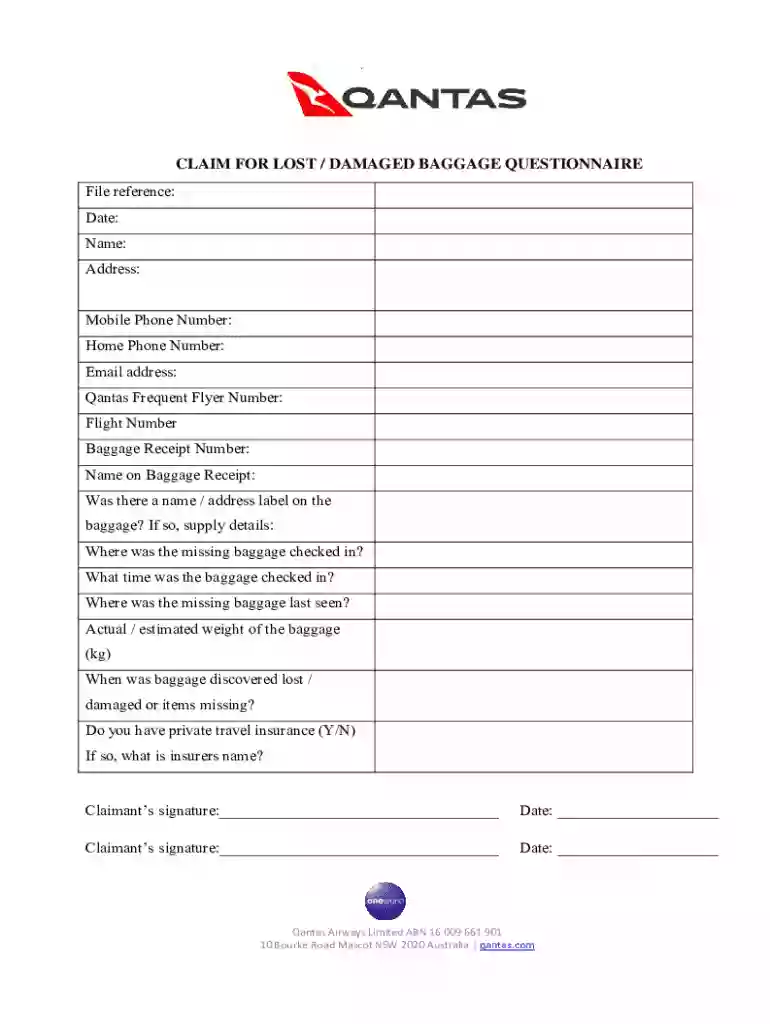
Claim for lost damaged baggage questionnaire 2026

Get Form
qantas baggage damage claim Preview on Page 1

Here's how it works

01. Edit your qantas baggage damage claim online
Type text, add images, blackout confidential details, add comments, highlights and more.

02. Sign it in a few clicks
Draw your signature, type it, upload its image, or use your mobile device as a signature pad.

03. Share your form with others
Send qantas baggage claim form via email, link, or fax. You can also download it, export it or print it out.

How to use or fill out claim for lost damaged baggage questionnaire with our platform

Form edit decoration
9.5
Ease of Setup
DocHub User Ratings on G2
9.0
Ease of Use
DocHub User Ratings on G2
  1. Click ‘Get Form’ to open the claim for lost damaged baggage questionnaire in the editor.
  2. Begin by filling in your personal details, including your name, address, and contact information. Ensure accuracy as this information is crucial for processing your claim.
  3. Provide your Qantas Frequent Flyer Number and Flight Number. This helps link your claim to your travel history.
  4. Fill in the Baggage Receipt Number and the name on the receipt. If applicable, indicate whether there was a name/address label on the baggage.
  5. Detail where and when you checked in your baggage, along with its last known location and estimated weight.
  6. Indicate when you discovered the baggage was lost or damaged and whether you have private travel insurance. If yes, include the insurer's name.
  7. Complete the declaration section by confirming that all provided information is accurate. Sign and date where indicated.
  8. Ensure all pages are completed and signed before submitting. Attach any supporting documentation as required.

Start using our platform today to easily fill out your claim for lost damaged baggage questionnaire for free!

See more claim for lost damaged baggage questionnaire versions

We've got more versions of the claim for lost damaged baggage questionnaire form. Select the right claim for lost damaged baggage questionnaire version from the list and start editing it straight away!
Versions Form popularity Fillable & printable
2018 4.8 Satisfied (29 Votes)
2013 4.4 Satisfied (47 Votes)
be ready to get more

Complete this form in 5 minutes or less

Get form

Got questions?

We have answers to the most popular questions from our customers. If you can't find an answer to your question, please contact us.
Contact us

Electronic document approval demands a software solution that works in compliance with data protection and eSignature laws. DocHub is a perfect tool for that, since it fulfills all the above mentioned requirements. Whatever method you like to sign your qantas baggage damage in DocHub, your electronic signature will be legally binding and court-admissible.

With DocHub, you have several convenient methods to edit your qantas baggage claim form online. You can drag and drop the form and modify it directly at the DocHub site or use our browser extension to fill out your form right away. On top of that, you can modify your PDF on your phone, as DocHub works with all the accessible mobile platforms.

Create an online form as easily as creating a document Select from multiple question types, drag-and-drop to reorder questions, and customize values as easily as pasting a list.
How to make a PDF fillable Open Jotform. Create a free Jotform account and build your fillable PDF form from scratch or upload an existing PDF form to convert it into a fillable PDF in a single click. Customize your form. Automate email responses. Download and share.
How do you create an online form? Create a new form. Regardless of your form builder, youll start by creating a new form. Edit and format your new form. Next, youll edit your form by adding fields. Test your form. Double-check to ensure your form works on multiple web browsers and devices. Send or publish your form.
be ready to get more

Complete this form in 5 minutes or less

Get form

People also ask

Make a Digital Copy of a Document: Follow These Steps Step 1: Gather Paper Documents. Step 2: Prepare Documents for Scanning. Step 3: Choose a Scanning Method. Step 4: Scan Documents. Step 5: Store and Organize Digitized Documents. AI-powered Document Organization. Mobile Document Digitization.
An online form is an electronic application in which data is entered by the person filling it out for recording and further processing via predefined data fields. Such electronic forms can be found, for example, on websites or as attachments in e-mails.
Login to your Canva account and search for form templates. Pick a design or start with a blank template. Choose a pre-made form template design. Customize your form. Edit your form by adding text, labels, logos, and other graphic elements. Download and print. Publish and share your form.
How to make a PDF form Open Acrobat. In the Tools tab, choose Prepare Form. Select a file or scan a document. Check the box for Signatures if it applies. Acrobat will automatically analyze your document and add form fields as necessary.
How do I create a digital form? The easiest way to create a digital form is by using a web form builder with a drag drop interface, like 123FormBuilder. No need to waste time with coding creating and embedding forms on your website is easier than ever (and even more so if you use a form template.)

qantas damaged baggage claim form