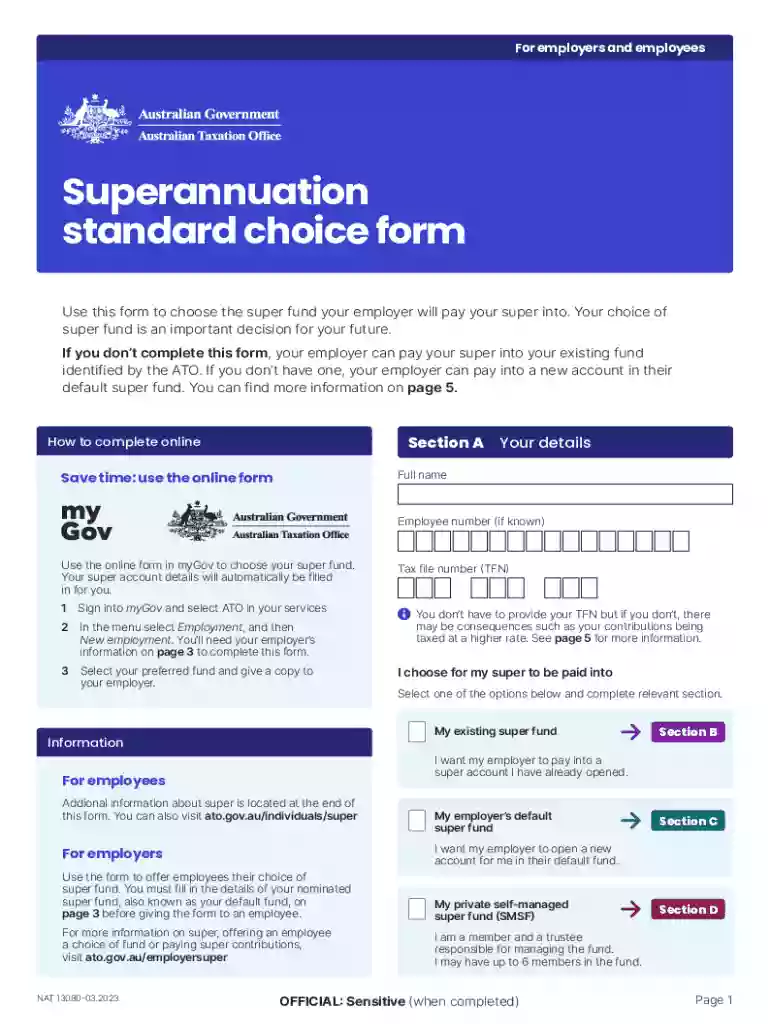
Superannuation Acknowledgement and Entitlements Forms Preview on Page 1

Superannuation Acknowledgement and Entitlements Forms 2026

Here's how it works

  • 01. Edit your form online

    Type text, add images, blackout confidential details, add comments, highlights and more.

  • 02. Sign it in a few clicks

    Draw your signature, type it, upload its image, or use your mobile device as a signature pad.

  • 03. Share your form with others

    Send it via email, link, or fax. You can also download it, export it or print it out.

How to use or fill out Superannuation Acknowledgement and Entitlements Forms with our platform

Form edit decoration
9.5
Ease of Setup
DocHub User Ratings on G2
9.0
Ease of Use
DocHub User Ratings on G2
  1. Click ‘Get Form’ to open it in the editor.
  2. Begin with Section A by entering your full name and employee number if known. This section is crucial as it identifies you as the employee making the superannuation choice.
  3. In Section B, provide details of your existing super fund. Fill in the super fund name, ABN, USI, and your member account number. Ensure that these details match what is on your super account.
  4. If opting for your employer's default fund, proceed to Section C. Confirm that your employer has filled in their business name and super fund details before signing and dating this section.
  5. For those choosing a self-managed super fund (SMSF), complete Section D with the SMSF name, ABN, ESA, and bank account details. Attach any required documentation confirming compliance.
  6. Review all sections for accuracy before submitting the completed form back to your employer promptly.

Start using our platform today to streamline your Superannuation Acknowledgement and Entitlements Forms for free!

See more Superannuation Acknowledgement and Entitlements Forms versions

We've got more versions of the Superannuation Acknowledgement and Entitlements Forms form. Select the right Superannuation Acknowledgement and Entitlements Forms version from the list and start editing it straight away!

VersionsForm popularityFillable & printable
20234.3 Satisfied (42 Votes)
20214.8 Satisfied (154 Votes)
20144.4 Satisfied (321 Votes)

be ready to get more

Complete this form in 5 minutes or less

Security and compliance

At DocHub, your data security is our priority. We follow HIPAA, SOC2, GDPR, and other standards, so you can work on your documents with confidence.

Related links

Agreement - Revised (A615787.DOC;1)

must be documented on a Family and Medical Leave Act Serious Health Condition Certification form. Annual certification of non- coverage will be required.

Learn more
If you believe that this page should be taken down, please follow our DMCA take down process here