Type text, add images, blackout confidential details, add comments, highlights and more.
02. Sign it in a few clicks
Draw your signature, type it, upload its image, or use your mobile device as a signature pad.
03. Share your form with others
Send table of heirship california via email, link, or fax. You can also download it, export it or print it out.
How to use or fill out the table of heirs
Ease of Setup
DocHub User Ratings on G2
Ease of Use
DocHub User Ratings on G2
Click ‘Get Form’ to open the table of heirs in our editor.
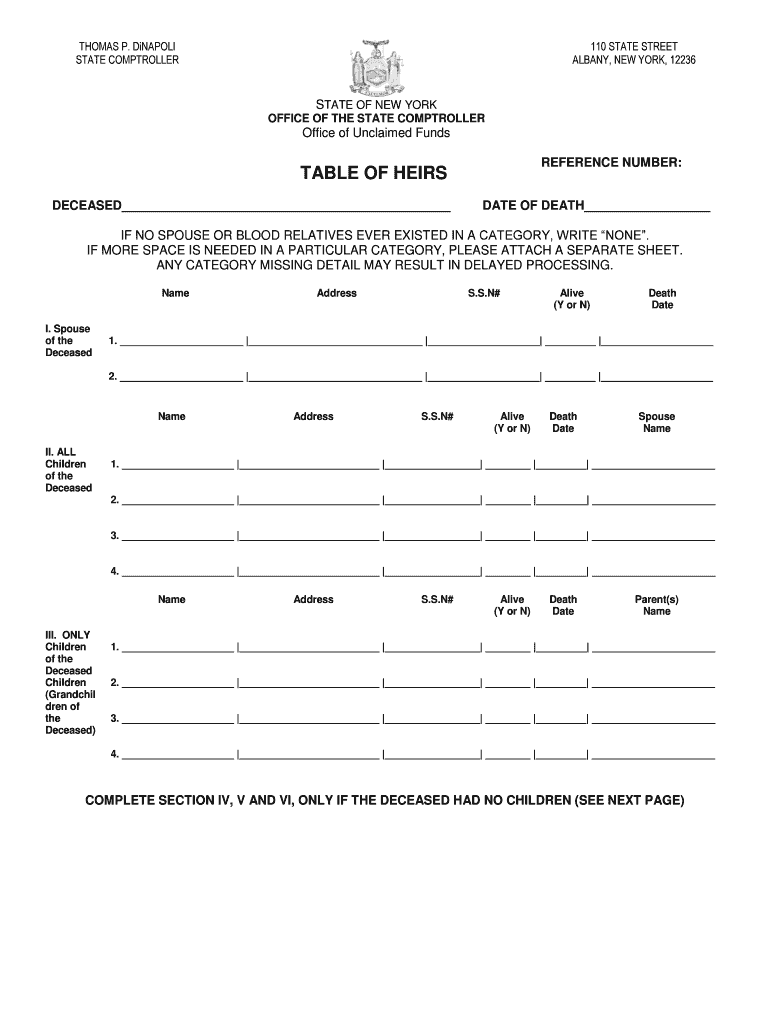
Begin with Section I, where you will enter the name of the deceased, their date of death, and details about their spouse. Fill in the spouse's name, address, Social Security Number (optional), whether they are alive (Y or N), and their date of death if applicable.
Proceed to Section II for all children of the deceased. Enter each child's name, address, Social Security Number, alive status, and death date. If a child is married, include their spouse's name.
In Section III, list any grandchildren by providing their names along with similar details as required for children.
If there are no children, complete Sections IV to VI for parents and siblings. Follow the same format as previous sections for entering names and details.
Finally, ensure that the form is signed by a relative of the deceased and include their contact information before submission.
Start using our platform today to easily fill out your table of heirs for free!
Table of heirs for unclaimed fundsTable of heirs templateTable of heirs pdfTable of heirs formTable of Heirship form OhioTable of heirs form pdfNYS Unclaimed Funds Table of HeirsTable of heirs california
Security and compliance
At DocHub, your data security is our priority. We follow HIPAA, SOC2, GDPR, and other standards, so you can work on your documents with confidence.
Actual heirs include relatives like sons, daughters, and parents, with specific shares defined by Islamic jurisprudence. The mother inherits 1/3 in absence ofRead more
Once a number is no longer used for 2 years in Round Table Germany, the number becomes available to the next charting club. This allows clubs to connect with
Cookie consent notice
This site uses cookies to enhance site navigation and personalize your experience.
By using this site you agree to our use of cookies as described in our Privacy Notice.
You can modify your selections by visiting our Cookie and Advertising Notice.