Type text, add images, blackout confidential details, add comments, highlights and more.
02. Sign it in a few clicks
Draw your signature, type it, upload its image, or use your mobile device as a signature pad.
03. Share your form with others
Send what is a transfer card for school via email, link, or fax. You can also download it, export it or print it out.
How to use or fill out school transfer card with our platform
Ease of Setup
DocHub User Ratings on G2
Ease of Use
DocHub User Ratings on G2
Click ‘Get Form’ to open the school transfer card in the editor.
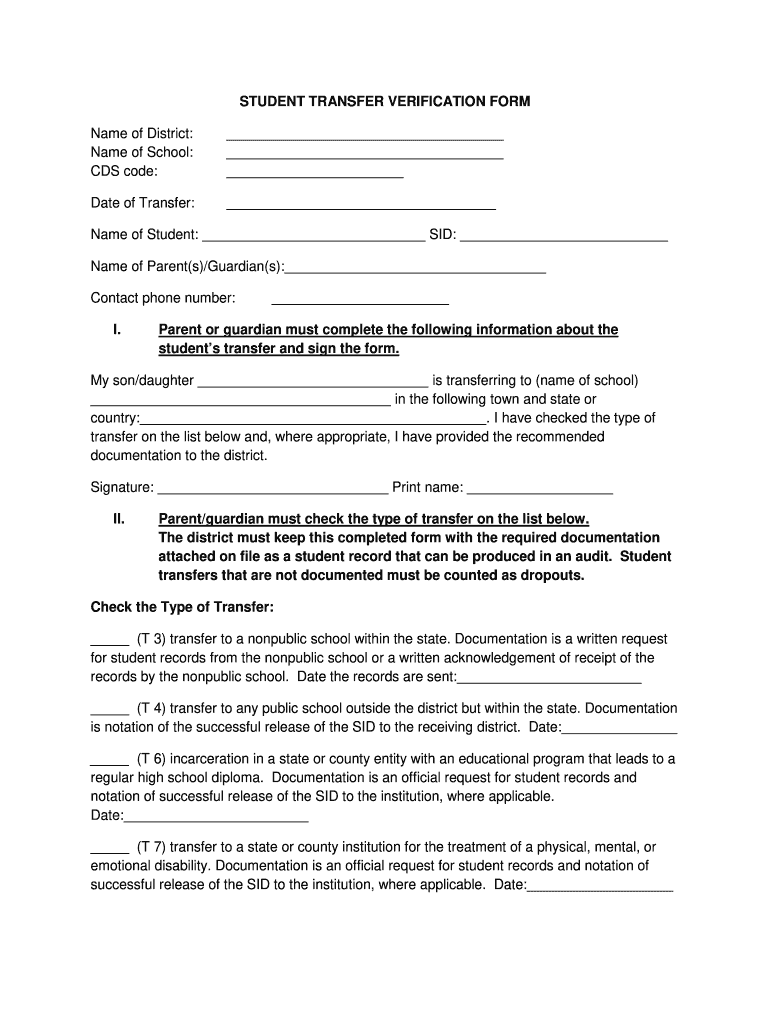
Begin by entering the 'Name of District', 'Name of School', and 'CDS code' in the designated fields at the top of the form.
Fill in the 'Date of Transfer' to indicate when the transfer is taking place.
Provide student details by entering the 'Name of Student' and 'SID'. Next, fill in the 'Name of Parent(s)/Guardian(s)' and their contact phone number.
In section I, state your child’s name and the new school they are transferring to, including town and state or country. Ensure you check off the appropriate type of transfer from section II and provide any required documentation dates.
Finally, sign and print your name at the bottom of section I to complete the form. Review all entries for accuracy before saving or sharing.
Start using our platform today for free to streamline your document editing experience!
School transfer card californiaSchool transfer card requirementsInterdistrict transferWhat are good reasons for interdistrict transferInterdistrict transfer applicationInterdistrict transfer permitCan you go to a school outside of your district in CaliforniaInter-district transfer vs intradistrict
Security and compliance
At DocHub, your data security is our priority. We follow HIPAA, SOC2, GDPR, and other standards, so you can work on your documents with confidence.
Directions: This card must be completed by the transferring school and sent directly to the students new school. The card must be sent the first day after theRead more
3.8.6 School Transfers / Change of Program Eligibility
Aug 18, 2025 Parents/guardians who move within San Francisco may be allowed to transfer their children to a school closer to the new residence depending on space/programRead more
After their adventure in the Cyber World, Kris and Susie return to school to transfer its Darkners to Castle Town. Chapter 4. In Chapter 4, Kris and SusieRead more
Cookie consent notice
This site uses cookies to enhance site navigation and personalize your experience.
By using this site you agree to our use of cookies as described in our Privacy Notice.
You can modify your selections by visiting our Cookie and Advertising Notice.