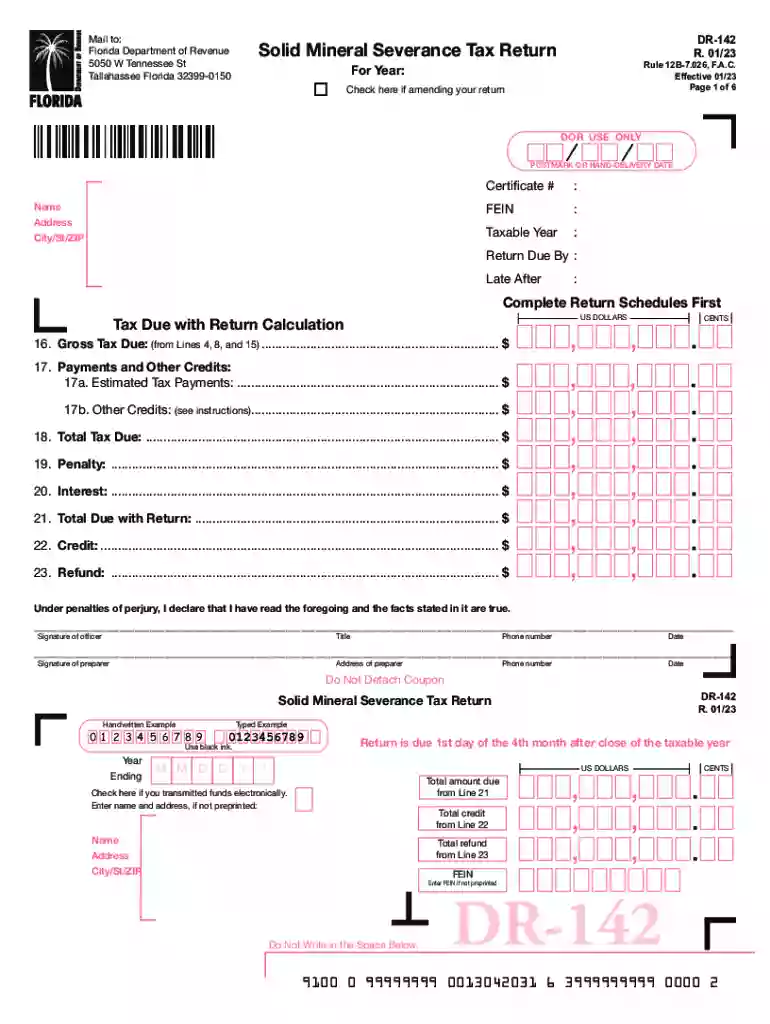
Florida Department of Revenue Application for Refund Section 1 2026

Get Form
Florida Department of Revenue Application for Refund Section 1 Preview on Page 1

Here's how it works

01. Edit your form online
Type text, add images, blackout confidential details, add comments, highlights and more.

02. Sign it in a few clicks
Draw your signature, type it, upload its image, or use your mobile device as a signature pad.

03. Share your form with others
Send it via email, link, or fax. You can also download it, export it or print it out.

How to use or fill out Florida Department of Revenue Application for Refund Section 1 with DocHub

Form edit decoration
9.5
Ease of Setup
DocHub User Ratings on G2
9.0
Ease of Use
DocHub User Ratings on G2
  1. Click ‘Get Form’ to open the Florida Department of Revenue Application for Refund in our platform.
  2. Begin by entering your name, address, city, state, and ZIP code in the designated fields. Ensure that all information is accurate to avoid processing delays.
  3. Next, provide your Certificate Number and Federal Employer Identification Number (FEIN) in the respective fields. This information is crucial for identifying your tax records.
  4. Indicate the taxable year for which you are applying for a refund. This helps the department process your request accurately.
  5. Complete the tax due calculation by filling out Lines 16 through 23 as instructed on the form. Use our editor's calculation features to ensure accuracy.
  6. Finally, sign and date the form at the bottom. If applicable, have your preparer sign as well before submitting it via mail to the Florida Department of Revenue.

Start using our platform today to streamline your document editing and submission process for free!

See more Florida Department of Revenue Application for Refund Section 1 versions

We've got more versions of the Florida Department of Revenue Application for Refund Section 1 form. Select the right Florida Department of Revenue Application for Refund Section 1 version from the list and start editing it straight away!
Versions Form popularity Fillable & printable
2023 4.5 Satisfied (33 Votes)
2019 4.8 Satisfied (70 Votes)
2013 4.3 Satisfied (191 Votes)
be ready to get more

Complete this form in 5 minutes or less

Get form

Got questions?

We have answers to the most popular questions from our customers. If you can't find an answer to your question, please contact us.
Contact us
To request a tax refund, file an Application for Refund - Sales and Use Tax (Form DR-26S) or Application for Refund - All Other Taxes (Form DR-26). An application form may be completed to request moneys paid into the State Treasury for a tax overpayment, payment when tax was not due, or payment made in error.
When a business declines to issue a refund to the purchaser, the business may issue an Assignment of Rights to Refund of Tax for tax the business collected from the purchaser and remitted to the Department. The purchaser may then apply to the Department directly to receive a refund of the tax.
A delinquency notice (Notice of Delinquency) is issued when a return is not filed and a bill (Notice of Amount Due) is issued when a return is filed late or additional money is due. The delinquency notice indicates a return has not been filed, while the initial bill contains a breakdown of the additional amount due.
An individual or business who has made a payment directly to the Department of Revenue or a county tax collector that​ was not owed, was paid in error, or was an overpayment, may submit an Application for Refund Sales and Use Tax (Form DR-26S).
Florida Sales Tax Deadlines Monthly: Due on the 1st day of the month and late after the 20th day of the month following the collection period. For example, if the sale took place during January, then tax is due on the 1st of February and late after the 20th of February.

Security and compliance

At DocHub, your data security is our priority. We follow HIPAA, SOC2, GDPR, and other standards, so you can work on your documents with confidence.

Learn more
ccpa2
pci-dss
gdpr-compliance
hipaa
soc-compliance

People also ask

If you are unable to connect when dialing (850) 488-6800, please try again later, review our frequently asked questions for an answer, or contact a local service center. ​The General Tax Administration Taxpayer Services Call Center is experiencing high call volumes and wait times.
The collection allowance is 2.5% (.025) of the first $1,200 of tax due, not to exceed $30 for each reporting location. If you have less than $1,200 in tax due, your collection allowance will be less than $30.

Related links