




Here's how it works



How to use or fill out offer to purchase real estate form winnebago county il 2006

- Click ‘Get Form’ to open it in the editor.
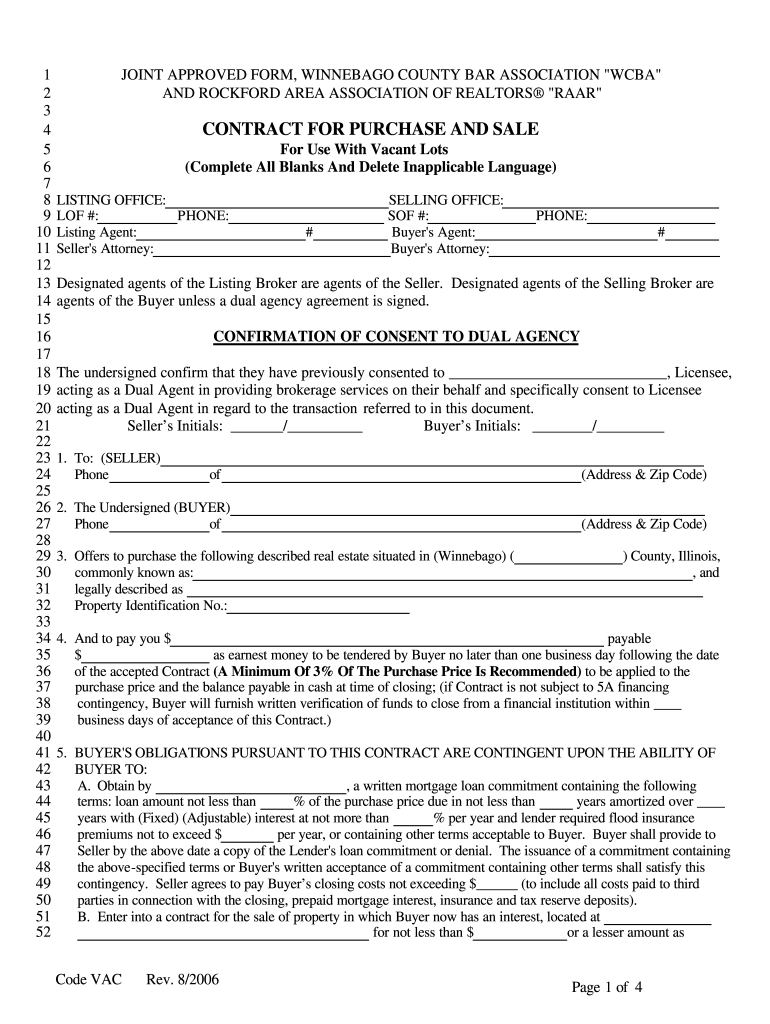
- Begin by filling in the Listing Office and Selling Office details, including names, phone numbers, and agent information.
- Enter the Seller's and Buyer's information, including names and addresses. Ensure all contact details are accurate.
- In the property description section, provide the common name and legal description of the real estate along with its Property Identification Number.
- Specify the earnest money amount and payment terms. Remember that a minimum of 3% of the purchase price is recommended.
- Complete any contingencies related to financing, appraisal, or sale of another property as required in sections A through C.
- Review all terms regarding closing dates, title insurance commitments, and any optional clauses before finalizing your entries.
Start using our platform today to fill out your offer to purchase real estate form for free!
It's free
See more offer to purchase real estate form winnebago county il 2006 versions
Got questions?
How do I sign my offer to purchase real estate form winnebago county il 2006 without printing?
eSignatures are a perfect replacement for traditional signing, as they save time, effort, and costs people spend on printing, scanning, and paper delivery. You can electronically sign your offer to purchase real estate form winnebago county il 2006 using a reliable and robust online document processing services like DocHub. It complies with primary eSignature regulations (ESIGN and UETA), so all forms approved there are legally binding and have the same validity as physically signed ones.
How do you edit offer to purchase real estate form winnebago county il 2006 on Android?
Document editing with DocHub is equally convenient on desktop and mobile devices. You only need an internet browser to revise your offer to purchase real estate form winnebago county il 2006 on Android. Open our site and sign in to access the instruments you need. Add your document and introduce your intended changes. After that, you can keep your form in your document storage or send it out right away.
Security and compliance
At DocHub, your data security is our priority. We follow HIPAA, SOC2, GDPR, and other standards, so you can work on your documents with confidence.
Learn more


