




Here's how it works
01. Edit your riverside waiver online
Type text, add images, blackout confidential details, add comments, highlights and more.

02. Sign it in a few clicks
Draw your signature, type it, upload its image, or use your mobile device as a signature pad.

03. Share your form with others
Send ri pr069 via email, link, or fax. You can also download it, export it or print it out.
How to use or fill out riverside waiver with our platform

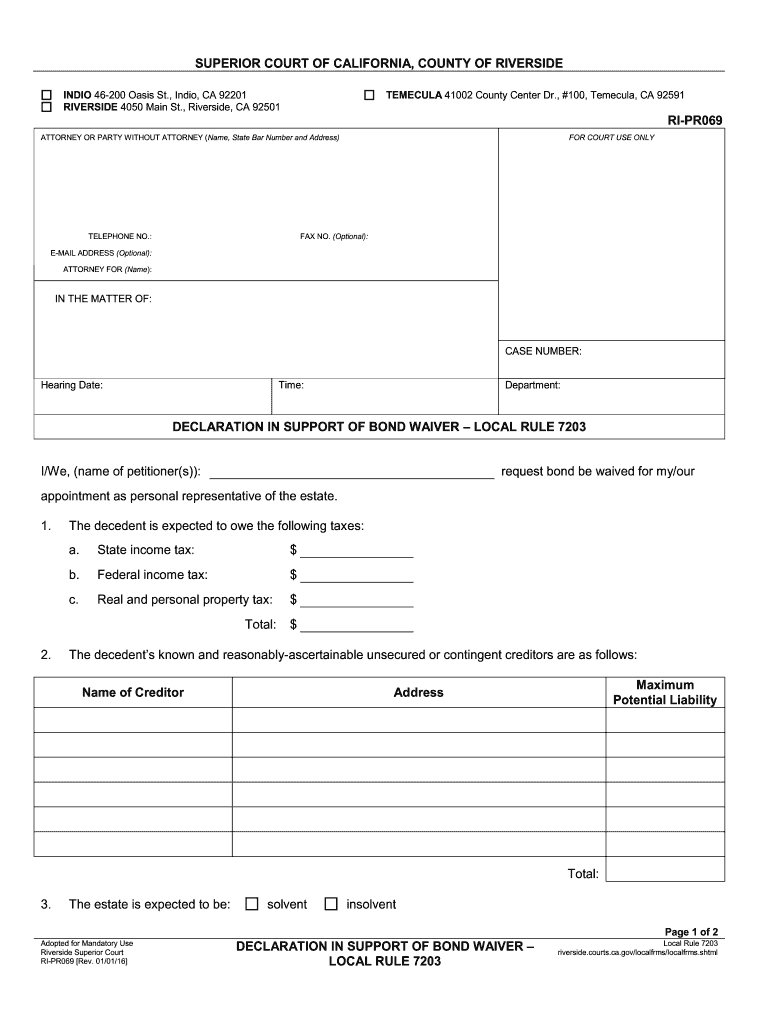
- Click ‘Get Form’ to open the riverside waiver in the editor.
- Begin by entering your name and contact information in the designated fields at the top of the form. This includes your telephone number, fax number (optional), and email address (optional).
- In the section labeled 'I/We, (name of petitioner(s)):', input the names of all petitioners requesting the bond waiver.
- Fill out the tax information for the decedent. Specify amounts for state income tax, federal income tax, and real and personal property tax in their respective fields.
- List known creditors along with their maximum potential liability and addresses in the provided table format.
- Indicate whether the estate is solvent or insolvent by selecting the appropriate option.
- Document your efforts to gather this information by detailing actions taken, such as reviewing mail or bank statements, in the specified area.
- Finally, sign and date the form at the bottom to certify that all information is true and correct.
Start filling out your riverside waiver today for free using our platform!
Fill out riverside waiver online
It's free
It's free
Security and compliance
At DocHub, your data security is our priority. We follow HIPAA, SOC2, GDPR, and other standards, so you can work on your documents with confidence.
Learn more


