




01. Edit your sc2 form online
Type text, add images, blackout confidential details, add comments, highlights and more.

Type text, add images, blackout confidential details, add comments, highlights and more.

Draw your signature, type it, upload its image, or use your mobile device as a signature pad.

Send sc2 form online via email, link, or fax. You can also download it, export it or print it out.
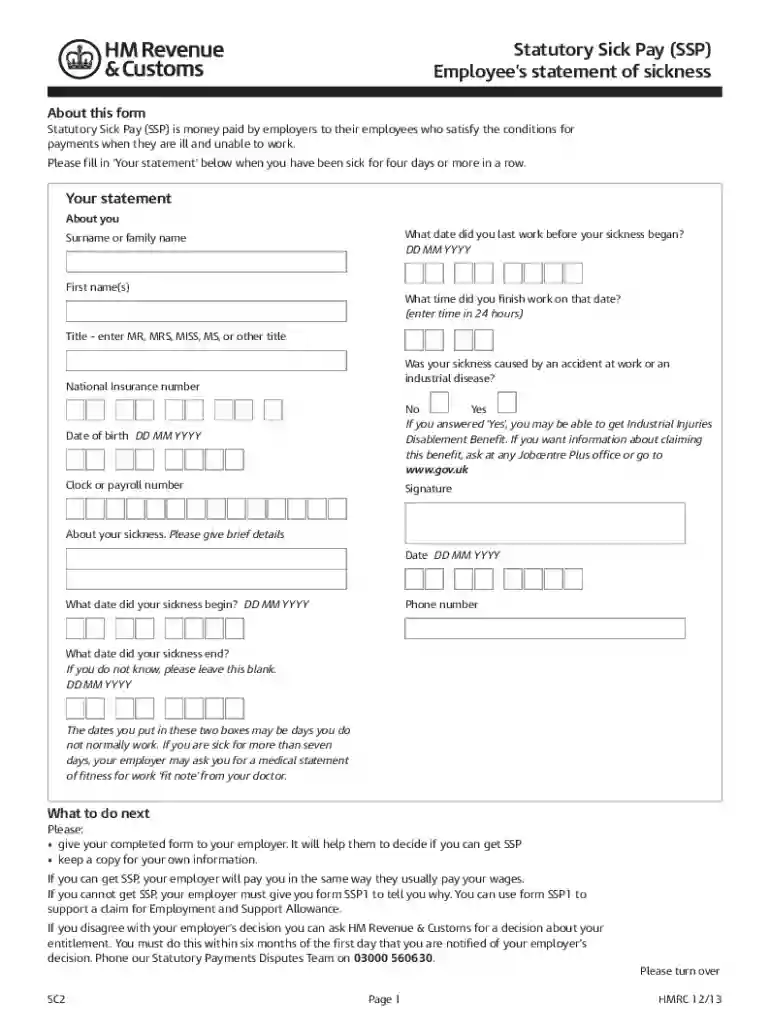
The SC2 form, officially known as the Statutory Sick Pay (SSP) Employee's Statement of Sickness, is an essential document for employees in the United States who need to claim sick pay due to illness or incapacity. This form serves as a declaration of sickness and is primarily used to inform employers about an employee's eligibility to receive SSP. Statutory Sick Pay is designed to provide financial support for employees who are unable to work due to health issues, ensuring they have a safety net during challenging times.
When filling out the SC2 form, employees must provide detailed information about their illness, including the duration of the sickness and any medical advice received. This documentation is necessary for employers to process the employee's claim for sick pay accurately. It is vital that the form is completed thoroughly to avoid delays in benefit payments.
Completing the SC2 form requires several systematic steps. Employees should follow these instructions to ensure proper submission:
Each step is crucial to ensure that the SSP claim is processed quickly and correctly, allowing employees to receive the financial assistance they need.
Understanding the eligibility criteria for SSP is vital for employees applying for benefits through the SC2 form. In general, to qualify for Statutory Sick Pay, employees must meet the following conditions:
Fulfilling these criteria ensures that employees are eligible to receive SSP, thus providing financial support during their recovery phase.


Several critical elements of the SC2 form ensure that it serves its intended purpose effectively. These elements include:
Each of these components plays a vital role in ensuring that the SC2 form fulfills its purpose and that employees receive the necessary support during their time of need.
The SC2 form is utilized by a variety of stakeholders involved in the process of claiming statutory sick pay. Key users include:
Understanding the roles of these stakeholders highlights the collaborative effort needed to successfully process statutory sick pay claims.
Familiarity with specific terminology is essential when dealing with the SC2 form. Key terms include:
Understanding these terms provides clarity for employees and employers alike as they navigate the statutory sick pay claims process.
We've got more versions of the sc2 form form. Select the right sc2 form version from the list and start editing it straight away!
Microsoft Word doesn’t have signing tools to generate valid electronic signatures and enforceable paperwork. Luckily, DocHub is an online eSignature-compliant editor that supports different document formats, such as .doc files. Log in to your account and add the Word version of your self certification form pdf download from your device and cloud, or URL - our editor will automatically turn it into an editable PDF. Make all essential changes in your form and click Sign to generate your own legally-binding electronic signature. There are four signing methods from which to choose.
With DocHub, there are several convenient ways to edit your sc2 form pdf online. You can drag and drop the form and edit it straight at the DocHub website or use our browser extension to fill out your form immediately. On top of that, you can edit your PDF on your smartphone, as DocHub works with all the accessible mobile platforms.
At DocHub, your data security is our priority. We follow HIPAA, SOC2, GDPR, and other standards, so you can work on your documents with confidence.


