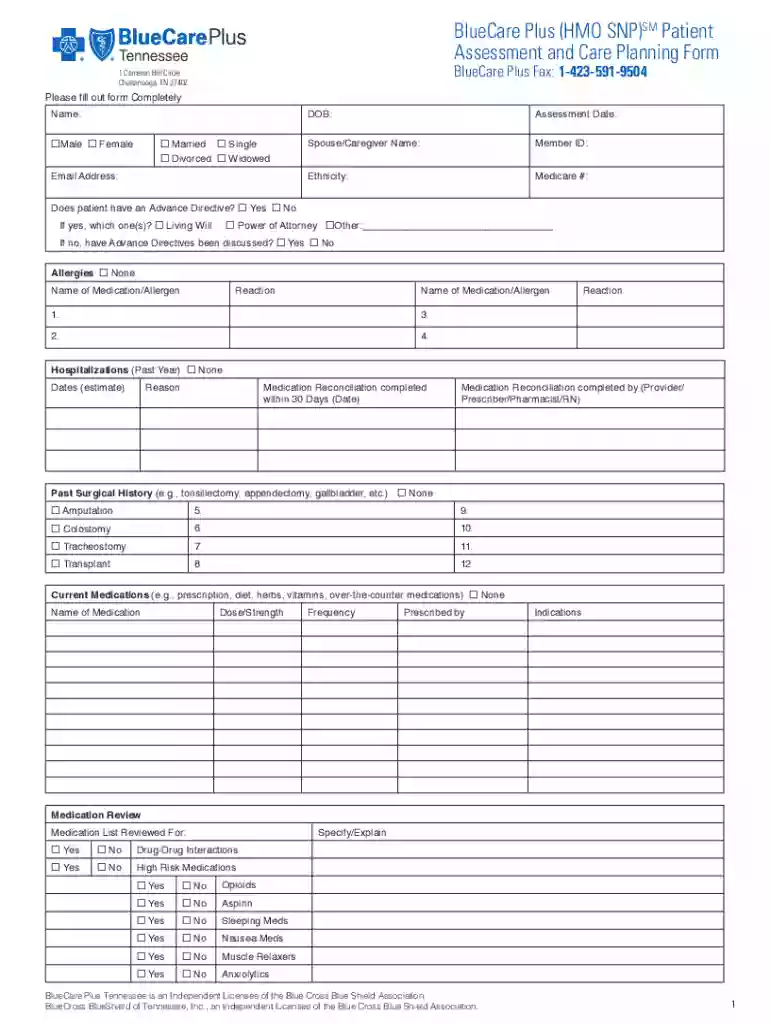
BlueCare Plus (HMO SNP)SM Home Health Request Fax Form 2026

Get Form
BlueCare Plus (HMO SNP)SM Home Health Request Fax Form Preview on Page 1

Here's how it works

01. Edit your form online
Type text, add images, blackout confidential details, add comments, highlights and more.

02. Sign it in a few clicks
Draw your signature, type it, upload its image, or use your mobile device as a signature pad.

03. Share your form with others
Send it via email, link, or fax. You can also download it, export it or print it out.

How to use or fill out BlueCare Plus (HMO SNP)SM Home Health Request Fax Form with our platform

Form edit decoration
9.5
Ease of Setup
DocHub User Ratings on G2
9.0
Ease of Use
DocHub User Ratings on G2
  1. Click ‘Get Form’ to open the BlueCare Plus (HMO SNP)SM Home Health Request Fax Form in the editor.
  2. Begin by entering the patient's name, gender, marital status, and email address in the designated fields. Ensure accuracy as this information is crucial for identification.
  3. Fill in the date of birth and assessment date. Next, provide details about the spouse or caregiver's name and member ID.
  4. Indicate whether the patient has an Advance Directive by selecting 'Yes' or 'No'. If applicable, specify which type(s) of directive exist.
  5. Document any allergies and reactions by listing medications or allergens in the provided sections. This helps healthcare providers understand potential risks.
  6. Complete sections on hospitalizations, current medications, and past surgical history. Be thorough to ensure comprehensive care planning.
  7. Review all entries for accuracy before saving your work. Utilize our platform’s features to easily edit any mistakes.

Start using our platform today to streamline your form completion process for free!

See more BlueCare Plus (HMO SNP)SM Home Health Request Fax Form versions

We've got more versions of the BlueCare Plus (HMO SNP)SM Home Health Request Fax Form form. Select the right BlueCare Plus (HMO SNP)SM Home Health Request Fax Form version from the list and start editing it straight away!
Versions Form popularity Fillable & printable
2022 4.6 Satisfied (20 Votes)
2020 4.1 Satisfied (41 Votes)
2018 4.9 Satisfied (42 Votes)
be ready to get more

Complete this form in 5 minutes or less

Get form

Got questions?

We have answers to the most popular questions from our customers. If you can't find an answer to your question, please contact us.
Contact us
Medicare + Medicaid = BlueCare Plus Tennessee It covers some of your medical costs but not all of them. Medicaid is coverage from the state. Its for those who qualify for TennCare. With these plans, you keep your Medicare and Medicaid benefits.
You can verify benefits and request prior authorization at Availity.com, by phone at 1-800-924-71411-800-924-7141 or fax to 1-866-558-0789.
CarePlus Health Plans, Inc. 11430 NW 20th Street, Suite 300 Miami, FL 33172 Attn: Grievance Appeals Department Fax number: 1-800-956-4288 Page 4 4 H1019GRVAPLHowToFileGrievanceAppealWebDoc2020C The Grievance or Appeal Form is available for download from our website at .
Fax: 1-866-325-6698 Enrollment in BlueCare Plus Tennessee depends on contract renewal.