PAYROLL STATUS CHANGE FORM - City of Urbandale 2026

Get Form
PAYROLL STATUS CHANGE FORM - City of Urbandale Preview on Page 1

Here's how it works

01. Edit your form online
Type text, add images, blackout confidential details, add comments, highlights and more.

02. Sign it in a few clicks
Draw your signature, type it, upload its image, or use your mobile device as a signature pad.

03. Share your form with others
Send it via email, link, or fax. You can also download it, export it or print it out.

Definition & Meaning

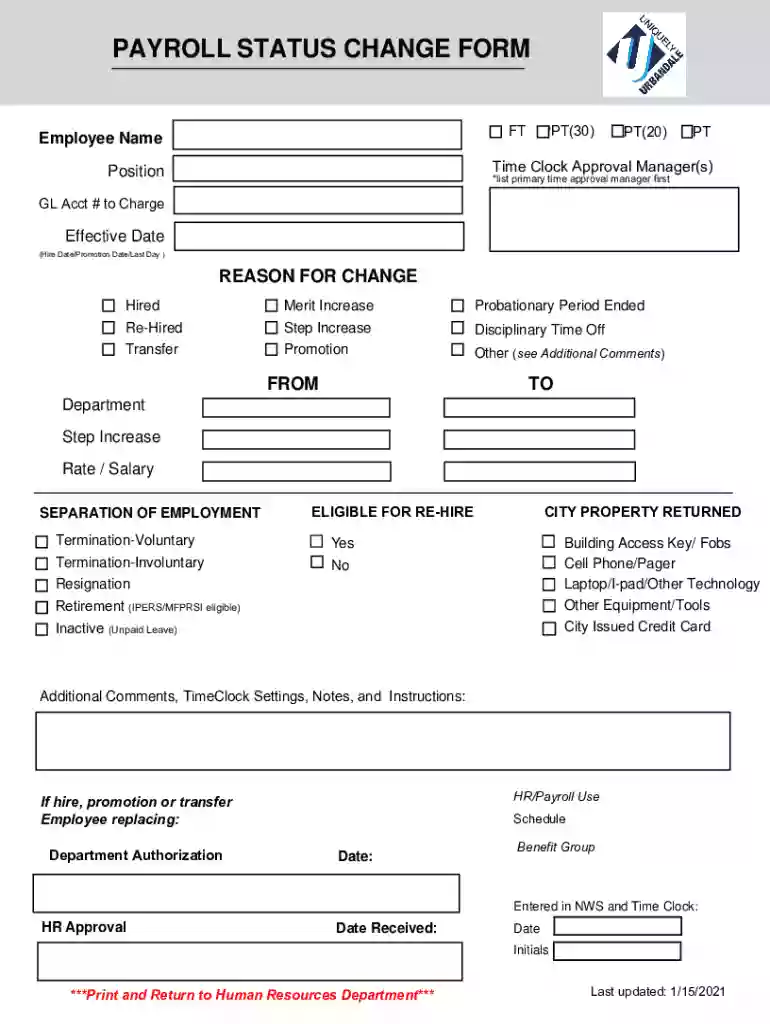
The Payroll Status Change Form - City of Urbandale is a document used to record any adjustments in an employee's employment status within the city government. This form facilitates the documentation of various types of employment changes such as hiring, promotions, separations, transfers, and terminations. Each change is captured methodically to maintain accurate personnel records and ensure appropriate actions are taken by the respective departments.

Examples of Status Changes

  • Hiring: When a new employee joins the City's workforce, this form records their entry, detailing their starting date and position title.
  • Promotion: Use this form when an employee is promoted, indicating any new job titles, responsibilities, and adjusted salary details.
  • Separation/Termination: Capture details regarding voluntary or involuntary departures, including last working day and any procedural steps taken during the exit.
  • Transfer: Document employee transfers, including new department details and reporting lines.

How to Use the Payroll Status Change Form - City of Urbandale

Individuals involved in administrative roles within the City of Urbandale Human Resources Department typically utilize this form. It is an essential document preceded or followed by conversations and approvals related to employment changes. The form acts as a central record for capturing the unique details of each employment adjustment.

Step-by-Step Process

  1. Identify Change Type: Determine whether the employee's change is a hire, promotion, separation, or transfer.
  2. Gather Details: Collect required information, including employee ID, effective date, and reason for change.
  3. Complete Form: Ensure all relevant sections are filled out, including signatures where necessary.
  4. Submit Form: Forward the form to the Human Resources Department for review and approval.
  5. Follow Up: Ensure changes have been approved and documented appropriately in the system.

Steps to Complete the Payroll Status Change Form - City of Urbandale

Completion requires careful attention to detail. Each section of the form needs to be filled out accurately, reflecting the nature of the employment change.

Detailed Instructions

  • Employee Information: Include full name, employee ID, current position, and department.
  • Change Details: Clearly state the type of change, effective date, and any accompanying notes or instructions.
  • Authorization: Obtain signatures from the department supervisor and HR representative to validate the change.
  • Final Check: Verify all fields are complete and accurate before submission to avoid processing delays.

Key Elements of the Payroll Status Change Form - City of Urbandale

The structure of the form comprises several key components, each designed to capture specific information relevant to employment changes.

Components

  • Employee Details: Name, ID, current role.
  • Reason for Change: Explanation for status modification.
  • Effective Date: When the change takes effect.
  • Department Approval: Sign-off from the relevant department authority.
  • HR Approval: Confirmation by HR for added legitimacy and compliance.

Legal Use of the Payroll Status Change Form - City of Urbandale

Functioning as a legal document, this form ensures all employment changes are recorded in compliance with applicable laws and policies. It plays an integral role in upholding transparency and fairness for both employee and employer.

Compliance Considerations

  • Data Accuracy: All details must be correct to prevent legal disputes or compliance issues.
  • Authorization: Unauthorized or improper changes can result in disciplinary action or legal challenges.

Who Typically Uses the Payroll Status Change Form - City of Urbandale

This form is primarily used by:

  • HR Professionals: Essential for HR departments managing employee records.
  • Supervisors/Managers: Required to initiate changes and confirm departmental approval.
  • Employees: May be reviewed by employees during status discussions but not typically completed by them.
decoration image ratings of Dochub

Important Terms Related to the Payroll Status Change Form - City of Urbandale

Understanding the terminology used in this form is crucial for accurate and efficient completion.

Key Terms

  • Effective Date: The date when the change officially takes effect in the HR system.
  • Authorization: The process of obtaining necessary approvals before implementing changes.
  • Employee ID: A unique identifier assigned to each City employee for record-keeping.

Form Submission Methods (Online / Mail / In-Person)

The City of Urbandale offers multiple ways to submit the Payroll Status Change Form, emphasizing flexibility and convenience.

Submission Options

  • Online: Preferred method through the city’s HR portal for efficiency and tracability.
  • Mail: Suitable for departments without immediate online access.
  • In-Person: Direct submission to the HR office for urgent processing or clarifications.

Selecting the appropriate submission method ensures timely processing and minimal disruptions to workflow adjustments.

See more PAYROLL STATUS CHANGE FORM - City of Urbandale versions

We've got more versions of the PAYROLL STATUS CHANGE FORM - City of Urbandale form. Select the right PAYROLL STATUS CHANGE FORM - City of Urbandale version from the list and start editing it straight away!
Versions Form popularity Fillable & printable
2021 4.4 Satisfied (57 Votes)
2015 4.5 Satisfied (44 Votes)
be ready to get more

Complete this form in 5 minutes or less

Get form

Got questions?

We have answers to the most popular questions from our customers. If you can't find an answer to your question, please contact us.
Contact us
Employee status change form is a document used by human resources department of the company or employer to make changes in employees status. Employee status is changed due to many reasons and one of them is job promotion.
Employee Change Form is a document that is used when the employer is planning to change the status of an employee like promotion, change in salary, demotion, transfer, or termination. From time to time, there are a lot of movements in a company or organization.
The Employee Payroll Change Form is designed to streamline changes to an employees payroll details. Changes could be regarding shift in department, salary increment, or updates in employees benefits, among others. It simplifies the payroll process and ensures all changes are well-documented and actionable.
This form is used to request a wage payroll adjustment for a pay period that has already been processed and finalized in Banner Time Entry. Any changes made after payroll processing require a manual adjustment, which must be supported by sufficient documentation.
A Payroll Change is any adjustment made to the workers salary or benefits. They can be one-off changes or more permanent, in the form of a contractual change.

Security and compliance

At DocHub, your data security is our priority. We follow HIPAA, SOC2, GDPR, and other standards, so you can work on your documents with confidence.

Learn more
ccpa2
pci-dss
gdpr-compliance
hipaa
soc-compliance
be ready to get more

Complete this form in 5 minutes or less

Get form

People also ask

Think of these forms as a record of your employee payments, broken down for each individual and totalled for your companys financial records. They ensure everyone gets paid accurately and on time, while keeping you on top of tax and benefit obligations.

Related links