Type text, add images, blackout confidential details, add comments, highlights and more.

02. Sign it in a few clicks
Draw your signature, type it, upload its image, or use your mobile device as a signature pad.

03. Share your form with others
Send cigna promptpa via email, link, or fax. You can also download it, export it or print it out.

How to use or fill out Cigna Network Exception Request with our platform
Ease of Setup
DocHub User Ratings on G2
Ease of Use
DocHub User Ratings on G2
Click ‘Get Form’ to open the Cigna Network Exception Request in the editor.
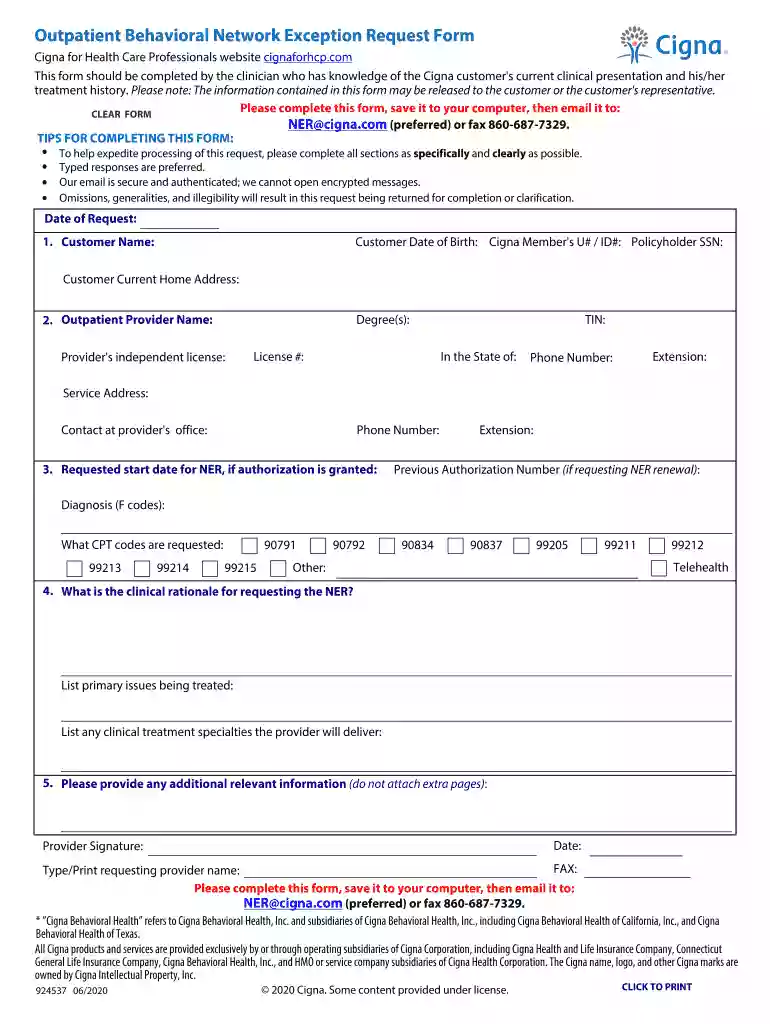
Begin by entering the 'Date of Request' at the top of the form. This helps track when the request was made.
Fill in the 'Customer Name', 'Date of Birth', and 'Cigna Member's U# / ID#'. Ensure accuracy as this information is crucial for identification.
Provide the 'Outpatient Provider Name' along with their degrees, independent license, and TIN. This section verifies the provider's credentials.
Indicate the 'Requested start date for NER' and any previous authorization numbers if applicable. This helps in processing renewals efficiently.
Detail the diagnosis using F codes and list requested CPT codes. Be specific to avoid delays in approval.
In the clinical rationale section, clearly outline primary issues being treated and any specialties that will be delivered by the provider.
Finally, provide any additional relevant information before signing and saving your completed form. Remember to email it to NER@cigna.com or fax it to 860-687-7329.
Start filling out your Cigna Network Exception Request today using our platform for free!
Fill out cigna network exception request online It's free
We've got more versions of the cigna network exception request form. Select the right cigna network exception request version from the list and start editing it straight away!
Cigna network exception request form onlineCigna network exception request form pdfEvernorth Network Exception RequestCigna out of Network Exception FormCigna outpatient Behavioral Network Exception Request FormCigna NAP formCigna single case agreement Behavioral HealthNetwork Adequacy Provision Cigna
Security and compliance
At DocHub, your data security is our priority. We follow HIPAA, SOC2, GDPR, and other standards, so you can work on your documents with confidence.
exception request. In the event we do not respond to an exception request within 24 hours for emergency circumstances, the exception request will be granted.Read more
Cookie consent notice
This site uses cookies to enhance site navigation and personalize your experience.
By using this site you agree to our use of cookies as described in our Privacy Notice.
You can modify your selections by visiting our Cookie and Advertising Notice.