01. Edit your west virginia department of revenue online
Type text, add images, blackout confidential details, add comments, highlights and more.
02. Sign it in a few clicks
Draw your signature, type it, upload its image, or use your mobile device as a signature pad.
03. Share your form with others
Send it via email, link, or fax. You can also download it, export it or print it out.
How to use or fill out Form West Virginia Department of Tax and Revenue BAR-0 with our platform
Ease of Setup
DocHub User Ratings on G2
Ease of Use
DocHub User Ratings on G2
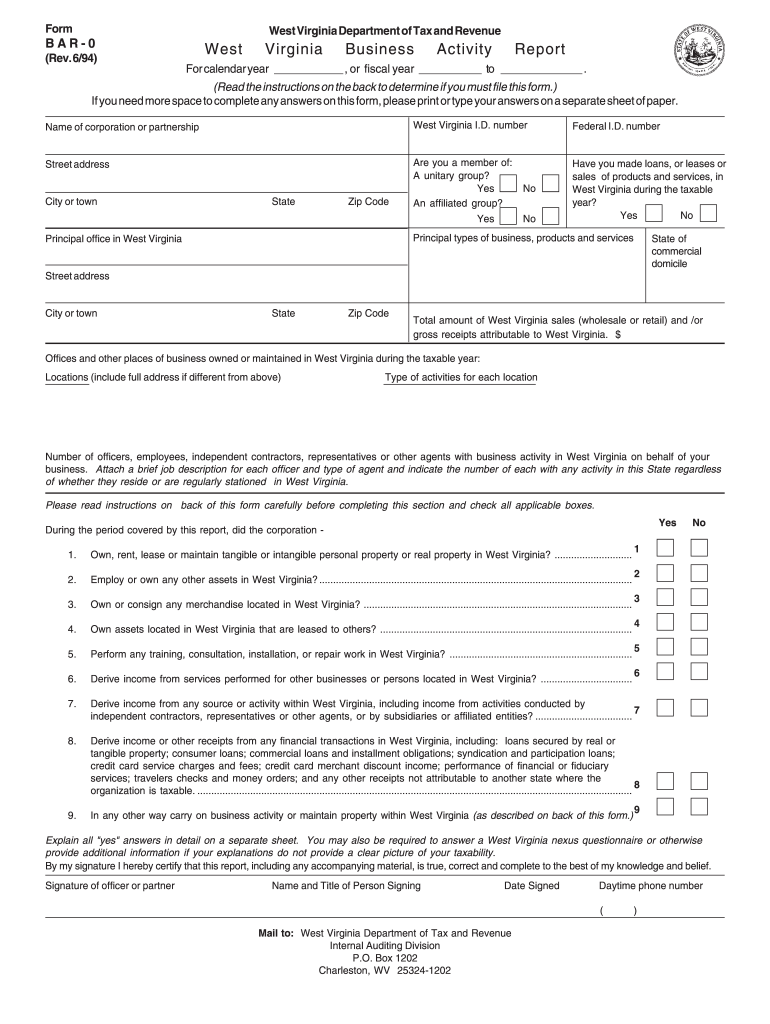
Click ‘Get Form’ to open it in the editor.
Begin by entering the calendar year or fiscal year for which you are reporting at the top of the form.
Fill in the name of your corporation or partnership, along with your West Virginia I.D. number and Federal I.D. number.
Provide your street address, city or town, state, and zip code.
Indicate whether you are a member of a unitary group or an affiliated group by checking 'Yes' or 'No'.
Answer questions regarding business activities in West Virginia during the taxable year by selecting 'Yes' or 'No'.
Detail your principal types of business, products, and services offered in West Virginia.
List all offices and other places of business maintained in West Virginia, including full addresses and types of activities conducted at each location.
Complete the section regarding the number of officers, employees, independent contractors, and agents conducting business activity in West Virginia.
Review all sections carefully before signing at the bottom to certify that your report is true and complete.
Start using our platform today to easily fill out Form BAR-0 for free!
Fill out Form West Virginia Department of Tax and Revenue BAR-0 West ... online It's free
Form west virginia department of tax and revenue bar 0 west onlineDownload form west virginia department of tax and revenue bar 0 westWV state tax Form IT-140 pdfWV State Tax Forms pdfWV Form CIT-120WV State tax form IT-104West Virginia Corporate Income TaxWV tax exempt form PDF
Security and compliance
At DocHub, your data security is our priority. We follow HIPAA, SOC2, GDPR, and other standards, so you can work on your documents with confidence.
Derive income or other receipts from any financial transactions in West Virginia, including: loans secured by real or tangible property; consumer loans;Read more
West Virginia is the second-biggest coal-producing state in the country (after Montana), with 152.4 million tons of coal mined in 2006 (13.1% of the US total).Read more
Cookie consent notice
This site uses cookies to enhance site navigation and personalize your experience.
By using this site you agree to our use of cookies as described in our Privacy Notice.
You can modify your selections by visiting our Cookie and Advertising Notice.