




01. Edit your form online
Type text, add images, blackout confidential details, add comments, highlights and more.

Type text, add images, blackout confidential details, add comments, highlights and more.

Draw your signature, type it, upload its image, or use your mobile device as a signature pad.

Send it via email, link, or fax. You can also download it, export it or print it out.
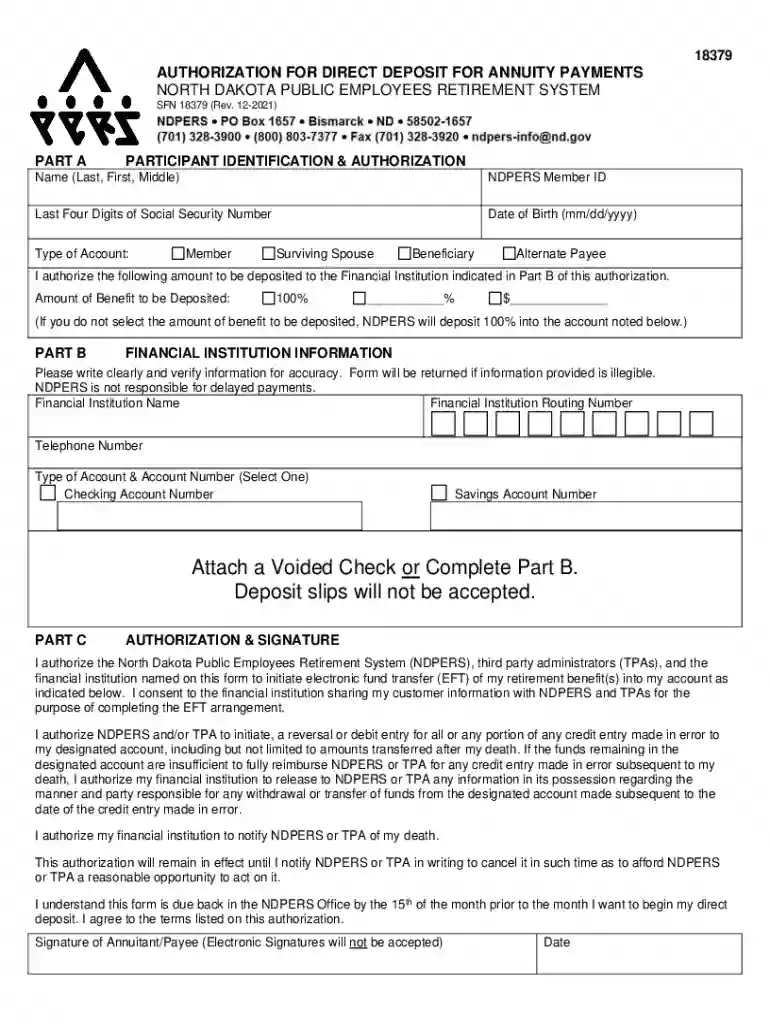
The SFN-18379 Authorization For Direct Deposit For Annuity Payments is a form used primarily by the North Dakota Public Employees Retirement System (NDPERS). It allows retirees to direct their annuity payments directly into their bank accounts. This form ensures a streamlined process for the transfer of retirement benefits, minimizing delays and potential issues that may arise from manual processing or paper checks.
To effectively use this form, annuitants must fill out specific sections that include personal identification information, bank details, and the amount they wish to deposit. The process typically involves selecting between allocating the entire amount to one account or splitting it across multiple accounts. Accurate completion of each section ensures prompt and error-free processing of annuity payments into designated accounts.
This form is typically used by retirees who are members of NDPERS. These individuals are often looking to simplify the payment process of their retirement benefits. By opting for direct deposit, retirees can avoid the delays associated with receiving paper checks and gain immediate access to their funds upon issuance.


The form incorporates several critical elements to be completed accurately:
To obtain this form, retirees can contact the NDPERS office or download it directly from their website. It's important to ensure that the version of the form used is the most current to comply with any updated requirements or banking practices.
Understanding the terminology related to this form is vital:
While using this form is optional, failure to switch to direct deposit when required or misusing the form can result in delays in receiving benefits. Compliance ensures that retirees avoid such disruptions.
The form is designed for individuals who are eligible NDPERS members receiving retirement benefits. Eligibility typically includes retirees or beneficiaries currently drawing annuity payments and wishing to opt for the direct deposit feature.

Once the form is submitted:
In summary, the SFN-18379 form is a critical tool for retirees within the NDPERS, facilitating the direct deposit of annuity payments into their selected bank accounts, ensuring security, consistency, and convenience.
We've got more versions of the SFN-18379 Authorization For Direct Deposit For Annuity Payments form. Select the right SFN-18379 Authorization For Direct Deposit For Annuity Payments version from the list and start editing it straight away!
With DocHub, it’s quite simple. The editor offers users an add-on called DocHub for Gmail, which you can find in the Google Workspace Marketplace free of charge. Set it up and grant it access to your Google account. Open your email with your SFN-18379 Authorization For Direct Deposit For Annuity Payments attached and click on the add-on button in the right-side panel. Sign in to your DocHub account, and import the form to our editor, where you can complete it and sign.
As a comprehensive document editing service, DocHub is available on smart phones. Open DocHub in your choice of mobile internet browser and employ our smart mobile-friendly toolset to complete your SFN-18379 Authorization For Direct Deposit For Annuity Payments.
At DocHub, your data security is our priority. We follow HIPAA, SOC2, GDPR, and other standards, so you can work on your documents with confidence.
Report on the Financial Statements. We have audited the accompanying financial statements of the business-type activities and the aggregate.Read more
This form is to be used only for North Dakota Public Employees Retirement System (NDPERS) Benefit Payments. You must complete this form to authorize NDPERS


