







Definition and Purpose of the Auto Pay Authorization Form
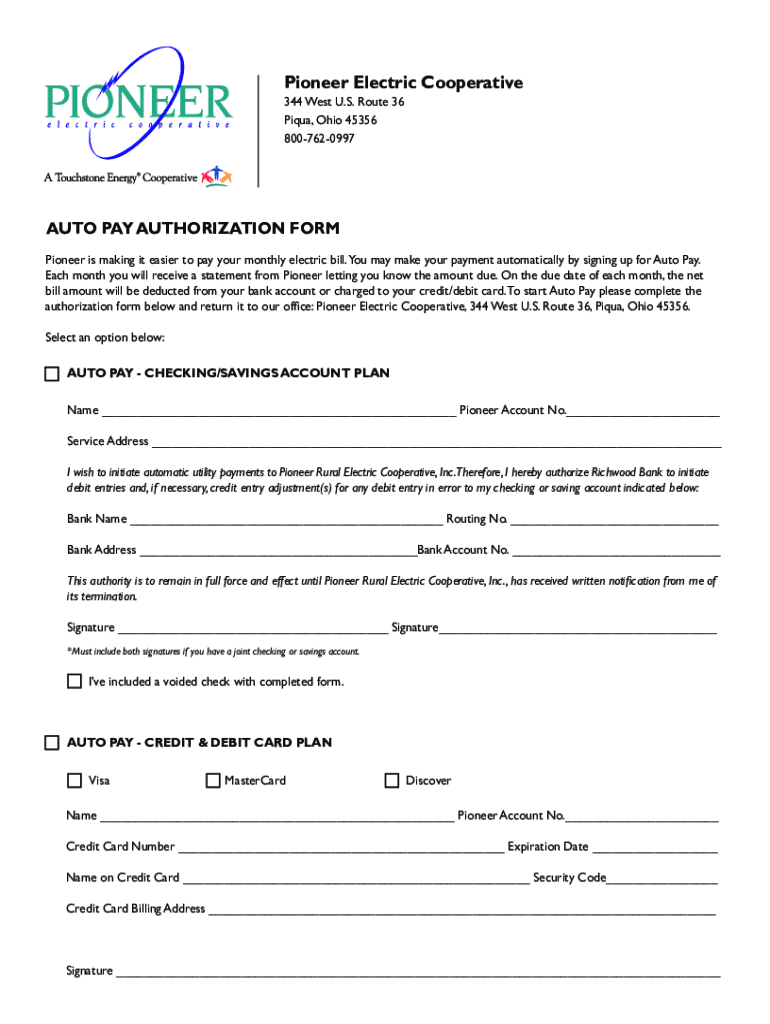
The Auto Pay Authorization Form is a document provided by Pioneer Electric Cooperative that allows customers to set up automatic monthly payments for their electric bills. This form is instrumental in ensuring seamless and timely payments by authorizing deductions from a customer's chosen financial account at regular intervals. By setting up these automatic payments, customers can avoid late fees and ensure their account remains in good standing. The primary purpose of this form is to simplify the payment process for both the cooperative and its members, enabling frictionless transactions that increase efficiency in billing operations.
How to Use the Auto Pay Authorization Form
Using the Auto Pay Authorization Form involves a straightforward process designed to make it easy for customers to enroll in automatic payment plans. Customers begin by filling out the form with their personal and banking information, which includes their account number with Pioneer Electric Cooperative and details about the payment method they choose. The options generally include deductions from checking or savings accounts or payment via credit or debit cards. Once completed, the form must be returned to Pioneer Electric Cooperative for processing. The cooperative will then set up the automatic payment agreement, officially notifying members when their automatic billing commences, typically on the next billing cycle.
Steps to Complete the Auto Pay Authorization Form
-
Accessing the Form: Obtain the Auto Pay Authorization Form from the Pioneer Electric Cooperative's website or their customer service office.
-
Filling Out Personal Information: Provide your account number, name, and the billing address that is associated with your account with Pioneer Electric Cooperative.
-
Entering Banking Details: Depending on your preferred method of payment, fill in your bank's routing number and your account number if choosing a checking or savings account. For credit or debit card payments, enter the card number, expiration date, and security code.
-
Specifying Payment Amount and Date: Indicate the desired monthly payment amount if different from the usual bill total or confirm the total amount. Specify the date on which you wish the payments to be processed each month.
-
Authorization and Signature: Carefully read the terms and conditions that detail the agreement's binding nature, ensuring you fully understand the authorization you are providing. Sign and date the form to confirm your consent.
-
Submitting the Form: Return the completed form to Pioneer Electric Cooperative via mail, in-person drop-off, or an available online submission portal.
-
Confirmation: Await a confirmation notice from Pioneer Electric Cooperative that your auto payments have been successfully set up.
Who Typically Uses the Auto Pay Authorization Form
Members of Pioneer Electric Cooperative, particularly those who prioritize convenience and reliability in managing their utility bills, are the primary users of the Auto Pay Authorization Form. These users include residential customers seeking to avoid inconveniences associated with manual payments, such as mailing checks or visiting payment centers in person. Frequent travelers and seasonal residents also benefit significantly, as automatic payments ensure their accounts remain current, regardless of their physical location. Businesses and organizations that manage multiple utility accounts use this form to streamline their operations, minimizing errors and administrative burdens associated with processing multiple payments monthly.


Key Elements of the Auto Pay Authorization Form
- Personal Information: Includes the customer's full name, service address, and account number with the cooperative.
- Banking Information: Provides details about the bank or financial institution, account type, routing numbers, and account numbers.
- Payment Method Selection: Offers options between checking/savings account withdrawals or credit/debit card payments.
- Authorization Agreement: Contains a legal section where the customer agrees to the terms under which automatic payments will occur.
- Signature and Date: Completes the form with the customer's signature, verifying consent and the date of signing, which is critical for the form's legality.
Legal Considerations and Compliance for the Auto Pay Authorization Form
The Auto Pay Authorization Form is legally binding once signed, entrusting Pioneer Electric Cooperative with the authority to make regular deductions from the specified account. Compliance with federal and state banking regulations, such as the Electronic Fund Transfer Act (EFTA), is essential to ensure that automated payments are handled ethically and legally. Customers are advised to read the terms and agreements carefully to understand their rights and responsibilities, including how to cancel or amend the automatic payments should their financial situation change. The form may also include specific disclosures required by law to inform users of their rights regarding unauthorized transactions and the procedure to report discrepancies.
Examples of Using the Auto Pay Authorization Form
Consider a scenario where a customer receives a monthly electric bill averaging $150. By completing and submitting the Auto Pay Authorization Form, the customer authorizes Pioneer Electric Cooperative to deduct this amount automatically from their selected account on a set date each month. This process exemplifies how the form simplifies routine billing, ensuring the member never misses a due date, thereby preserving their financial standing with the cooperative. In another instance, a small business using the form to handle utility payments across multiple properties can maintain accurate financial records and enhance cash flow predictability by automating these recurring transactions.
Important Terms Related to the Auto Pay Authorization Form
- Routing Number: A nine-digit code used to identify the financial institution associated with the customer's account.
- Automatic Clearing House (ACH): A network coordinating electronic payments and automated money transfers between banks in the U.S.
- Billing Cycle: The interval between billing statements, typically aligned with the beginning and end of each month.
- Authorization: Formal consent granted by the customer to Pioneer Electric Cooperative to process payments automatically.




