Type text, add images, blackout confidential details, add comments, highlights and more.

02. Sign it in a few clicks
Draw your signature, type it, upload its image, or use your mobile device as a signature pad.

03. Share your form with others
Send jsom resume via email, link, or fax. You can also download it, export it or print it out.

How to use or fill out jsom resume template with our platform
Ease of Setup
DocHub User Ratings on G2
Ease of Use
DocHub User Ratings on G2
Click ‘Get Form’ to open the jsom resume template in the editor.
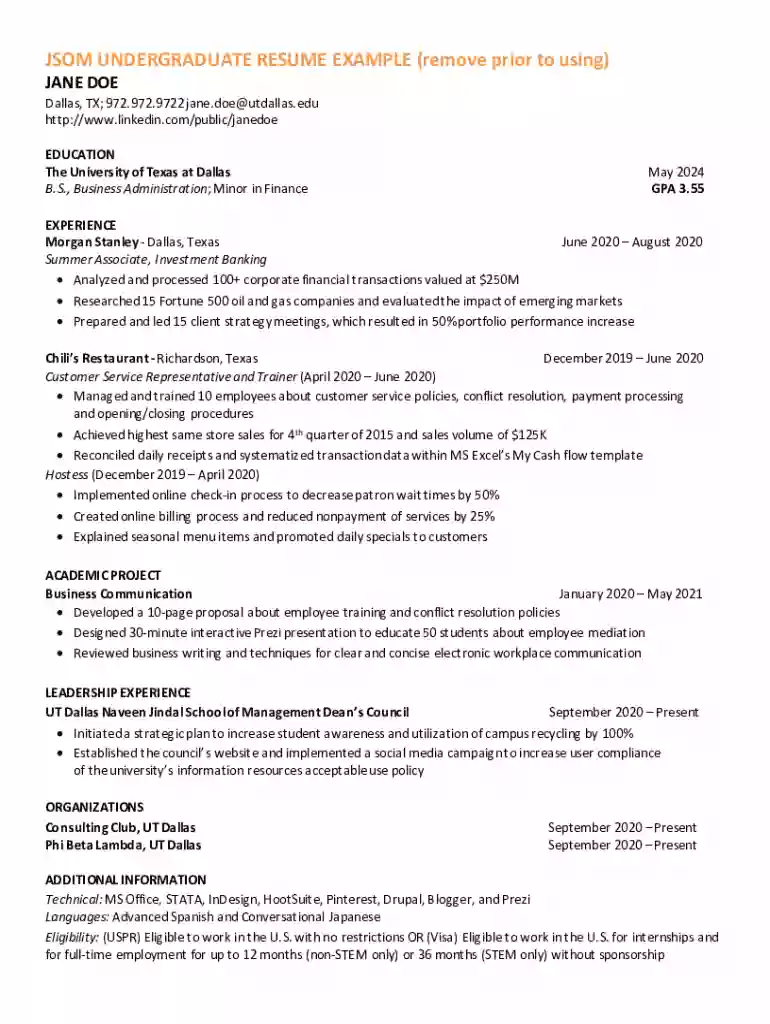
Begin by entering your personal information at the top, including your name, location, phone number, email address, and LinkedIn profile link. Ensure that this information is accurate and up-to-date.
Move to the 'EDUCATION' section. Fill in your degree details, including the institution's name, degree type, major, graduation date, and GPA. This showcases your academic achievements effectively.
In the 'EXPERIENCE' section, list your work history chronologically. For each position, include the company name, location, job title, dates of employment, and bullet points detailing your responsibilities and accomplishments.
Complete the 'ACADEMIC PROJECT' section by summarizing relevant projects you've undertaken. Highlight key contributions and skills demonstrated during these projects.
Fill out the 'LEADERSHIP EXPERIENCE' section with any leadership roles you have held. Describe initiatives you led and their impact on your organization.
Lastly, complete the 'ADDITIONAL INFORMATION' section with technical skills and language proficiencies that are relevant to potential employers.
Start editing your jsom resume template for free today on our platform!
We've got more versions of the jsom resume template form. Select the right jsom resume template version from the list and start editing it straight away!
Its best to structure your MBA resume with your contact information and objective at the top, followed by your education and most recent work experiences, and concluding with a desirable skills and accolades section.
What is the best template for a resume?
The most effective resume template is one that is clean, well-organized, and easy to read, with plenty of white space to guide the readers eye. Choose a design that supports your resume formatchronological, functional, or combinationand make sure it allows your skills and achievements to stand out.
What are the 5 key sections of a resume?
What are the 5 main resume sections you should include? Contact information. Resume summary. Work experience. Skills. Education.
What are the 5 Ps of professional growth?
The 5 Ps of professional growth and career development offer the ideal framework to guide this process: Purpose, Personal Brand, People, Performance, and Plan.
What are 5 things you should include in your CV?
Sections for your CV. Your CV should include a section for your contact details, an introduction, your education history, your work history and references.
Yes, ChatGPT can generate personalized resumes and cover letters. All you have to do is provide some context and information that you want included in the document and the AI will take care of the rest.
What are the 5 steps to writing a resume?
Follow these steps when drafting a resume for your next job application : Choose the right format. Tailor your resume for each position. Add a resume summary or objective. List your soft and hard skills. Detail your professional history. Proofread your resume.
What are the 5 Ps of a resume?
The 5 Ps of a resume emphasize its important aspects: Purpose, Presentation, Precision, Proofreading, and Personalization. These elements focus on the resumes goal, its visual layout, accuracy in details, error-free content, and tailoring for the job applied for.
Related links
Target Your Rsum and Cover Letter
Write a rsum that gets results with us. Here you will find all the information you need to build a resume that fulfills ATS requirements and more.
Cookie consent notice
This site uses cookies to enhance site navigation and personalize your experience.
By using this site you agree to our use of cookies as described in our Privacy Notice.
You can modify your selections by visiting our Cookie and Advertising Notice.