





Automatic transfer authorization agreement - The Clay City 2026

Get Form
automatic transfer authorization agreement - The Clay City Preview on Page 1

Here's how it works

01. Edit your form online
Type text, add images, blackout confidential details, add comments, highlights and more.
02. Sign it in a few clicks
Draw your signature, type it, upload its image, or use your mobile device as a signature pad.
03. Share your form with others
Send it via email, link, or fax. You can also download it, export it or print it out.

How to use or fill out automatic transfer authorization agreement - The Clay City

Form edit decoration
9.5
Ease of Setup
DocHub User Ratings on G2
9.0
Ease of Use
DocHub User Ratings on G2
  1. Click ‘Get Form’ to open it in the editor.
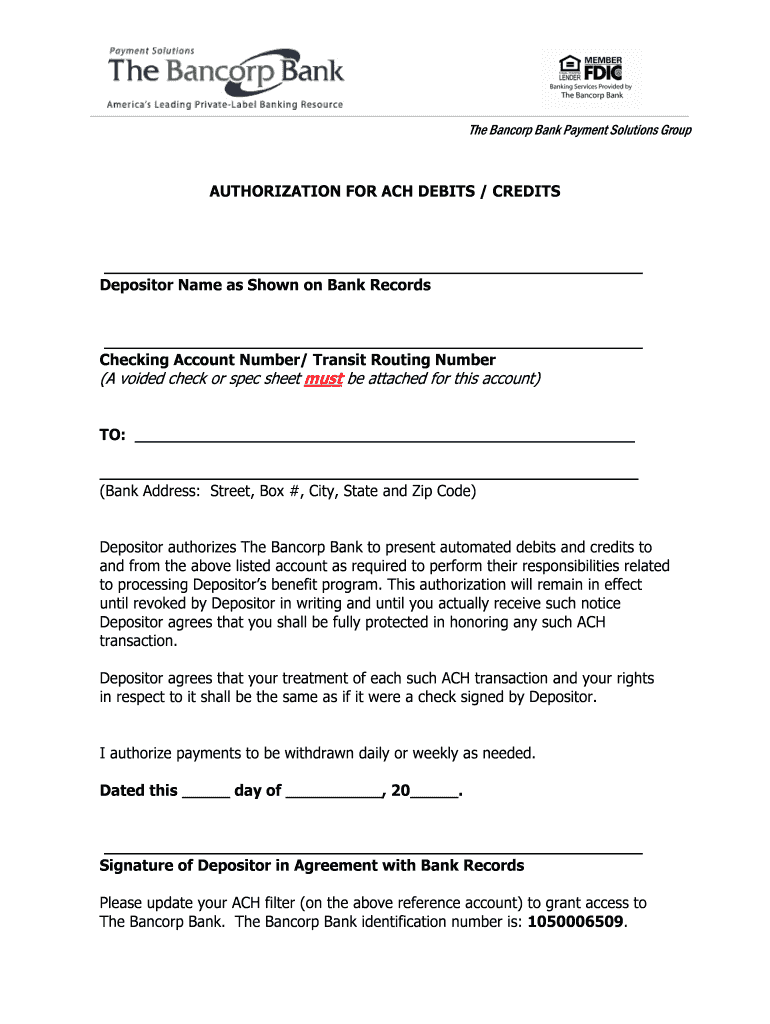
  2. Begin by entering your name as it appears on your bank records in the designated field for 'Depositor Name'.
  3. Next, input your checking account number and transit routing number in the respective fields. Ensure these numbers are accurate to avoid processing issues.
  4. Fill in the bank's address, including street, box number (if applicable), city, state, and zip code. This information is crucial for proper identification of your banking institution.
  5. Indicate your authorization preferences by selecting whether payments should be withdrawn daily or weekly as needed.
  6. Date the form by entering the day and month in the provided fields.
  7. Finally, sign the document where indicated to confirm your agreement with the terms outlined. Make sure your signature matches what is on file with your bank.

Start using our platform today to easily complete and manage your automatic transfer authorization agreement!

See more automatic transfer authorization agreement - The Clay City versions

We've got more versions of the automatic transfer authorization agreement - The Clay City form. Select the right automatic transfer authorization agreement - The Clay City version from the list and start editing it straight away!
Versions Form popularity Fillable & printable
2017 4.5 Satisfied (39 Votes)
2008 4 Satisfied (59 Votes)
be ready to get more

Complete this form in 5 minutes or less

Get form

Got questions?

We have answers to the most popular questions from our customers. If you can't find an answer to your question, please contact us.
Contact us

Managing your forms with DocHub this way is extremely simple after you have downloaded its extension for Google Chrome. Navigate to the Chrome Web Store and set up DocHub - Sign PDF from Gmail to obtain it. Give our tool access to your Google account, and then open an email containing automatic transfer authorization agreement - The Clay City as an attachment and point to the file with your cursor - the DocHub extension button will automatically appear there. Click on it to open your document in our editor. Make any required modifications, complete the blanks, and click Sign to create your legally-binding electronic signature.

If you use Chrome, there are two straightforward methods to modify your automatic transfer authorization agreement - The Clay City online. First, visit the DocHub website, add your document, and modify it using our toolbar. You can also install our Chrome extension and modify any document by dragging and dropping it in your browser tab.

An automatic transfer of funds is a banking arrangement where transfers occur between your two (or more) accounts on a regular, periodic basis without your further instruction or action. The automatic transfer of funds is one core offering of commercial and online banks.
The most direct impact of ATS transfer failure is to cause power supply interruption. In industrial production, this may lead to production line stagnation, equipment shutdown, and subsequently result in decreased production efficiency, compromised product quality, and even trigger production accidents.
An automatic transfer switch helps an electrical load connect to a backup generator when it needs power. In the event of a power failure or outage, an ATS senses the lack of electricity from the primary power source. The ATS then switches the loads power connection from the primary source to the backup generator.

Security and compliance

At DocHub, your data security is our priority. We follow HIPAA, SOC2, GDPR, and other standards, so you can work on your documents with confidence.

Learn more
ccpa2
pci-dss
gdpr-compliance
hipaa
soc-compliance
be ready to get more

Complete this form in 5 minutes or less

Get form

People also ask

An automatic transfer is a pre-authorized movement of funds from one account to another. It occurs at regular intervals, such as weekly or monthly, and is usually set up by the account holder to ensure timely payments or savings contributions.
An automatic transfer of funds is a banking arrangement that allows for regular, scheduled transfers of money between accounts without the need for further action from the account holder.
An ACH transfer is the electronic movement of money between banks through the Automated Clearing House network. They generally take 1-3 days to process.

Related links