Type text, add images, blackout confidential details, add comments, highlights and more.
02. Sign it in a few clicks
Draw your signature, type it, upload its image, or use your mobile device as a signature pad.
03. Share your form with others
Send wire transfer payment slip via email, link, or fax. You can also download it, export it or print it out.
How to use or fill out wire transfer slip with our platform
Ease of Setup
DocHub User Ratings on G2
Ease of Use
DocHub User Ratings on G2
Click ‘Get Form’ to open the wire transfer slip in the editor.
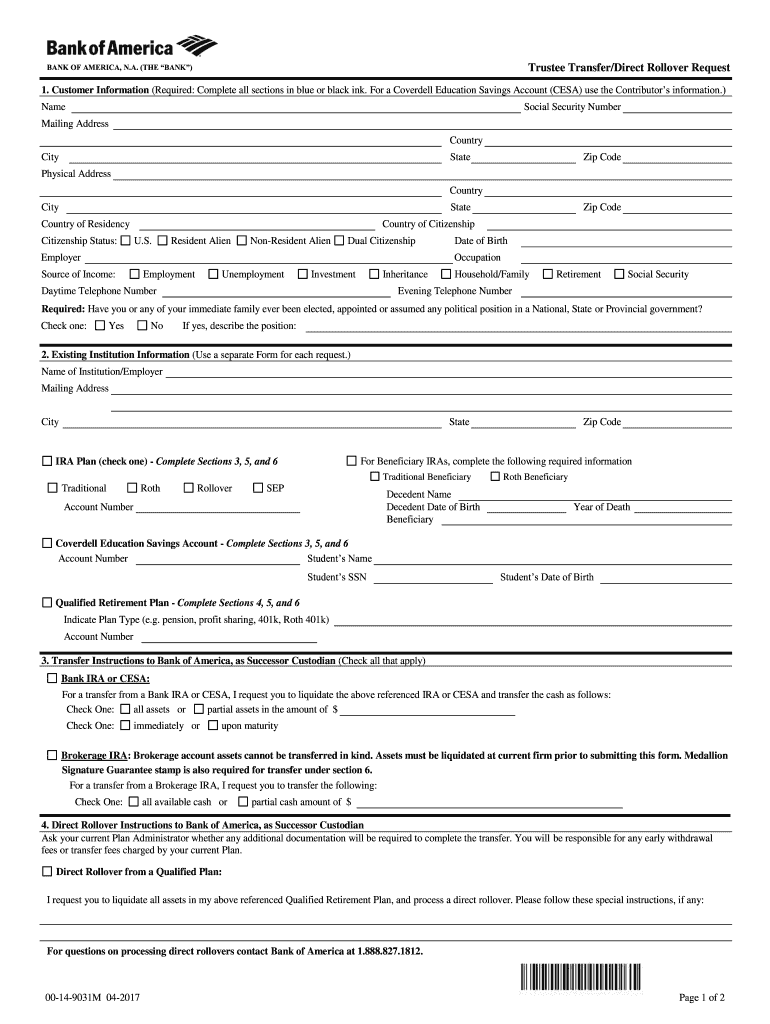
Begin by filling out the Customer Information section. Enter your name, Social Security Number, and mailing address. Ensure all fields are completed in blue or black ink.
Next, provide your physical address and citizenship status. Indicate whether you are a U.S. citizen, resident alien, or non-resident alien.
In the Existing Institution Information section, input details about your current institution or employer. If applicable, complete the required information for Beneficiary IRAs.
Proceed to the Transfer Instructions section. Specify whether you want to transfer all assets or a partial amount and choose between immediate or deferred processing.
Finally, review the Customer's Acceptance section carefully before signing and dating the form to confirm your understanding of the terms.
Start using our platform today for free to streamline your wire transfer process!
Wire transfer slip templateWire transfer slip wells fargoWire transfer slip exampleWire transfer slip chaseWire transfer slip pdfWire Transfer Receipt PDFWire transfer Form template wordWire transfer slip online
Security and compliance
At DocHub, your data security is our priority. We follow HIPAA, SOC2, GDPR, and other standards, so you can work on your documents with confidence.
Thermal transfer paper media requires the use of carbon ribbon for print application. In such a scenario, it is the carbon ribbon that contains the ink thatRead more
WIRE TRANSFER FORM. Instructions: 1. Attach this form to the payment request being submitted (Toolkit, TravelND, etc). 2. Contact Accounts Payable (JulieRead more
Cookie consent notice
This site uses cookies to enhance site navigation and personalize your experience.
By using this site you agree to our use of cookies as described in our Privacy Notice.
You can modify your selections by visiting our Cookie and Advertising Notice.