ssa 721 Preview on Page 1

Social security 721 form fillable 2005-2026

Here's how it works

  • 01. Edit your ssa 721 online

    Type text, add images, blackout confidential details, add comments, highlights and more.

  • 02. Sign it in a few clicks

    Draw your signature, type it, upload its image, or use your mobile device as a signature pad.

  • 03. Share your form with others

    Send ssn 721 form via email, link, or fax. You can also download it, export it or print it out.

How to use or fill out social security 721 form fillable 2005 with our platform

Form edit decoration
9.5
Ease of Setup
DocHub User Ratings on G2
9.0
Ease of Use
DocHub User Ratings on G2
  1. Click ‘Get Form’ to open the social security 721 form fillable 2005 in the editor.
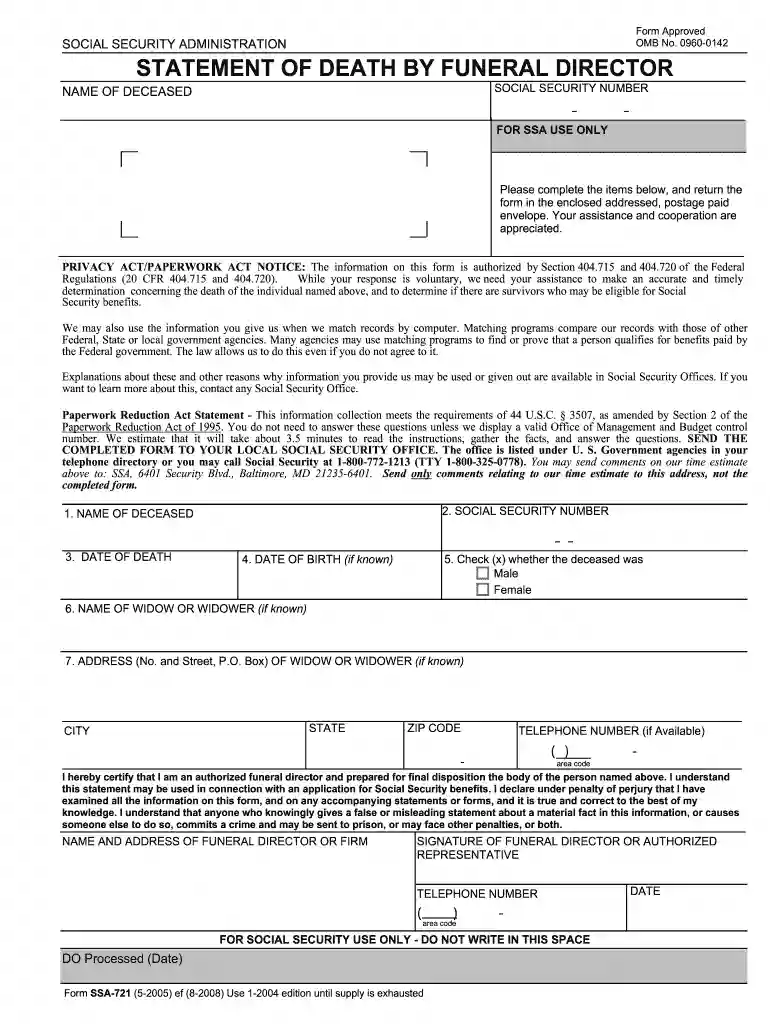
  2. Begin by entering the name of the deceased in the designated field. Ensure accuracy as this is crucial for processing.
  3. Next, input the Social Security number of the deceased. This helps in identifying their records efficiently.
  4. Fill in the date of death and, if known, the date of birth. These dates are essential for verifying eligibility for benefits.
  5. Indicate the gender of the deceased by checking either 'Male' or 'Female'.
  6. If applicable, provide details about the widow or widower, including their name and address.
  7. Complete your section by signing as an authorized funeral director and providing your contact information.

Start using our platform today to fill out your social security forms online for free!

See more ssa 721 versions

We've got more versions of the ssa 721 form. Select the right ssa 721 version from the list and start editing it straight away!

VersionsForm popularityFillable & printable
20084.9 Satisfied (521 Votes)
20054 Satisfied (33 Votes)

be ready to get more

Complete this form in 5 minutes or less

Got questions?

We have answers to the most popular questions from our customers. If you can't find an answer to your question, please contact us.

With DocHub, it’s pretty simple. The editor offers users an add-on called DocHub for Gmail, which you can locate in the Google Workspace Marketplace without being charged. Set it up and give it access to your Google account. Open your email with your ssa 721 fax number attached and click on the add-on button in the right-side panel. Sign in to your DocHub account, and import the form to our editor, where you can fill it out and sign.

As a comprehensive document modifying service, DocHub is available on mobile phones. Open DocHub in your choice of mobile browser and employ our intelligent mobile-friendly toolset to fill out your social security 721 form fillable 2005.

Benefits stop when your child reaches age 18 unless your child is a student or disabled. Within a family, a child can receive up to half of the parent's full retirement or disability benefit.
Your Social Security number and the deceased worker's Social Security number. A death certificate. (Generally, the funeral director provides a statement that can be used for this purpose.) Proof of the deceased worker's earnings for the previous year (W-2 forms or self-employment tax return).
If you need to report a death or apply for benefits, call 1-800-772-1213 (TTY 1-800-325-0778). You can speak to a Social Security representative between 8:00 a.m. \u2013 7:00 p.m. Monday through Friday.

Security and compliance

At DocHub, your data security is our priority. We follow HIPAA, SOC2, GDPR, and other standards, so you can work on your documents with confidence.

People also ask

Benefits stop when your child reaches age 18 unless your child is a student or disabled. Within a family, a child can receive up to half of the parent's full retirement or disability benefit.
If the eligible surviving spouse or child is not currently receiving benefits, they must apply for this payment within two years of the date of death. For more information about this lump-sum payment, contact your local Social Security office or call 1-800-772-1213 (TTY 1-800-325-0778).
CalPERS Disability & Survivor Benefits Division Date of death. Name and Social Security number or CalPERS ID of the deceased. Name, address, telephone number, date of birth, date of marriage, and Social Security number of surviving spouse or registered domestic partner.
A widow or widower age 60 or older (age 50 or older if they have a disability). A surviving divorced spouse, under certain circumstances. A widow or widower at any age who is caring for the deceased's child who is under age 16 or has a disability and receiving child's benefits.
Documents you may need to provide We may ask you to provide documents to show that you are eligible, such as: Proof of the worker's death; Birth certificate or other proof of birth; Proof of U.S. citizenship or lawful alien status if you were not born in the United States [More Info];

Related links

Predicting Intentional and Inadvertent Non-compliance

Schedule M-3 and Partnerships with REPs The IRS introduced the Form 1120 ... population filing the 2005 Form 1120 Schedule M-3 (total negative BTD of -$436 ...

Learn more
Untitled

DESIGN MANUAL PART 5. UTILITY RELOCATION. GAS ‐ WATER ‐ SANITARY SEWER ‐ ELECTRIC. TELECOMMUNICATIONS ‐ CABLE TELEVISION. PUB 16, Change 3 (6‐19) ... Browser ...

Learn more
inFormCustomReport (2) - Social Security

1, Form Number, Form Title. 2, SSA-L8125-F6, Supplemental Security Income Notice Of Interim Assistance Reimbursement. 3. 4. 5, SSA-8150-EV, Reporting Events ...

Learn more
If you believe that this page should be taken down, please follow our DMCA take down process here