PAID PREPARER USE ONLY - Louisiana Department of Revenue 2026

Get Form
r 1310 rev 07 16 Preview on Page 1

Here's how it works

01. Edit your r 1310 rev 07 16 online
Type text, add images, blackout confidential details, add comments, highlights and more.

02. Sign it in a few clicks
Draw your signature, type it, upload its image, or use your mobile device as a signature pad.

03. Share your form with others
Send l4 louisiana via email, link, or fax. You can also download it, export it or print it out.

How to use or fill out PAID PREPARER USE ONLY - Louisiana Department of Revenue with our platform

Form edit decoration
9.5
Ease of Setup
DocHub User Ratings on G2
9.0
Ease of Use
DocHub User Ratings on G2
  1. Click ‘Get Form’ to open it in the editor.
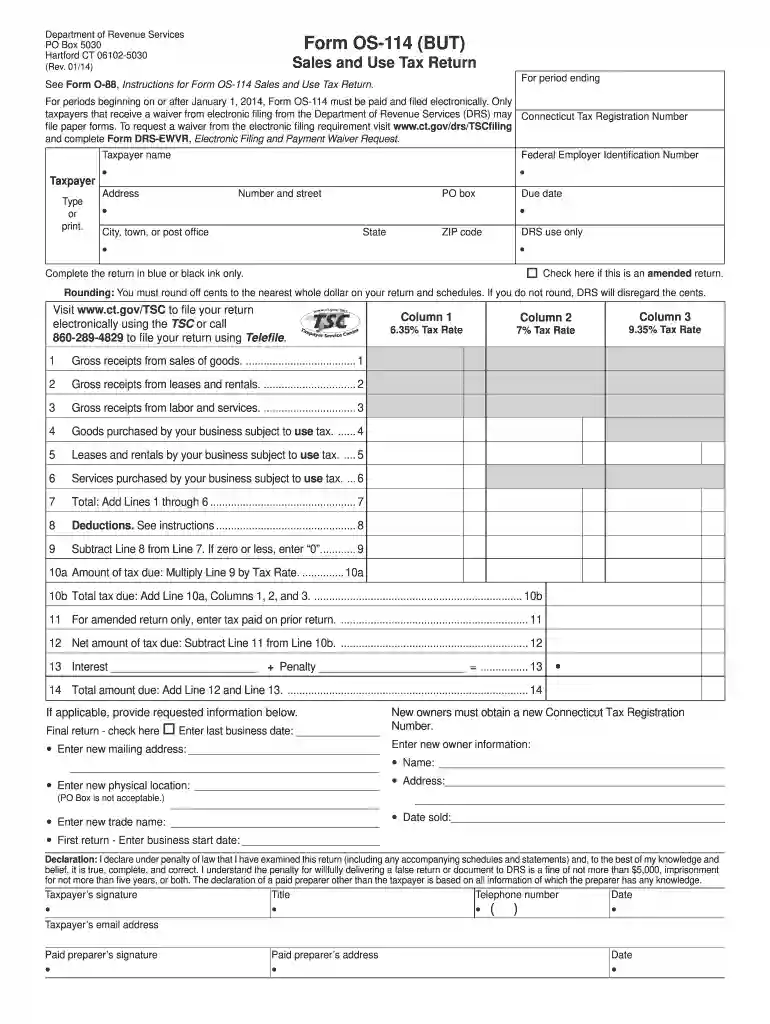
  2. Begin by entering the Taxpayer Name and Connecticut Tax Registration Number in the designated fields. Ensure all information is printed clearly.
  3. Fill in the address details, including street number, PO box (if applicable), city, state, and ZIP code. Double-check for accuracy.
  4. Indicate if this is an amended return by checking the appropriate box. Remember to complete the form using blue or black ink only.
  5. Proceed to enter your gross receipts from labor and services, goods purchased subject to use tax, and other relevant figures in their respective sections.
  6. Calculate total deductions as instructed and ensure you round off cents to the nearest whole dollar.
  7. Finally, review all entries for completeness before signing. The taxpayer's signature and email address are required at the end of the form.

Start editing your form today for free on our platform!

See more PAID PREPARER USE ONLY - Louisiana Department of Revenue versions

We've got more versions of the PAID PREPARER USE ONLY - Louisiana Department of Revenue form. Select the right PAID PREPARER USE ONLY - Louisiana Department of Revenue version from the list and start editing it straight away!
Versions Form popularity Fillable & printable
2016 4.8 Satisfied (271 Votes)
2014 4.3 Satisfied (166 Votes)
be ready to get more

Complete this form in 5 minutes or less

Get form

Got questions?

We have answers to the most popular questions from our customers. If you can't find an answer to your question, please contact us.
Contact us

Electronic document signing demands a software solution that works in compliance with data security and eSignature laws. DocHub is a perfect tool for that, because it meets all the above mentioned requirements. Whatever method you like to sign your PAID PREPARER USE ONLY - Louisiana Department of Revenue in DocHub, your electronic signature will be legally binding and court-admissible.

When you go for analog methods of completing your PAID PREPARER USE ONLY - Louisiana Department of Revenue, you can easily download your file for printing. Search DocHub’s Forms & Templates catalog to get the exact file template you require and open it for editing or download it on your device in the format of your liking. It is easy to complete your form electronically and put your handwritten signature on it after printing or eSign your file with DocHub.

If you owe a tax debt to the Louisiana Department of Revenue and cannot afford to pay the balance in full, you may enter into a payment plan to pay your debt over time. You will be required to make monthly payments for the duration of the plan.
Pay your taxes online at .eftps.gov, over the phone, or through your tax professional, payroll service, or financial institution.
Online Payments Visit the LaTAP online payments portal. Make a one-time credit card payment. Enter into a payment plan.

Security and compliance

At DocHub, your data security is our priority. We follow HIPAA, SOC2, GDPR, and other standards, so you can work on your documents with confidence.

Learn more
ccpa2
pci-dss
gdpr-compliance
hipaa
soc-compliance
be ready to get more

Complete this form in 5 minutes or less

Get form

People also ask

Making a Payment to ODR Revenue Online: Pay directly from your bank account or with a credit/debit card through the Revenue Online portal. Note that card payments may incur a fee. ACH Debit: Schedule payments directly from your bank account, which is free of charge.
Pay your taxes online now or enroll in monthly automated payment. Either way you choose, there is no cost to you for electronic check (eCheck) payments. You may also pay online by using a debit or credit card.
About Treasury Refund Offsets Under federal law, the Louisiana Department of Revenue can garnish federal income tax refunds to reduce or pay income tax debt owed to the state. To garnish a federal income tax refund, the Department files an offset claim with the United States Department of the Treasury.
A PTIN is a number issued by the IRS to paid federal tax return preparers. It is used as the tax return preparers identification number and, when applicable, must be placed in the Paid Preparer Use Only section of a tax return that the return preparer prepared for compensation.
Individual income tax returns are due by May 15th for calendar year filers. Fiscal year returns are due on the 15th day of the 5th month after the close of the fiscal year.

Related links