01. Edit your unum medical certification form online
Type text, add images, blackout confidential details, add comments, highlights and more.
02. Sign it in a few clicks
Draw your signature, type it, upload its image, or use your mobile device as a signature pad.
03. Share your form with others
Send unum fitness for duty form via email, link, or fax. You can also download it, export it or print it out.
How to use or fill out the Unum Beneficiary Form with our platform
Ease of Setup
DocHub User Ratings on G2
Ease of Use
DocHub User Ratings on G2
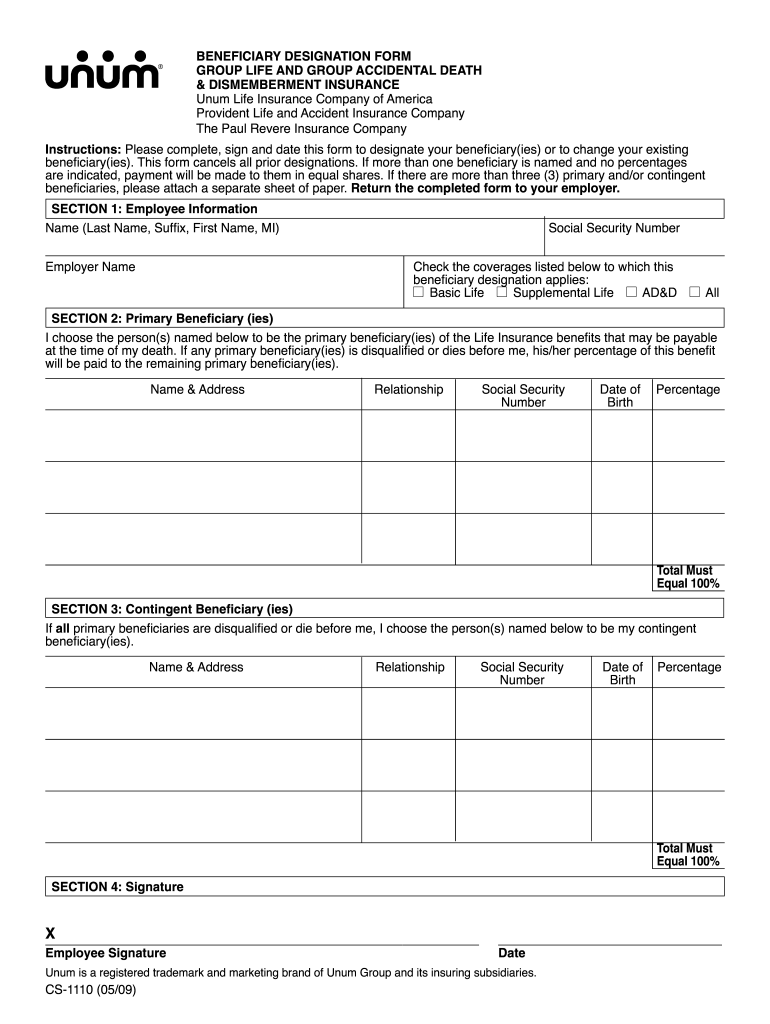
Click ‘Get Form’ to open the Unum Beneficiary Form in the editor.
In Section 1, provide your Employee Information including your full name, employer name, and Social Security Number. Check the coverages that apply to your beneficiary designation.
Move to Section 2 to designate your Primary Beneficiary(ies). Fill in their names, addresses, relationships to you, Social Security Numbers, dates of birth, and specify the percentage of benefits for each. Ensure these percentages total 100%.
Proceed to Section 3 for Contingent Beneficiary(ies). Repeat the process of entering their details and percentages, ensuring they also total 100%.
Finally, sign and date the form in Section 4. Review all entries for accuracy before submitting.
Start filling out your Unum Beneficiary Form today on our platform for free!
We've got more versions of the unum beneficiary form form. Select the right unum beneficiary form version from the list and start editing it straight away!
Unum beneficiary form templateUnum beneficiary form pdfUnum beneficiary form onlineUnum beneficiary designation Form for the unum retained asset accountUnum Life Insurance Beneficiary change formUnum life insurance beneficiary loginUnum Life Insurance Death claim formUnum beneficiary form california
Security and compliance
At DocHub, your data security is our priority. We follow HIPAA, SOC2, GDPR, and other standards, so you can work on your documents with confidence.
I choose the person(s) named below to be the primary beneficiary(ies) of the Life Insurance benefits that may be payable at the time of my death. If any primaryRead more
Instructions: Please complete, sign and date this form to designate your beneficiary(ies) or to change your existing beneficiary(ies). This form cancels allRead more
Cookie consent notice
This site uses cookies to enhance site navigation and personalize your experience.
By using this site you agree to our use of cookies as described in our Privacy Notice.
You can modify your selections by visiting our Cookie and Advertising Notice.